Key takeaways
- Google Alerts is a prospecting layer, not an outreach tool. Treat it as a signal feed that flags opportunities. The conversion still depends on outreach quality, timing, and follow-up.
- Operators do the heavy lifting. A raw keyword alert produces noise. Operators like intitle:, inurl:, site:, and exclusion flags (-site:) are what surface high-intent prospects: write-for-us pages, resource lists, unlinked mentions.
- Speed beats volume. Unlinked mentions convert at 25–50% when contacted within 48 hours of publishing, compared to 5–10% for cold outreach. As-it-happens delivery matters for time-sensitive alerts like newsjacking and breaking competitor news.
- Five well-tuned alerts beat fifty noisy ones. Audit every 30 days. Kill alerts that produce junk, refine the ones that nearly work.
- Route alerts to RSS, not your inbox. Pipe the feed into a Google Sheet or Slack channel to track outreach status. A 30-minute Friday review keeps the pipeline running without anyone babysitting it.
- Google Alerts has real blind spots. It misses most social platforms, paywalled content, image-only mentions, and image alt text. Layer a paid tool (Brand24, Mention, Ahrefs Alerts) on top once mention volume outgrows the free tier.
Backlinks still decide who wins the top of Google. Backlinko’s analysis found that the #1 result has roughly 3.8x more backlinks than positions two through ten. That correlation hasn’t moved much, no matter how often the SEO community claims links are losing weight.
The real question isn’t whether to build links. It’s how to find the right opportunities fast enough to convert them before everyone else gets there.
Google Alerts is the most underused free tool for that job..
This guide breaks down the ten setups that actually produce backlinks: the exact query strings to copy, the operators that cut the noise, and the outreach pattern that converts each alert type into a placed link.
You’ll also see where Google Alerts falls short, how to automate it into a real pipeline, and how it stacks up against paid tools.
What is Google Alerts?
Google Alerts is a free monitoring service from Google that sends an email or RSS notification whenever new content matching a saved query gets indexed. You enter a search term, a brand name, a competitor, an industry phrase, a person’s name, and Google watches for new matches across web, news, blogs, video, books, and discussion sources.
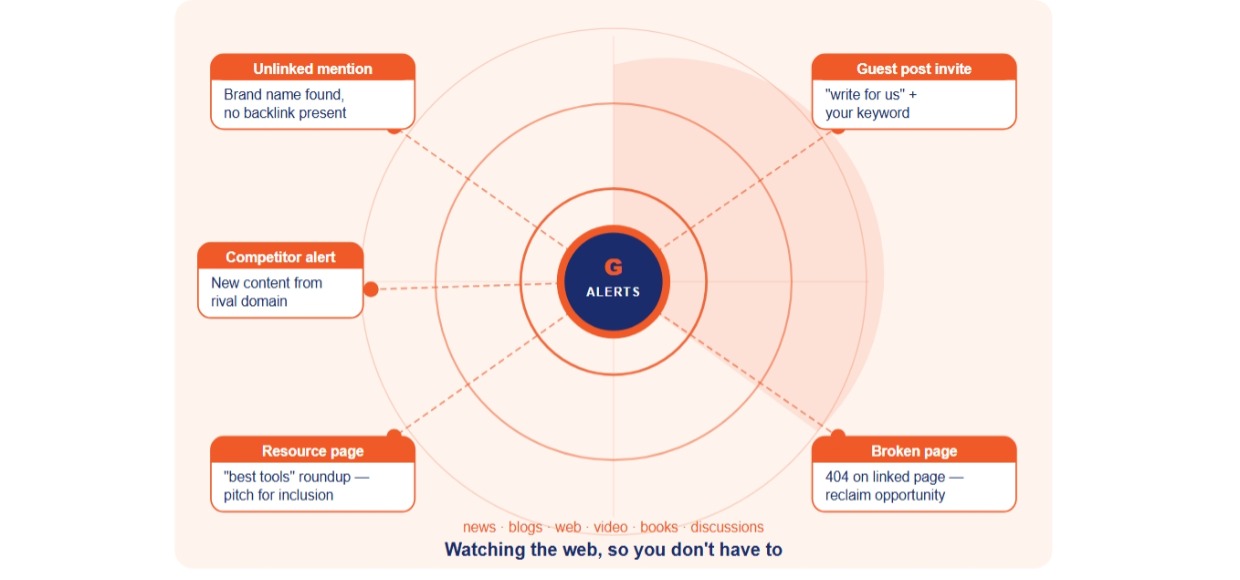
That’s the whole product. The power isn’t in the feature set. It’s in how you string together queries with Google’s search operators to surface specific kinds of opportunities, such as broken pages, guest post invitations, unlinked brand mentions, resource pages, and so on.
Why Google Alerts works for link building
There are three reasons:
First, it’s continuous. Manual prospecting is a one-shot effort. An alert runs forever once set, picking up new opportunities the day Google indexes them.
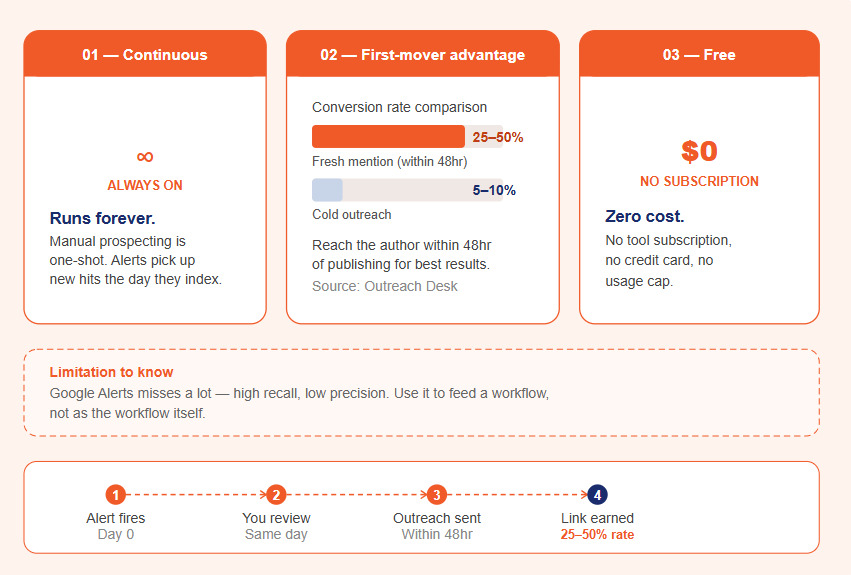
Second is its first-mover advantage. New mentions are easiest to convert. Reach the author within 48 hours of publishing and conversion rates jump dramatically. Most outreach pros put well-qualified, fresh-mention conversion at 25–50%, compared to 5–10% for cold outreach. (Source: Outreach Desk’s analysis.)
Third, it’s free. No tool subscription, no credit card, no usage cap.
What it doesn’t do well: it misses a lot. It’s a high-recall, low-precision tool. Set it up to feed into a workflow, not as the workflow.
How to set up Google Alerts (step by step)
Step 1- Open Google Alerts
Go to Google Alerts and sign in with the Google account where you want to receive notifications.
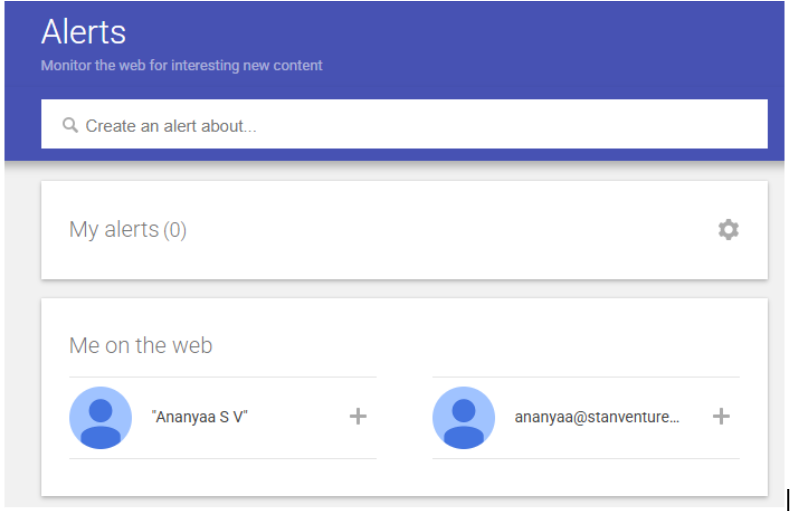
Step 2: Enter your query
Type a keyword, phrase, brand name, or operator-driven query into the search box at the top. Use quotation marks for exact-match phrases (“link building” returns only that two-word phrase; without quotes you’ll get pages mentioning the words separately).
Watch the live preview Google shows underneath. If it’s pulling irrelevant results, tighten the query before saving.
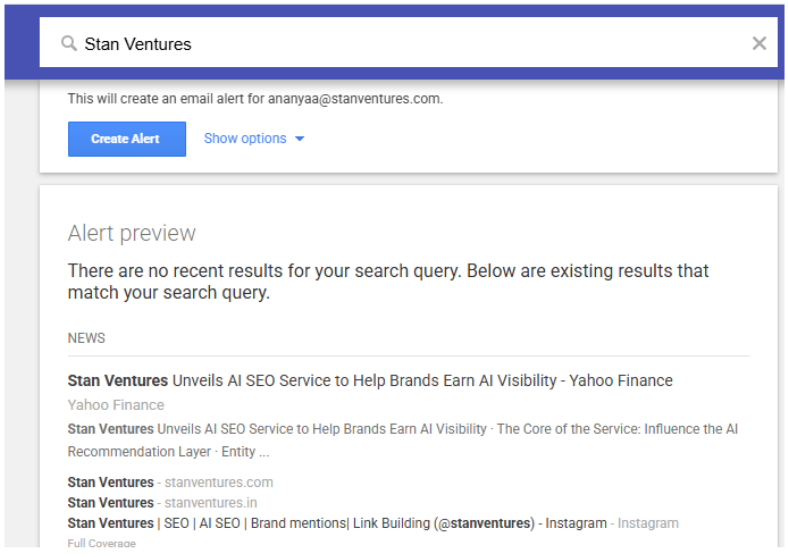
Step 3: Click “Show options”
This expands the configuration panel. Six fields to set:
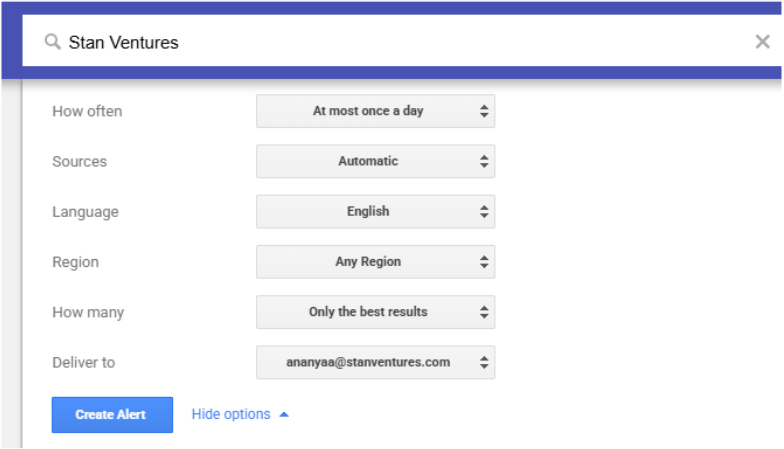
| Setting | Recommendation for link prospecting |
| How often | “At most once a day” for most use cases. “As-it-happens” only for time-sensitive alerts (newsjacking, breaking competitor news). |
| Sources | “Blogs” + “Web” for outreach prospecting. Skip “News” — news sites rarely link out to outside blogs. Skip “Discussions” unless you’re actively prospecting Reddit/Quora. |
| Language | English (or your target language). |
| Region | “Any region” for broad coverage; specify a country if your link strategy is geo-specific. |
| How many | “Only the best results” for high-volume queries that would otherwise flood your inbox. “All results” for narrow queries where every match matters. |
| Deliver to | Your email, or pick “RSS feed” if you want to route alerts to Slack, a spreadsheet, or a dashboard. (More on this in the automation section.) |
Step 4: Click “Create Alert”
That’s it. The first email usually arrives within 24 hours. As mentioned in Google’s official help docs, you can edit any alert later by clicking the pencil icon next to it on the Alerts management page.
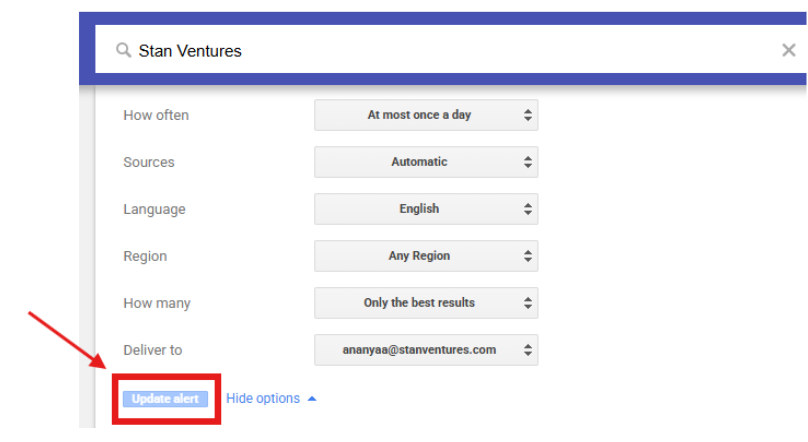
Step 5: Edit or delete
To edit: pencil icon → adjust settings → “Update alert.” To delete: trash icon. To unsubscribe from a single alert via email: scroll to the bottom of the alert email and click “Unsubscribe.”
A common mistake: People set up an alert, forget to revisit, then complain it sends junk. Audit alerts every 30 days. Kill the ones producing noise. Refine the operators on the ones that nearly work.
Search operators that cut the noise
Most link-prospecting alerts get useful only when you stack a few operators. The ones that pull their weight:
| Operator | What it does | Example |
| “phrase” | Exact-match phrase | “manual link building” |
| intitle: | Word must appear in the page title | intitle:”write for us” SEO |
| inurl: | Word must appear in the URL | inurl:resources marketing |
| site: | Restrict to a single domain | “your brand” site:medium.com |
| – (minus) | Exclude a term | “your brand” -site:yourbrand.com |
| OR | Either of two terms | “link building” OR “backlink building” |
| AROUND(N) | Two terms within N words of each other | “SEO” AROUND(5) “guide” |
| filetype: | Specific file type | “link building” filetype:pdf |
A good prospecting query rarely uses just one. Example: intitle:”write for us” “link building” -site:yourbrand.com will surface guest post invitations on the topic of link building, excluding any pages on your own site.
10 Google Alerts setups for link building
Each setup below includes the alert string to copy, what it surfaces, and what good outreach looks like once an alert lands. Treat the strings as starting points, and substitute your brand, competitors, and niche keywords as needed.
1. Unlinked brand mentions
Alert string: “YourBrandName” -site:yourbrand.com -site:facebook.com -site:twitter.com -site:linkedin.com
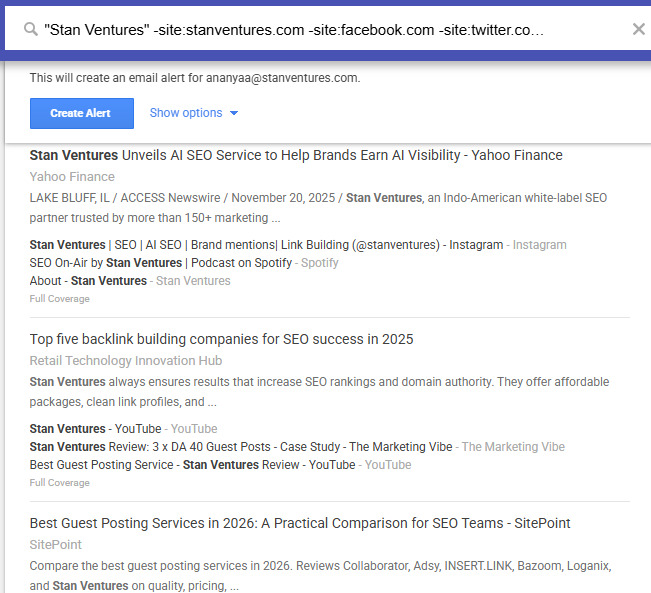
What it surfaces: Articles, blog posts, and press hits where someone wrote your brand name but didn’t link to your site.
Why it works: Unlinked mentions convert. The author already knows your brand, vetted you, and chose to include you. They just didn’t add the hyperlink. The ask is small (one link, no rewrite), and the relationship is already half-built.
Outreach pattern that works: Short, specific, low-friction. Reference the exact paragraph that mentions you. Suggest the link as a value-add to their readers, not a favor to you. Conversion rates of 25–50% on well-qualified mentions are realistic when the mention is recent and the source is reputable.
Pro tip: Run separate alerts for brand variations and misspellings. “Stan Ventures,” “StanVentures,” “Stan-Ventures,” and any common typo of your name all need their own alert. A 2025 analysis from the Outreach Desk found that brands tracking only their canonical name miss roughly 40% of total mentions.
2. Competitor mentions
Alert string: “CompetitorBrand” -site:competitorbrand.com
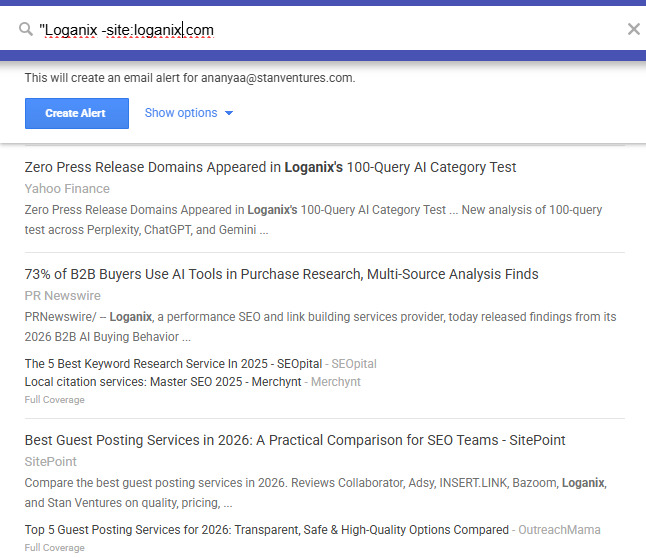
What it surfaces: Every new mention of a competitor across the indexed web.
Why it works: Where your competitors get mentioned, you can usually get mentioned too. If a roundup post features them, that publication has demonstrated willingness to cover your category. If a journalist quotes them, that journalist is probably writing about your space again next month.
Two ways to act on it:
- Replacement pitch: Reach out to the publisher with a stronger angle, fresher data, or a more recent case study.
- Alternative listing: Pitch yourself for inclusion in “best of” or “alternatives to [competitor]” pages.
Stack with: A second alert for each of the competitor’s leadership team — “CompetitorCEO Name”. Personal mentions often surface op-eds and interviews that don’t include the brand name.
3. Industry keyword mentions
Alert string: “your seed keyword” -site:yourbrand.com
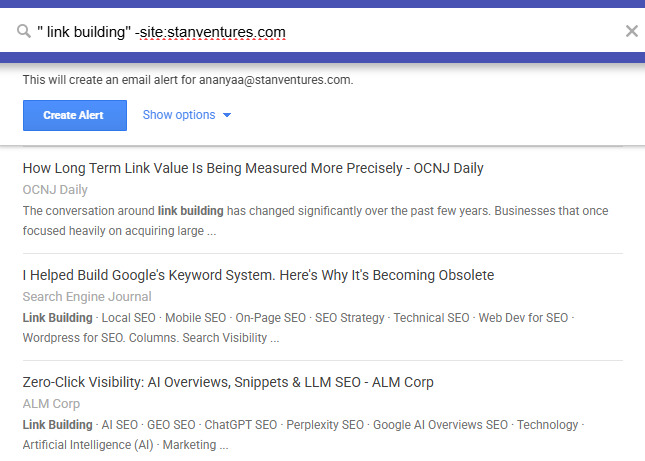
What it surfaces: New content published on your topic, anywhere on the web. The freshest list of who’s writing what in your niche.
Why it works: This is your ongoing topic-radar. When a new piece publishes on a keyword you care about, three things become possible at once: a guest post pitch, a backlink request (if your existing content is the better source), or a content collaboration.
Refine it: Stack with intitle: to focus on pieces where the keyword is the main topic, not a passing mention. Example: intitle:”local SEO” -site:yourbrand.com returns only pages whose title contains “local SEO.”
4. Guest post opportunities
Alert string: intitle:”write for us” “your niche keyword”. Also try: intitle:”guest post guidelines”, inurl:write-for-us, and inurl:contribute.
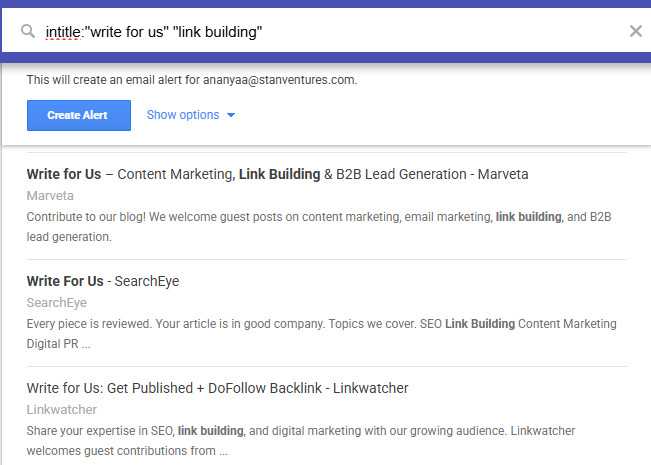
What it surfaces: Sites actively soliciting guest contributions in your space.
Why it works: “Write for us” pages don’t get publicized. Most are buried in footers. An alert flags new ones the moment Google indexes them, often before the broader SEO crowd finds them.
Bonus alert: Track contributors who guest post a lot in your niche by setting “Author Name” intitle:”by”. When they publish on a new site, that site is probably accepting guest contributions.
Note: Many high-quality publications don’t use “write for us” pages. They accept pitches via direct editor outreach. So this alert will skew toward mid-tier sites. Still useful, but pair it with manual outreach for the higher-DR targets.
5. Newsjacking and PR opportunities
Alert string: “breaking” OR “announces” OR “study” “your industry keyword”
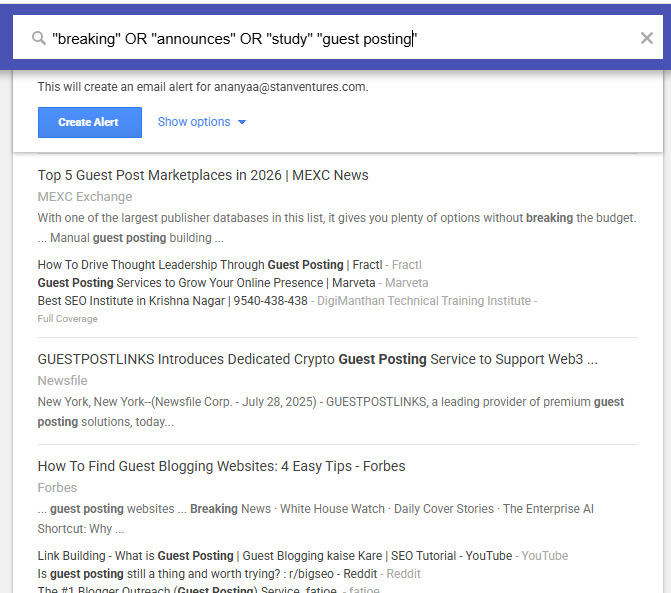
What it surfaces: Press releases, news stories, and research drops in your industry.
Why it works: Newsjacking — publishing a fast, opinionated take on breaking news — is one of the fastest ways to earn editorial links because journalists writing follow-up coverage need expert sources to quote. The window is hours, not days. As-it-happens alerts make sense here.
Setup tip: For this alert specifically, switch “How often” to “as-it-happens” and “Sources” to include “News.” The faster the email arrives, the better the chance of being first.
Watch the calendar: Algorithm updates, regulatory changes, and major industry events are predictable newsjacking triggers.
6. Resource page link building
Alert string: “your topic” intitle:resources, or try- inurl:resources “your topic” and intitle:”useful links” “your topic”.
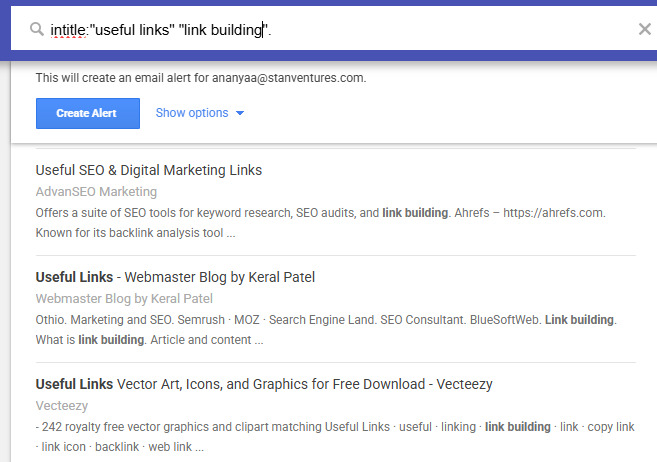
What it surfaces: Curated lists of links on a topic — the format that exists specifically to link out.
Why it works: Resource pages are designed for outbound linking. The page owner wants to add good resources. You’re not asking for a favor; you’re offering to make their page more useful.
The pitch that works: Don’t just say “please add my link.” Identify a specific gap in their list, name a resource currently linked that’s outdated or broken, and propose your page as a clean replacement or worthy addition. Webmasters who curate resource pages tend to actually maintain them, so the response rate is higher than for generic outreach.
7. Niche forum and Q&A monitoring
Alert string: “your topic” site:quora.com, or “your topic” site:reddit.com, “your topic” site:stackexchange.com.
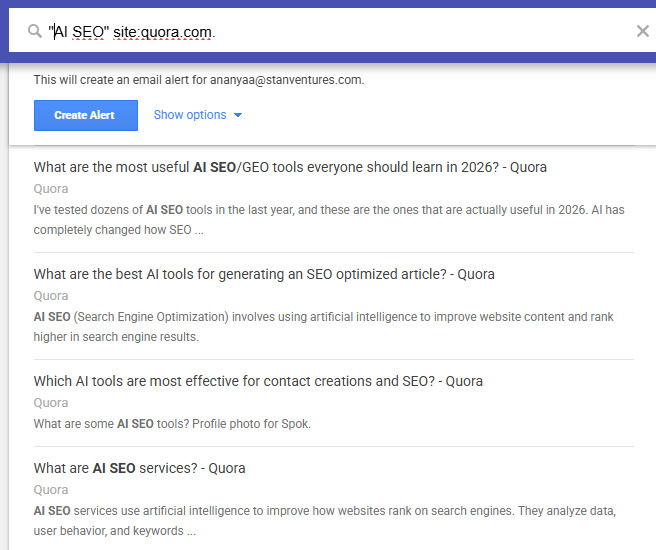
What it surfaces: New questions or threads on your topic in specific communities.
Why it works: Answering questions where you have genuine expertise builds authority and, occasionally, earns a contextual link back to your content. Google’s recent emphasis on forum and discussion content (Reddit threads now appear regularly in top-10 SERPs for many queries) makes this one more valuable than it used to be.
Note: This is a slow-burn play, not an outreach hack. Drop a link only when it actually answers the question. Spammy self-promotion gets downvoted, removed, and remembered.
8. Influencer and expert tracking
Alert string: “Influencer Name” -site:linkedin.com (combined with one for their book/product/podcast title if applicable)
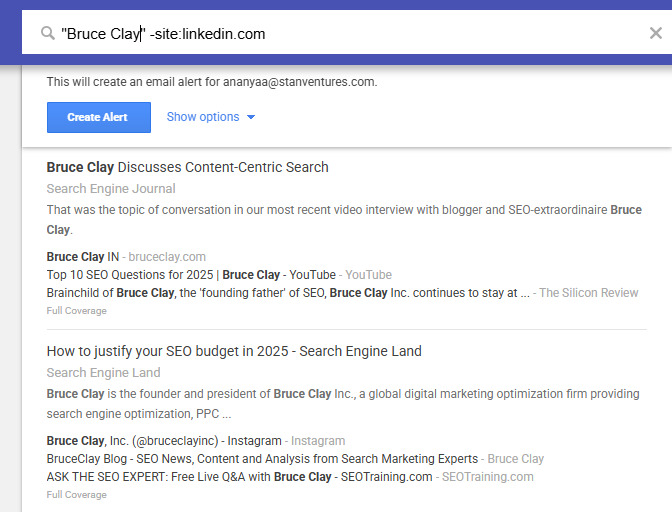
What it surfaces: Where industry influencers are getting mentioned, interviewed, or quoted.
Why it works: Two outcomes. First, you spot publications that interview or feature experts in your space. Those are publications open to expert sources, including you. Second, you spot opportunities to engage with the influencer’s work directly (a thoughtful response post, a shared comment, a counter-argument), which can build the kind of relationship that earns links over time.
The slow play: Don’t jump straight to “can you link to my article?” Engage with three to five pieces of their work first.
9. Broken link prospecting
Alert string: “your topic” intext:”page not found” OR intext:”404″ — or “your topic” intitle:”broken link”.
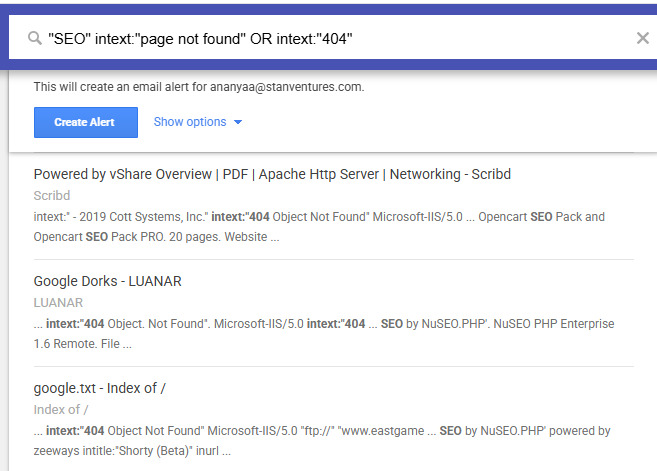
What it surfaces: Discussion threads, forum posts, or articles that complain about or reference broken links related to your topic. Less commonly, pages that themselves contain broken links.
Why it works: Broken link building is a clean win-win. The site owner gets a fix; you get a contextual link. The hard part is finding the broken links in the first place. This alert surfaces some of them passively.
The honest caveat: Most broken link discovery still needs an active tool (Ahrefs Site Explorer or Screaming Frog) to scan for dead outbound links on a target domain. Use Google Alerts as the discovery layer that flags candidates worth scanning, not as a complete broken-link-finding system.
10. Tracking your own published guest posts
Alert string: “Your Guest Post Title” -site:hostsite.com — and a separate one for “YourAuthorName” -site:hostsite.com -site:yourbrand.com.
What it surfaces: Other articles citing your guest post, mentions of your author byline elsewhere, social discussions referencing your work.
Why it works: A successful guest post doesn’t end at publish. When other writers cite it, that’s a second-order link opportunity. They already trust your work, so reaching out for a follow-up collaboration or a deeper-link request lands warmer than cold outreach.
Use the data: If a guest post regularly attracts citations, the host publication is delivering reach. Pitch them again. If a different post sits silent for six months with no mentions, that publication isn’t passing attention.
Automating Google Alerts (the gap most guides skip)
The biggest complaint about Google Alerts is email overload. Five alerts producing 30 emails a day is fast and unmanageable. Two fixes:
Fix 1: Switch delivery to RSS
In any alert’s settings, change “Deliver to” from your email address to “RSS feed.” Save. A small RSS icon appears next to that alert on the management page. Click it to copy the feed URL.
You can now:
- Subscribe to the feed in any RSS reader (Feedly, Inoreader) and check it on your schedule
- Pipe the feed to Slack, Microsoft Teams, or a Google Sheet using Zapier or IFTTT
- Build a single dashboard that aggregates every alert in one place.
Fix 2: Use a Sheets logger to track outreach status
Once alerts are flowing into a Google Sheet, add columns for: date received, source URL, mention type, outreach status, response, link earned. This turns the alert stream into a measurable pipeline.
A weekly review against this sheet (30 minutes on a Friday) is enough to keep an outreach pipeline running without hiring anyone to babysit it.
What Google Alerts can’t do (limitations)
Honest framing matters here. Google Alerts is a free tool with real gaps:
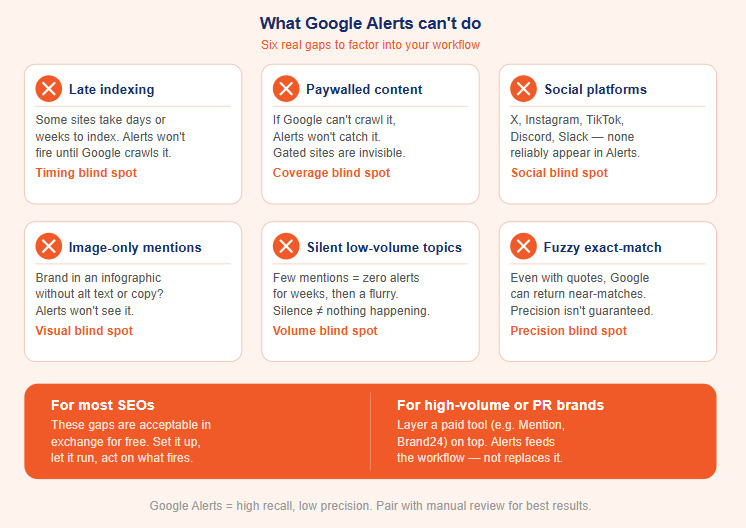
- It misses indexed-but-late content. Google indexes some sites within minutes; others take days or weeks. Alerts won’t fire on what isn’t indexed yet.
- It misses paywalled and gated content. If Google can’t crawl it, Alerts won’t catch it.
- It misses most social platforms. Twitter/X, Instagram, TikTok, private Facebook groups, Discord, Slack; none of these reliably appear in Alerts.
- It misses image-only mentions. If your brand appears in an infographic without alt text or surrounding copy, Alerts won’t see it.
- It can be silent for low-volume topics. Brands or keywords with very few monthly mentions sometimes get zero alerts for weeks, then a flurry. The lack of email isn’t always proof of nothing happening.
- The exact-match algorithm is fuzzier than it looks. Even with quotation marks, Google occasionally returns near-match results.
For most SEOs, these limitations are acceptable in exchange for “free.” For brands with high mention volume or compliance/PR needs, layer a paid tool on top.
Google Alerts vs. paid mention-tracking tools
A side-by-side for the practical decision:
| Tool | Cost | Strength | Best for |
| Google Alerts | Free | Web indexing coverage, easy setup | Solo SEOs, small brands, prospecting on a budget |
| Ahrefs Alerts (Content Explorer) | Included with Ahrefs subscription | Filter by Domain Rating, traffic, language; integrates with backlink data | SEOs already using Ahrefs |
| Brand24 | $79+/mo | Sentiment analysis, social media coverage, Slack integration | Brands needing real-time social tracking |
| Mention | $41+/mo | Multi-source dashboard, team collaboration | Marketing teams managing multiple brands |
| BuzzSumo | $199+/mo | Content discovery + brand monitoring combo | Content teams + PR pros |
| SEMrush Brand Monitoring | Included with SEMrush | Linked vs. unlinked filter, DA scoring | Existing SEMrush users |
The default stack worth recommending: Start with Google Alerts plus an Ahrefs Alerts setup if you have access. If mention volume outgrows that combination, add Brand24 or Mention for the social and sentiment coverage Google Alerts can’t provide.
Summing Up
Set up the five alerts that map to your highest-value prospecting use cases. Route them all to RSS, then to a Slack channel or Google Sheet. Review weekly. Reach out within 48 hours on the high-priority hits. Audit and refine queries every 30 days.
That’s the whole system. Google Alerts isn’t going to replace the rest of an outreach stack, but it adds a continuous, free, low-effort signal layer that most SEO teams either ignore or run badly. Done right, it can produce three to five qualified prospects a week without anyone touching it after setup.
Frequently asked questions
Is Google Alerts still useful in 2026?
Yes, for specific use cases. It’s still the easiest free way to monitor indexed web mentions and surface prospecting opportunities. It’s not a replacement for real backlink tools or a brand-monitoring suite, but as a free first-pass layer it earns its keep.
How many Google Alerts can I set up?
Google’s documentation doesn’t publish a hard cap, but accounts have been reported to hit issues beyond 1,000 active alerts. For practical link prospecting, 5-20 well-tuned alerts produce more usable signals than 100 noisy ones.
How long does it take to receive the first alert?
Usually within 24 hours of setup. If 48 hours pass with no email, check your spam folder, confirm the alert is saved on the Google Alerts management page, and try a broader query to confirm the system is working.
Can Google Alerts monitor social media?
Mostly no. Public LinkedIn posts sometimes get indexed and surface in alerts. Twitter/X, Instagram, TikTok, Reddit (with site:reddit.com), and Facebook do not reliably appear. For social monitoring, use a dedicated tool like Brand24 or Mention.
What’s the conversion rate from a Google Alerts unlinked mention to an actual backlink?
For well-qualified, recent mentions on reputable sites, expect 25-50%, significantly higher than cold outreach (5–10%), because the author already chose to mention you. Speed matters: reach out within 48 hours of publishing for the higher end of that range.
Does Google Alerts work for AI search visibility (AI Overviews, ChatGPT, Perplexity)?
Indirectly. Google Alerts won’t tell you when your brand is cited in an AI Overview or LLM response. But the unlinked mentions it surfaces are exactly the brand citations that train AI search models, so converting them into linked, contextual references on authoritative domains feeds both classical SEO and the newer AI visibility layer.

Ananyaa
AuthorAnanyaa Venkat is a seasoned content specialist with over nine years of experience creating industry-focused content for diverse brands. At Stan Ventures, she blends SEO insight with strategic storytelling to shape a compelling brand voice. She has contributed to several leading SEO publications and stays attuned to evolving trends to ensure her content remains authoritative, relevant, and high-quality.


