
Google has officially announced that Gemini, its conversational AI assistant, is coming to Google TV.
For years, Google TV combined content discovery with the power of Google Assistant, letting you find shows, control smart home devices or ask for quick recommendations.
But Gemini takes things several steps further. Now, instead of just issuing voice commands, you will be able to have free-flowing conversations with your TV.
Whether it is finding a movie everyone can agree on, catching up on past seasons of a show, helping your kids with homework or even planning a family trip, Gemini makes it possible.
What Exactly Is Gemini on Google TV?
The VP of Google TV put it simply: “The TV is the heart of the home — the place where we gather, cheer and connect.”

Until now, Google Assistant has helped with basics: “Play Stranger Things,” “Dim the lights,” or “Show me comedies.” But Gemini for TV moves beyond commands, it is about conversation.
You just say, “Hey Google” or press the microphone button on your remote. From there, Gemini engages naturally, guiding you through decisions and tasks.
Think about it: your TV can now act like a conversational partner. Not just answering what’s on tonight but also:
- Explaining last season’s plot in detail.
- Suggesting a show based on the preferences of everyone in the room.
- Helping with school projects.
- Even giving cooking or travel advice.
The living room is no longer just for entertainment but it is becoming an interactive learning and discovery space.
How Does Gemini Make Finding Entertainment Effortless?
Choosing what to watch can sometimes take longer than watching the show itself. Gemini aims to fix that.
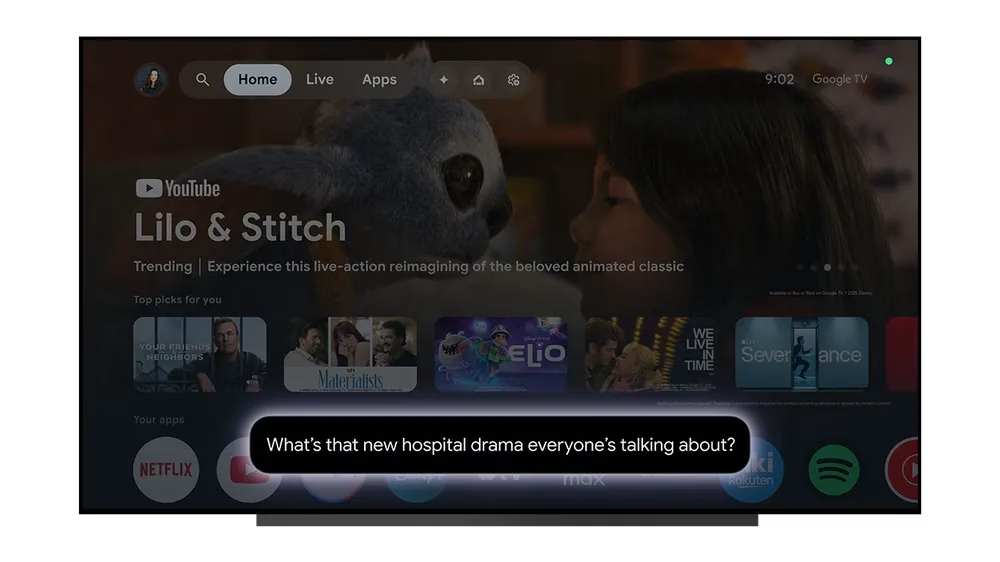
Instead of endless scrolling, you can have a quick chat:
- For movie night debates: “Find me something to watch with my wife. I like dramas, but she likes lighthearted comedies.” Gemini will balance the preferences and offer something you can both agree on.
- For catching up: “What happened in the last season of Outlander?” Gemini gives you a recap so you’re not lost when the new season drops.
- For vague searches: Can’t recall the name? Just describe it: “What’s the new hospital drama everyone’s talking about?” Gemini might suggest “The Pitt” and even provide reviews so you know whether it’s worth the hype.
This is not just convenience, now it is about personalization on a level search menus and static recommendations could never provide.
Can Gemini Really Help with Learning and Everyday Life?
Google is not just positioning Gemini as an entertainment guide. It’s turning the largest screen in your home into a learning hub.
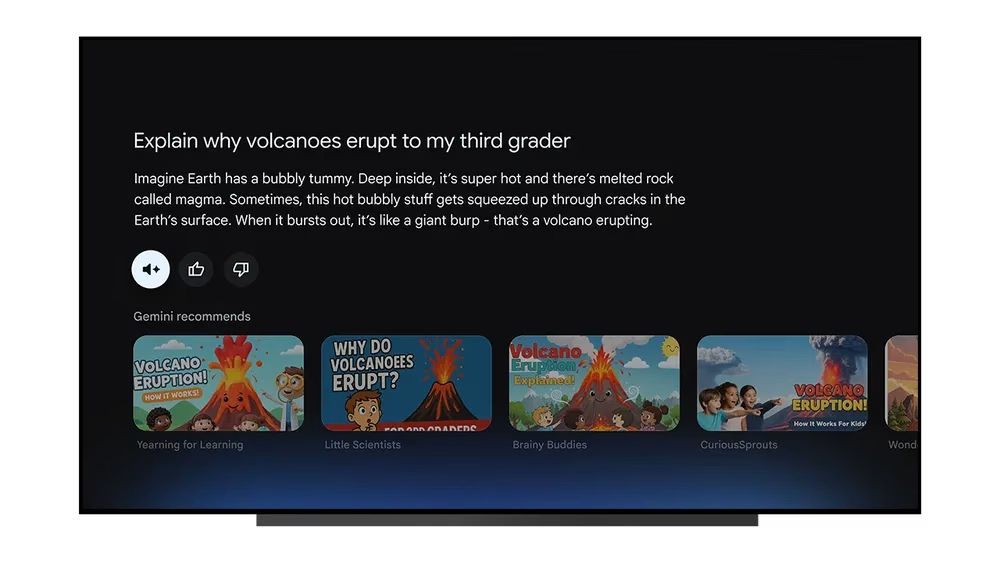
Imagine this:
- Helping kids: Your child has a project on volcanoes. You ask, “Explain why volcanoes erupt to my third grader.” Gemini responds in simple terms, then follows up with ideas like, “Here is how you can make a model volcano.”
- Learning new skills: Want to start playing guitar? Just ask, “How do I learn guitar as a beginner?” Gemini provides step-by-step guidance with supporting YouTube tutorials—right on your big screen.
- Cooking inspiration: Heading to a potluck? “What’s a dessert I can make in less than an hour?” Gemini will not only suggest recipes but show video guides to help you nail it.
The shift here is clear that Gemini is blurring the line between passive viewing and active discovery.
How Do You Use Gemini on Google TV?
The process is simple:
- Activate Gemini – Say “Hey Google” or press the microphone button on your TV remote.
- Start a conversation – Ask naturally, just as you would with a person.
- Follow up – Gemini allows ongoing dialogue, meaning you can refine your search or dig deeper without starting over.
That subtle shift from telling your TV what to do, to asking it questions and getting layered responses—is what makes Gemini different.
Which Devices Support Gemini for TV?
Gemini is not just a demo but it is rolling out today.
| Availability | Devices |
| Available Now | TCL QM9K series |
| Coming Later in 2025 | Google TV Streamer |
| Walmart onn. 4K Pro | |
| Hisense U7 (2025) | |
| Hisense U8 (2025) | |
| Hisense UX (2025) | |
| TCL QM7K (2025) | |
| TCL QM8K (2025) | |
| TCL X11K (2025) |
This rollout is only the beginning. With over 300 million active Google TV and Android TV OS devices worldwide, the potential reach is enormous.
Could This Change How We Interact With AI at Home?
Until now, AI assistants like Alexa, Siri and even Google Assistant have mostly lived in our phones, smart speakers, or small displays. With Gemini moving to the TV, this could completely change how families interact with AI.
Instead of being a solitary tool, it becomes part of shared household experiences, something the whole family can use together in the living room.
Parents and kids might turn to Gemini for help with school projects, while couples could rely on it to plan movie nights, meals or even vacations.
Individuals too can use the big screen to learn new skills, supported by YouTube tutorials. In this way, AI becomes communal rather than personal, which makes it feel more like a natural part of the household.
Key Takeaways: What Gemini on Google TV Means for Your Brand
- Conversational Search Goes Mainstream – Users will ask natural, free-flowing questions instead of typing short keywords.
- Video SEO Takes Center Stage – YouTube and multimedia results will shape discovery on the big screen.
- Intent-Rich Queries Win – Long-tail, context-heavy searches will define how content surfaces.
- The TV Becomes a Search Hub – Discovery is moving from phones to the shared living room screen.
- New Openings for Lifestyle Brands – Education, food, travel and skill-building content gain fresh visibility.

Dileep Thekkethil
AuthorDileep Thekkethil is the Director of Marketing at Stan Ventures, where he applies over 15 years of SEO and digital marketing expertise to drive growth and authority. A former journalist with six years of experience, he combines strategic storytelling with technical know-how to help brands navigate the shift toward AI-driven search and generative engines. Dileep is a strong advocate for Google’s EEAT standards, regularly sharing real-world use cases and scenarios to demystify complex marketing trends. He is an avid gardener of tropical fruits, a motor enthusiast, and a dedicated caretaker of his pair of cockatiels.
