Brave Search has launched “Rerank,” a new feature that puts users in control of their search results. With this tool, you can promote trusted websites and demote or eliminate ones you dislike—all while keeping your data private.
Unlike traditional search engines, Brave’s Rerank ensures transparency and personalization without tracking or hidden algorithms.
Search Results, Your Way
The new “Rerank” feature allows users to reorder search results with unprecedented ease.
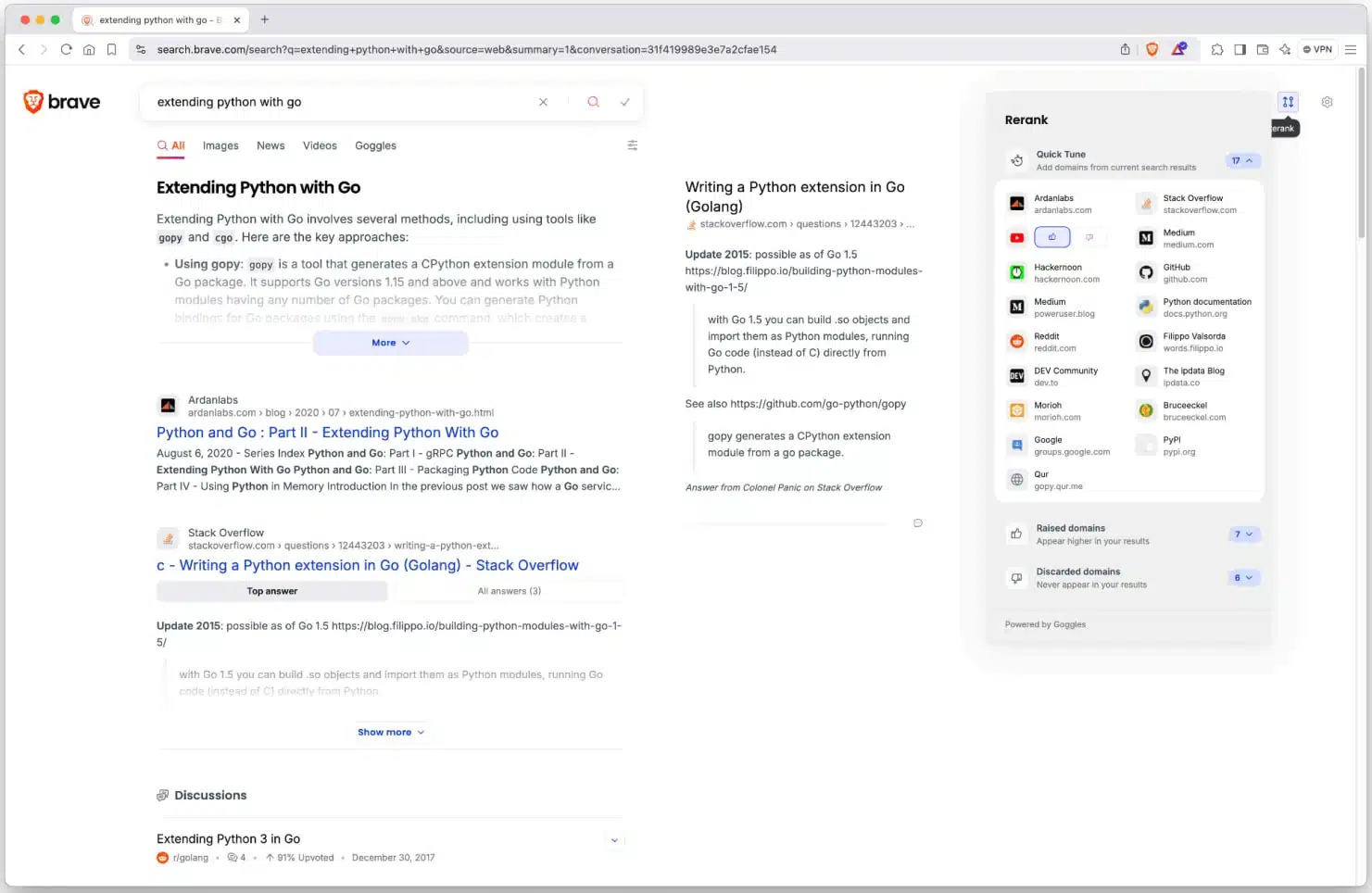
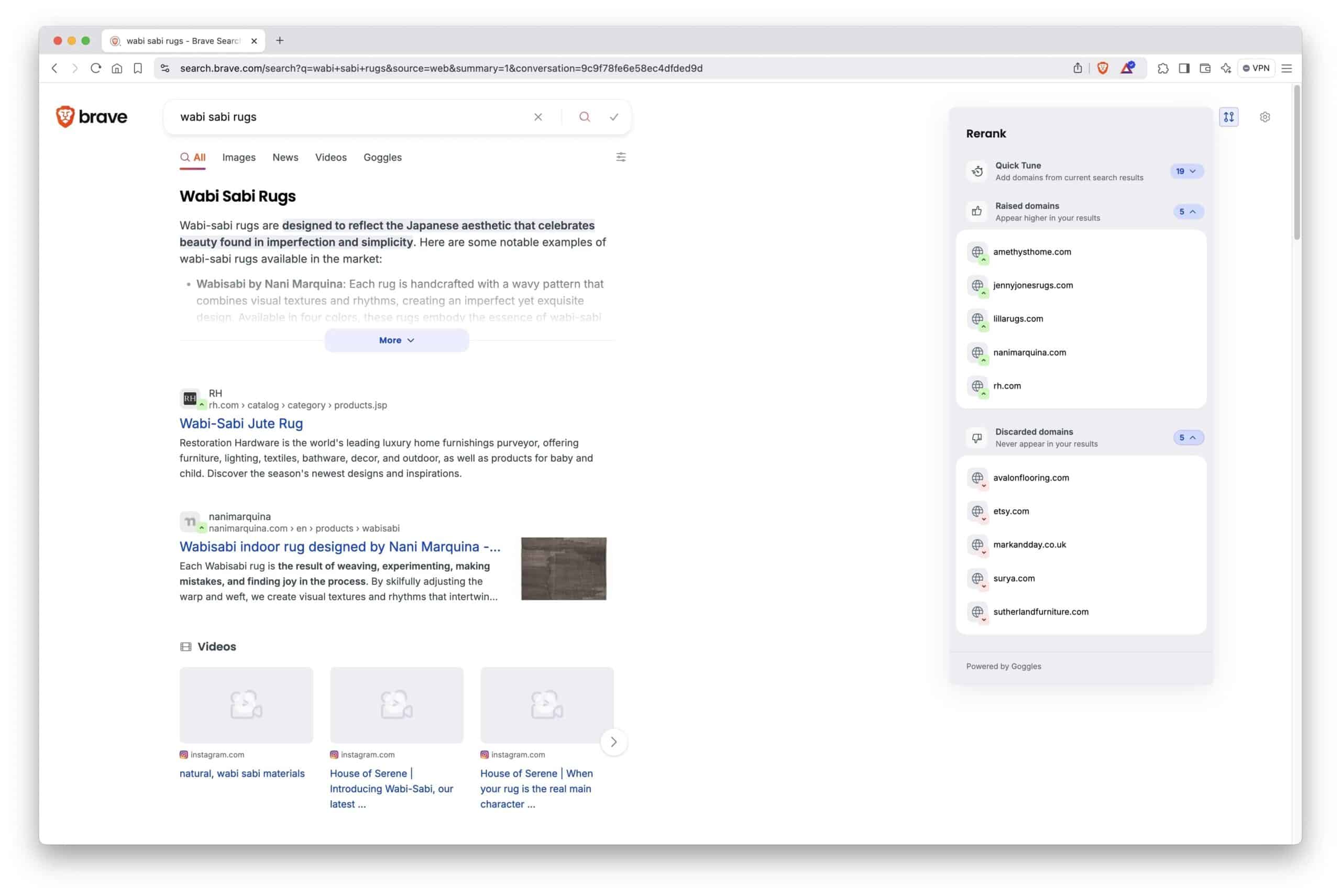
A new interactive panel appears on the right side of the search results page, displaying a summary of domains for any query. Users can upvote or downvote sites by clicking thumbs-up or thumbs-down icons beneath each domain.

Want to prioritize reputable news outlets or your favorite blogs? With Rerank, you can ensure those sources always appear at the top. Frustrated by clickbait or low-quality content? Demote those sites, or even eliminate them from your results entirely.
The adjustments are immediate, giving users a real-time glimpse of how their preferences shape the search experience.
“Rerank enables users to easily adjust search results according to their preferences while being in full control,” explained Arjaldo Karaj, VP of Brave Search.
No More Algorithmic Mysteries
Brave’s Rerank feature sets itself apart by being completely transparent. Unlike Google’s opaque personalization practices, Rerank doesn’t rely on hidden algorithms. It also doesn’t collect or share user data.
Here’s how Brave keeps it private:
- Local Storage Only: Rerank settings are stored locally on your device. Brave passes these preferences via cookies, which are not used for tracking.
- Account-Specific Control: Your Rerank settings are linked to your account, meaning you get a customized experience without impacting other users.
- No External Influence: Brave doesn’t use Rerank data to tweak its broader search algorithms. Your adjustments remain entirely personal.
This commitment to privacy and transparency is part of Brave’s DNA, distinguishing it from the industry’s major players.
A Tool for Everyone
Whether you’re a casual user, a researcher, or someone with niche interests, Rerank’s flexibility offers something for everyone.
You can fine-tune results in seconds, prioritizing quality and relevance based on your unique preferences.
Rerank isn’t designed to replace Goggles, Brave’s 2022 feature that allows users to apply custom filters and rules to search results.
Instead, it simplifies the process, letting users quickly adjust rankings without diving into technical settings.
Turning the Tables on Big Tech
For years, search engines like Google and Bing have dominated the online search experience. Their algorithms, while advanced, have been criticized for favoring advertisers and using invasive tracking methods.
Brave’s Rerank challenges this model, giving users—not corporations—control over what they see online.
This shift could fundamentally change how search engines operate. If more users adopt Rerank, it could push the industry toward greater transparency and personalization.
Brave’s commitment to privacy could also set a new standard, pressuring competitors to rethink their reliance on user data.
What Comes Next?
The introduction of Rerank raises intriguing possibilities for the future of search:
- Empowered Users: By making search results customizable, Brave is giving people a sense of agency often missing in today’s tech landscape.
- Privacy as a Priority: As privacy concerns grow, Brave’s model could inspire other companies to adopt less intrusive practices.
- Potential Challenges: Convincing users to leave established platforms like Google will be an uphill battle. Success will depend on how well Brave delivers on its promise of a superior search experience.
How to Use Rerank?
Making the most of Rerank is simple:
Get Started: Open Brave Search and look for the new Rerank panel on the right.
Customize on the Fly: Use thumbs-up to boost trusted sites and thumbs-down to demote or remove unwanted domains.
Experiment and Refine: Test the feature with different types of searches to see what works best for you.
Reset Anytime: If you change your mind, Brave lets you clear your preferences with ease.
Key Takeaways
- Brave Search’s “Rerank” feature lets users control how search results are ranked by promoting or demoting specific sites.
- The feature operates privately, with settings stored locally and no data collection involved.
- Rerank complements Brave’s existing Goggles tool, offering a faster and simpler way to personalize results.
- The move could disrupt the search engine market by prioritizing transparency and user empowerment.
- Brave’s privacy-first approach challenges Big Tech’s dominance, redefining what search engines should offer.

Dileep Thekkethil
AuthorDileep Thekkethil is the Director of Marketing at Stan Ventures, where he applies over 15 years of SEO and digital marketing expertise to drive growth and authority. A former journalist with six years of experience, he combines strategic storytelling with technical know-how to help brands navigate the shift toward AI-driven search and generative engines. Dileep is a strong advocate for Google’s EEAT standards, regularly sharing real-world use cases and scenarios to demystify complex marketing trends. He is an avid gardener of tropical fruits, a motor enthusiast, and a dedicated caretaker of his pair of cockatiels.
