OpenAI just made it a lot easier to work together inside ChatGPT. Every user can now share projects with others and collaborate directly, no matter which plan they’re on.
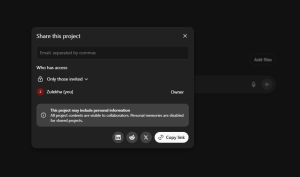
OpenAI has rolled out a feature that turns ChatGPT into a true teamwork tool. The company announced that project sharing is now available to everyone, expanding access beyond Business, Enterprise, and Edu accounts.
This means ChatGPT can now function like a shared workspace where people can upload files, track ideas, and refine projects together without juggling screenshots or endless copy-paste sessions.
The update is already live for users worldwide across the web, iOS, and Android.
What You Can Actually Do Now
Here’s how it works: A “project” in ChatGPT acts like a shared folder that holds everything related to a specific task, which includes conversations, notes, files, and instructions. When you share that project, others can hop in, edit, and contribute in real time.
OpenAI has set some limits depending on your plan:
- Free users: up to 5 files and 5 collaborators
- Plus and Go users: up to 25 files and 10 collaborators
- Pro users: up to 40 files and 100 collaborators
The limits are reasonable, and for most users, they’ll be plenty.
You can also decide who gets access. Project owners can make sharing invite-only or open it up with a link. If something changes, you can adjust visibility anytime or switch back to private.
Why This Matters
Collaboration has been one of the most requested features in ChatGPT. People have been using ChatGPT for group work anyway, just in clunky ways. They’d copy chat transcripts into Google Docs or take screenshots of responses to share with teammates. Now that’s unnecessary.
By opening up project sharing, OpenAI is signaling that it wants ChatGPT to be more than a solo productivity tool. It’s moving toward something that feels like a shared workspace where people and AI build together.
It’s also a smart move strategically. The more people who collaborate in ChatGPT, the more deeply it becomes part of how teams operate day to day.
Real-World Use Cases
OpenAI shared a few examples of how people might use project sharing in everyday work:
- Group work: Upload notes, proposals, or contracts so everyone can stay aligned and move faster.
- Content creation: Keep tone and style consistent across writers by applying project-level instructions.
- Reporting: Store datasets and reports in one spot and generate regular updates without starting over.
- Research: Collect survey results, transcripts, or market data in a single shared space where everyone can query or analyze together.
It’s easy to see how this could change workflows for writers, researchers, educators, and small teams who rely on ChatGPT daily.
What Users Should Watch Out For
There are a few things worth keeping in mind before jumping in:
- Be careful with shared data. If you share a project via a link, anyone with that link can access it. Stick with invite-only for sensitive work.
- No version tracking yet. Unlike Google Docs, there’s no built-in way to see edit history or restore old versions.
- Plan limits still matter. If you hit file or collaborator caps, you’ll need to upgrade to expand.
- Platform parity. The good news is that everything works across desktop and mobile, so you can start on your phone and finish on your laptop without issues.
Getting Started Is Simple
You don’t need a manual to try it. Just start a project, invite a few teammates, and see how it feels. A few quick tips:
- Create one project per topic or goal. It keeps things tidy and easier to manage.
- Use clear instructions. ChatGPT will maintain tone and structure if you define them early.
- Assign informal roles. Decide who drafts, who reviews, and who finalizes. It avoids confusion.
- Return to the same project. Don’t start fresh every time, you’ll save context and reduce repetitive setup.
- Protect your privacy. Review sharing settings regularly, especially for public links.
Once you’ve got the hang of it, ChatGPT starts feeling less like an assistant and more like a shared notebook that helps everyone think together.
The Bigger Meaning Behind the Update
This update shows how OpenAI is expanding ChatGPT’s role. It’s no longer just about having one-on-one conversations with an AI, it’s about enabling groups to create together inside the same environment.
That could shift how people collaborate online.
Instead of switching between chat, docs, and notes apps, users can handle the whole process in one place, with AI woven throughout. It’s an early glimpse of what the next generation of productivity tools might look like.
For now, though, it’s just a really useful feature that makes life easier for anyone who works with others.
Key Takeaways
- Project sharing is now available to all ChatGPT users, from Free to Pro.
- Collaborators can edit and contribute directly within shared projects.
- Sharing limits range from 5 to 40 files and 5 to 100 collaborators.
- Privacy settings let users control who has access.
- The update turns ChatGPT into a shared workspace for teams, writers, and researchers.

Zulekha
AuthorZulekha is an emerging leader in the content marketing industry from India. She began her career in 2019 as a freelancer and, with over five years of experience, has made a significant impact in content writing. Recognized for her innovative approaches, deep knowledge of SEO, and exceptional storytelling skills, she continues to set new standards in the field. Her keen interest in news and current events, which started during an internship with The New Indian Express, further enriches her content. As an author and continuous learner, she has transformed numerous websites and digital marketing companies with customized content writing and marketing strategies.