Key Takeaways:
- No Direct Tool: Ahrefs no longer has a traditional “Disavow Tool” for submitting files to Google.
- The “Soft Disavow”: You can use the “Best Links” filter in Site Explorer to exclude up to 10,000 URLs from your Ahrefs reports to clean up your data.
- Google’s Role: Google ignores most spammy links automatically; disavowing is usually only necessary if you have a Manual Action.
- The Solution: To actually disavow links for ranking purposes, you must export data from Ahrefs and upload it manually to Google Search Console.
You have likely logged into Ahrefs, navigated to your dashboard, and spent ten minutes looking for the “Disavow” button.
Here is the hard truth: You won’t find it.
In the past, Ahrefs provided a dedicated tool to manage disavow files directly. However, they have since retired this feature, leaving many SEOs wondering how to handle toxic backlinks using their platform.
If you asked Ahrefs’ AI support (Fin) today, it would tell you to use a “soft disavow” alternative using the Best Links filter. But what does that actually mean for your SEO strategy? Does it protect your site?
At Stan Ventures, we audit thousands of backlink profiles annually. In this guide, we will break down exactly how to use Ahrefs’ current features to filter bad data, and more importantly, how to take that data to Google to protect your rankings if you are under attack.
Does Ahrefs Have a Disavow Tool? (The Short Answer)
Technically, no. Ahrefs does not have a tool that communicates directly with Google’s Disavow API, nor do they maintain the legacy “Disavow Links” feature in the same capacity it once existed.
Recently, when we queried Ahrefs support regarding this, their AI agent confirmed:
“We don’t have a traditional disavow tool, but you can use our ‘Best Links’ filter in Site Explorer as a soft disavow alternative.”
Why Ahrefs Does’t Have a Disavow Feature Like in Semrush?
The SEO landscape has shifted. Years ago, “negative SEO” was a massive concern, and webmasters were disavowing links weekly. Today, Google’s Penguin algorithm is granular—it devalues bad links rather than demoting the whole site.
Because Google is now efficient at ignoring spam automatically, Ahrefs pivoted. They realized their tool was better used for data analysis rather than acting as a gateway to Google Search Console.
However, as SEOs, we know there are still times you need to clean up a profile—specifically when facing a Manual Action or a massive spam attack.
How to Perform a “Soft Disavow” in Ahrefs
The “Soft Disavow” doesn’t tell Google to ignore the links; it tells Ahrefs to ignore them in your reports. This is useful when you want to see what your “true” Domain Rating (DR) and organic traffic potential look like without the noise of spammy links.
Here is the step-by-step process we use to clean up client reports using the method suggested by Ahrefs.
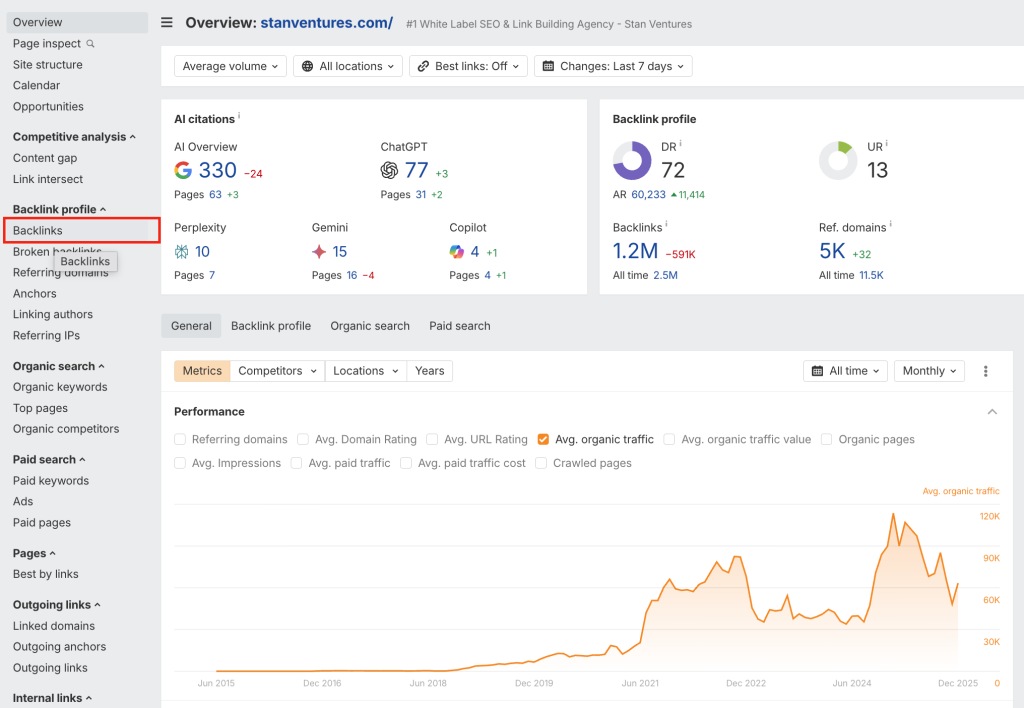
Step 1: Access Site Explorer
Enter your domain into Site Explorer. Navigate to the Backlinks profile on the left-hand sidebar.
Step 2: Open the “Best Links” Filter
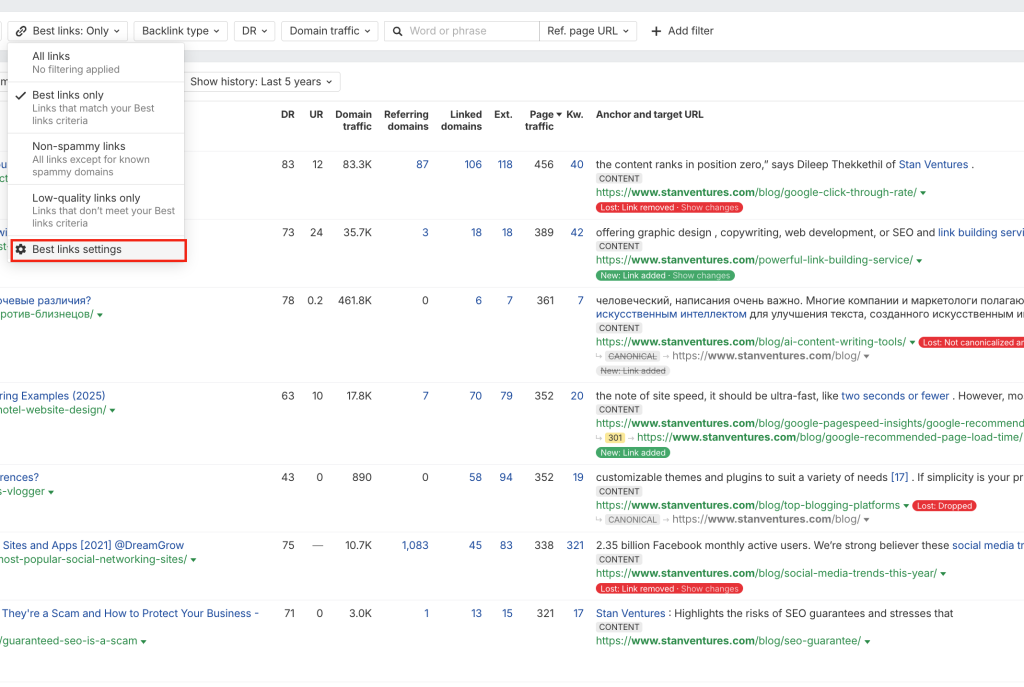
This is the new home for exclusion logic. The “Best Links” filter is designed to show you your high-value links, but you can reverse-engineer it to filter out the junk.
Step 3: Set Your Exclusion Criteria
According to Ahrefs, you can filter out up to 10,000 URLs. This exclusion applies across all your domain and backlink charts.
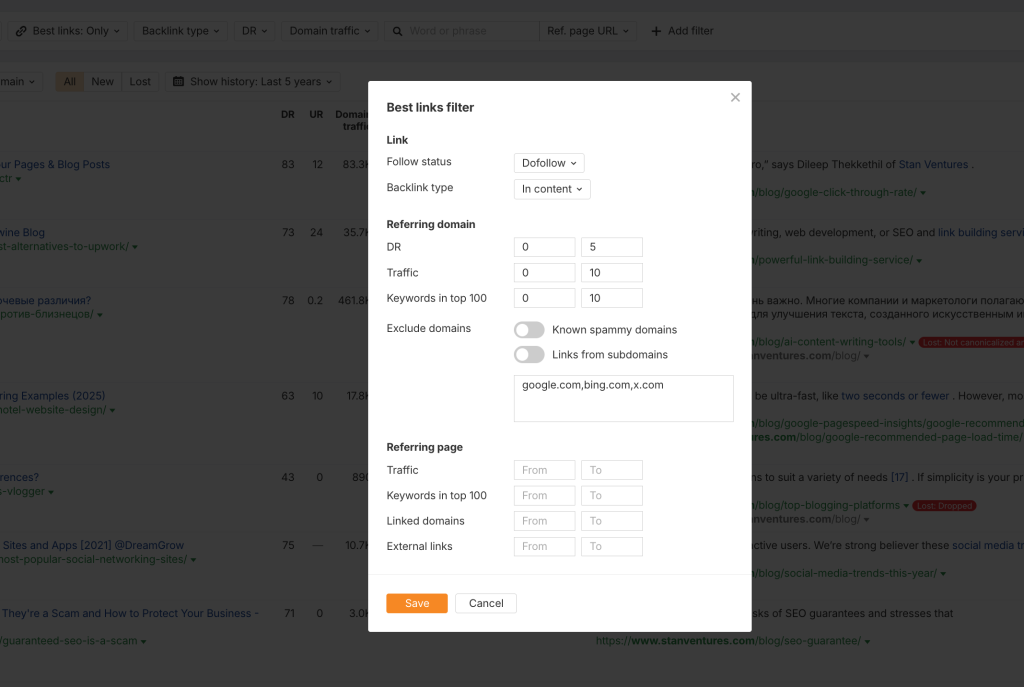
We recommend setting the following filters to identify the “junk” you want to hide/remove later:
- Backlink type: In content
- Follow status: Dofollow
- Domain Rating (DR): Set to show only DR 0-5.
- Traffic: Set to “Organic Traffic” < 10.
- Keyword in Top 100: < 10
- Known Spammy: Deselect the filter
Step 4: Exclude the URLs
Once you have identified the links that are skewing your data, you can enter these URLs into the filter to exclude them.
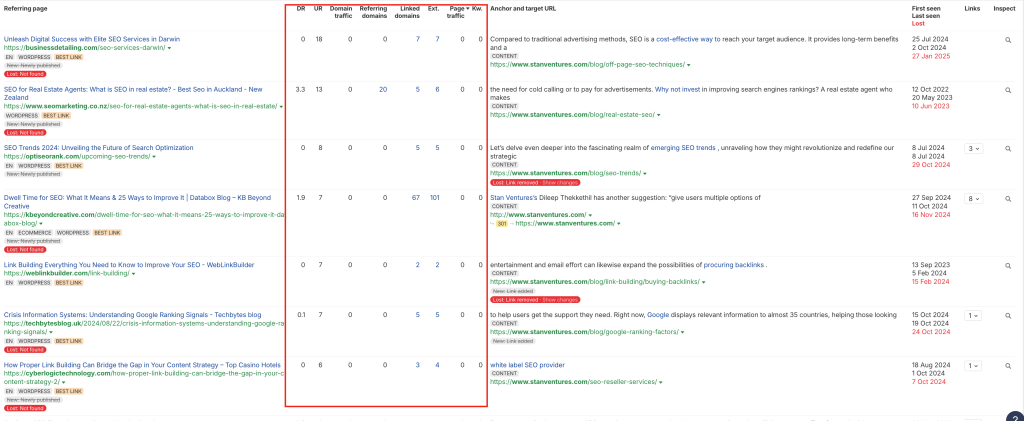
The Result: You now get a list of sites that you can export and safely disavow in Google search Console.
Exclusion List: Now add these sites to the exclusion list of best link filter. And rest the best link settings.
The “Soft Disavow” vs. Google’s Actual Disavow Tool
It is vital to understand the difference between cleaning your reporting data and protecting your site from penalties.
| Feature | Ahrefs “Soft Disavow” | Google Disavow Tool |
|---|---|---|
| Primary Purpose | Clean up Ahrefs reports | Prevent algorithmic penalties |
| Who Sees It? | You and your team | Google’s Algorithm |
| Impact on Rankings | None | Potential Recovery / Protection |
| Risk Level | Zero (Visual only) | High (Can hurt SEO if done wrong) |
At Stan Ventures, we use the Ahrefs method to report “Clean Link Growth” to clients, but we use the Google Disavow Tool when we are resolving specific algorithmic suppression.
When Should You Actually Disavow Links?
Before you go exporting thousands of links, you need to verify if you actually need to disavow. Google’s documentation is clear: Most sites do not need to use this tool and Google executives have time and again said that Disavow should only be used when hit by a manual link penalty.
However, in our operational experience, there are two specific scenarios where manual disavow is non-negotiable:
1. You Have a Manual Action
If you check Google Search Console (GSC) under “Security & Manual Actions” and see a notification for “Unnatural Inbound Links,” you must disavow. There is no way around this. You will need to create a disavow file and submit a reconsideration request.
2. Algorithmic Suppression (The Gray Area)
Sometimes, you won’t get a manual notice, but your traffic flatlines coinciding with a massive influx of casino, adult, or pharma links.
If we see a client gain 50,000 spam links in a week and their rankings drop for core keywords, we intervene. Google should ignore them, but if the volume is high enough, the algorithm can get confused. In these cases, we manually disavow to help Google along.
How to Create a Disavow File for Google Using Ahrefs
Since the direct button is gone, you have to do this the manual way. Here is the workflow we use at Stan Ventures to bridge the gap between Ahrefs data and Google Search Console.
Step 1: Export Your Backlinks
- Go to Site Explorer > Backlinks.
- Apply filters to find toxic links (e.g., DR < 5, Traffic < 5, Dofollow only).
- Click Export and choose “Full Export” in CSV format.
Step 2: Audit the File (Crucial)
Do not just upload the raw export. You risk disavowing good links from new sites that just happen to have low DR.
Open your CSV in Excel or Google Sheets. We look for:
- Irrelevant TLDs: High volumes of .xyz, .ru, or .cn links if your audience is US-based.
- Over-optimized Anchors: Thousands of links with exact match anchors like “cheap gucci bags.”
- Network IPs: Multiple links coming from the same Class-C IP block.
Step 3: Format the Disavow File
Google requires a specific format (.txt file).
- To disavow a specific URL:
http://spam-site.com/page-a - To disavow an entire domain (Recommended):
domain:spam-site.com
Example of a clean .txt file:
# Disavowed on 2023-10-24
domain:spammy-directory.com
domain:buy-cheap-links.net
http://bad-site.com/specific-page.html
Step 4: Upload to Google Search Console
- Go to the Google Disavow Links Tool page.
- Select your property.
- Upload your .txt file.
- Wait. It can take Google 3 to 9 weeks to process this file and recrawl the links.
Identifying Toxic Links: What We Look For
Identifying which links to cut is more art than science. Ahrefs provides the metrics, but you need human intuition to interpret them.
1. The “Zero Traffic” Rule
If a website links to you, but Ahrefs shows it has 0 organic traffic, be suspicious. If Google isn’t ranking that site for anything, its vote of confidence (backlink) is likely worthless or toxic.
2. High Outbound Link (OBL) Ratio
If you check a referring page and it has 500 outbound links and 300 words of text, it is a link farm. Ahrefs allows you to filter by “External links count.” We generally flag pages with over 100 external links for manual review.
3. Anchor Text Manipulation
Go to the Anchors report in Ahrefs. If you see a spike in anchor text that is unrelated to your brand (e.g., “poker,” “essay writing”), those are the links you need to target immediately.
The Risk of Over-Disavowing
We often onboard clients who have shot themselves in the foot by being too aggressive.
If you disavow a link from a site with DR 10, you might think you are “cleaning” your profile. But if that site is a legitimate local blog that is just new, you are throwing away a valid vote.
Our Rule of Thumb:
If you are unsure if a link is bad, keep it. Only disavow if you are 100% certain the link is malicious or part of a link scheme.
Need Help Auditing Your Links?
Auditing thousands of lines of data is tedious and risky. Our team at Stan Ventures handles manual link audits to ensure you only cut the toxic links, not the healthy ones.
While Ahrefs has removed the traditional disavow tool, their platform remains the best in the industry for finding the data you need. The “Best Links” filter acts as a great soft disavow for your own internal reporting, ensuring your analytics aren’t skewed by spam.
However, for actual recovery and ranking protection, you must still rely on the manual export method and Google’s official tool.
Don’t let spammy links dictate your site’s health. If you are seeing a drop in rankings and suspect negative SEO, take action today.
Do you have questions about your backlink profile? Drop a comment below or contact our team for a free consultation.
Frequently Asked Questions (FAQ)
Q: Where is the Disavow Tool in Ahrefs?
A: Ahrefs has retired the traditional Disavow Tool. They now recommend using the “Best Links” filter in Site Explorer to exclude unwanted URLs from reports, or exporting the data to submit to Google manually.
Q: Does the Ahrefs Best Links filter affect my Google rankings?
A: No. The Best Links filter only hides data within the Ahrefs dashboard. It does not communicate with Google. To affect rankings, you must upload a disavow file to Google Search Console.
Q: How many URLs can I exclude in Ahrefs?
A: According to Ahrefs, you can filter out up to 10,000 URLs using the Best Links filter configuration.
Q: Is it safe to use automated disavow tools?
A: We generally advise against fully automated disavow tools. Algorithms can mistake niche-relevant, low-DR sites for spam. Manual review is always safer to prevent losing valuable link equity.

Dileep Thekkethil
AuthorDileep Thekkethil is the Director of Marketing at Stan Ventures, where he applies over 15 years of SEO and digital marketing expertise to drive growth and authority. A former journalist with six years of experience, he combines strategic storytelling with technical know-how to help brands navigate the shift toward AI-driven search and generative engines. Dileep is a strong advocate for Google’s EEAT standards, regularly sharing real-world use cases and scenarios to demystify complex marketing trends. He is an avid gardener of tropical fruits, a motor enthusiast, and a dedicated caretaker of his pair of cockatiels.