If Google suddenly slows down crawling your site, it can feel like your SEO progress is grinding to a halt. New content takes longer to get indexed, updates don’t show up in search as fast, and traffic can dip before you even realize what’s happening.
The good news? Crawl rate drops are usually temporary and almost always fixable. Let’s break down why Google cuts back on crawling and what you can do to get things back on track
A Sharp Crawl Drop Raises Questions
It all started when a website operator shared a concerning discovery: within just 24 hours of deploying broken hreflang URLs in HTTP headers, Googlebot’s crawl requests had fallen by roughly 90%. That’s right — nine out of ten crawl attempts vanished almost instantly.
The post explained that the broken hreflang URLs returned 404 errors when Googlebot tried to access them. Interestingly, despite the massive crawl reduction, the indexed pages remained stable. The user wrote:
“Last week, a deployment accidentally added broken hreflang URLs in the Link: HTTP headers across the site. Googlebot crawled them immediately — all returned hard 404s. Within 24h, crawl requests dropped ~90%. Indexed pages are stable, but crawl volume hasn’t recovered yet.”
Naturally, this raised eyebrows across the SEO community. Could 404s alone cause such a dramatic drop?
Mueller’s Insight: Server Errors, Not 404s, Are Likely Culprits
John Mueller, Google’s Senior Webmaster Trends Analyst, responded to the Reddit thread with a critical clarification. He noted that 404s, while not ideal, usually don’t trigger such a rapid decline in crawling.
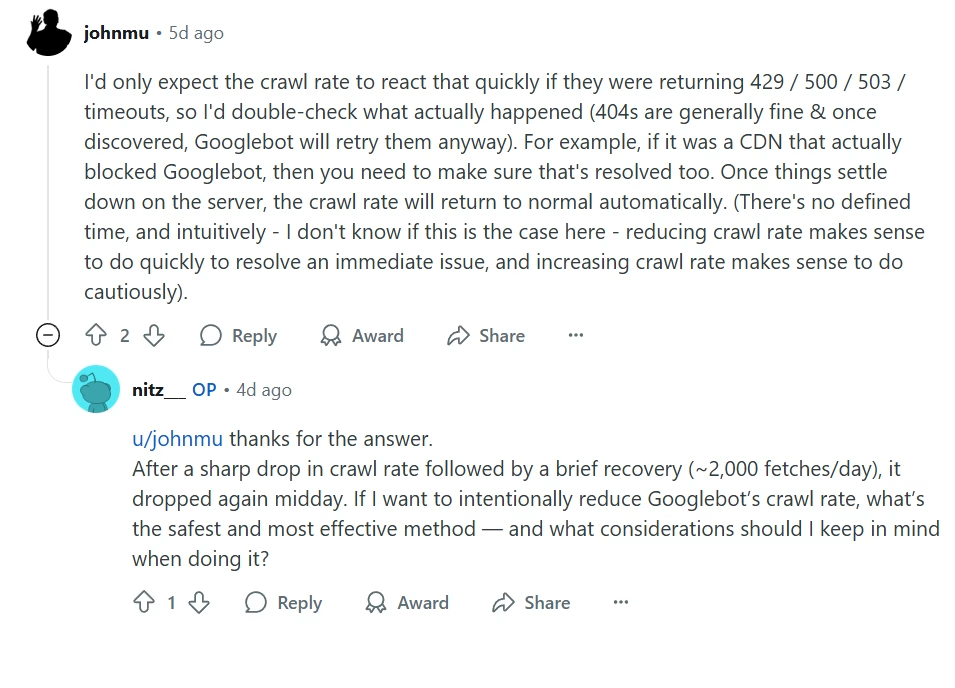
Instead, he pointed to server-side issues specifically 429 (Too Many Requests), 500 (Internal Server Error) or 503 (Service Unavailable) responses, as more likely reasons for a sharp crawl slowdown.
Mueller emphasized:
“I’d only expect the crawl rate to react that quickly if they were returning 429 / 500 / 503 / timeouts, so I’d double-check what actually happened (404s are generally fine & once discovered, Googlebot will retry them anyway). For example, if it was a CDN that actually blocked Googlebot, then you need to make sure that’s resolved too. Once things settle down on the server, the crawl rate will return to normal automatically.
There’s no defined time and intuitively I don’t know if this is the case here reducing crawl rate makes sense to do quickly to resolve an immediate issue, and increasing crawl rate makes sense to do cautiously.”
This aligns perfectly with Google’s documented crawl management guidelines. Essentially, Googlebot is protective: it throttles its activity to avoid overloading your server, and server-side errors are the main triggers for this behavior.
Why Does Google’s Crawl Rate Drop?
1. Spike in Server Errors (5xx or 429)
If your site starts returning 500, 503, or 429 errors, Google interprets this as a server overload. To protect your site from crashing, Googlebot pulls back its crawl rate significantly.
Pro Tip: Monitor server logs regularly to catch spikes early. At Stan Ventures, our technical SEO audits surface these errors before they impact crawling.
2. Firewall, CDN, or Hosting Blocks
Firewalls and CDNs sometimes get too aggressive. IP allowlists, bot filters, or rate-limiting rules can accidentally block Googlebot. When that happens, crawling slows or stops overnight.
Action Step: Double-check recent security changes. Make sure Googlebot’s IPs are allowlisted and not flagged as “suspicious traffic.”
3. Slow Server Response Times
Google doesn’t want to overload a slow server. If your pages consistently take too long to load, it will reduce how many URLs get crawled per session.
Fix: Optimize server response time, compress images, minimize JavaScript, and enable caching.
Need a hand with site speed? Our team at Stan Ventures specializes in technical fixes that boost both crawl efficiency and user experience.
4. Crawl Budget & Site Quality Signals
Sites with lots of duplicate, thin, or low-value pages get less crawl attention. Redirect chains, broken links, or messy internal linking also waste crawl budget.
Fix: Audit your site for duplicate pages, clean up thin content, and simplify redirect chains. Google will reward a streamlined structure with better crawl coverage.
5. Site Structure or Technical Errors
Long redirect loops, blocked resources, broken sitemaps, or overly complex JavaScript can all confuse Googlebot and reduce crawling.
Keep your robots.txt clean, update sitemaps regularly, and test JavaScript rendering with Google’s inspection tools.
How to Fix a Crawl Rate Drop
If you notice a sudden crawl slump, here is a checklist to recover efficiently:
Check and Fix Server Issues
Resolve 500, 503, and 429 errors right away. Ensure your hosting environment can handle normal crawl volumes without choking.
Review Firewall & CDN Settings
Verify that Googlebot isn’t being blocked or rate-limited. Adjust allow lists and bot rules to ensure smooth crawling.
Improve Site Speed
Faster sites get crawled more efficiently. Focus on server response time, caching, and core web vitals.
Optimize Site Structure
Remove duplicates, strengthen internal linking, and ensure your sitemap is accurate and easy to follow.
Update Sitemaps & Robots.txt
Always keep your XML sitemap fresh and submitted in Search Console. Double-check that no “noindex” or “disallow” rules are blocking critical pages.
Monitor in Google Search Console
Use Crawl Stats and Coverage reports to track Google’s crawling activity. These reports highlight sudden drops and help confirm when fixes are working.
Avoid Prolonged Error Signals
Don’t let server errors linger for days. The longer they persist, the slower Google will crawl even after you fix them.
Key Takeaway
When crawl rate drops, it’s usually a sign of technical issues — not a penalty. Once server errors, blocking rules, or site structure problems are resolved, Google’s crawl rate typically recovers within days.
The best defense is staying proactive with regular technical SEO checks. That way, small crawl hiccups don’t snowball into bigger ranking problems.
At Stan Ventures, our technical SEO team monitors crawl health, site speed, and indexation for clients daily. We identify and fix crawl rate issues before they impact visibility, helping your site stay competitive in search.
Want peace of mind that Google never misses your updates? Book a free consultation and let’s make sure your crawl health stays strong.

Dileep Thekkethil
AuthorDileep Thekkethil is the Director of Marketing at Stan Ventures, where he applies over 15 years of SEO and digital marketing expertise to drive growth and authority. A former journalist with six years of experience, he combines strategic storytelling with technical know-how to help brands navigate the shift toward AI-driven search and generative engines. Dileep is a strong advocate for Google’s EEAT standards, regularly sharing real-world use cases and scenarios to demystify complex marketing trends. He is an avid gardener of tropical fruits, a motor enthusiast, and a dedicated caretaker of his pair of cockatiels.
