Google has quietly made an interesting update that’s catching the attention of developers and SEOs alike. The company has added a new user agent called “Google-CWS” to its documentation.
It is a Chrome Web Store user-triggered fetcher designed to access URLs provided in Chrome extension and theme metadata.
Have you ever noticed an unfamiliar crawler hitting your server logs and wondered, “Wait, is that Google?” Well, this might just be one of those cases.
The addition of Google-CWS clarifies a long-standing gray area around Chrome Web Store fetch behavior, giving developers a better understanding of how and why Google interacts with their hosted URLs.
What Is the New Google-CWS User Agent?
According to Google’s official documentation, the Google-CWS user agent is associated with the Chrome Web Store and acts as a user-triggered fetcher.
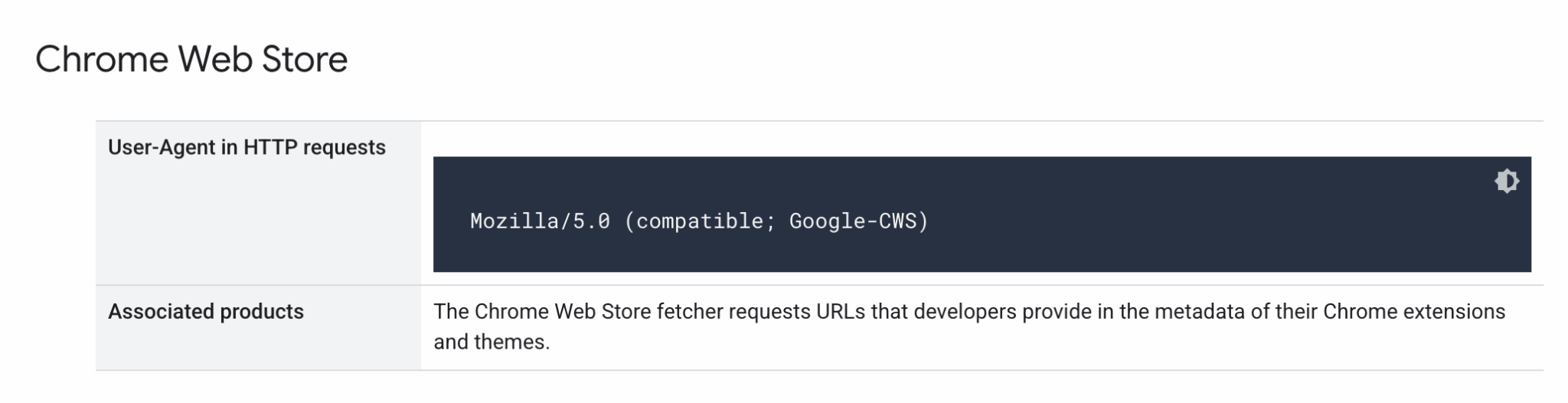
In simple terms, this means that when developers submit metadata for their Chrome extensions or themes including external URLs for documentation, icons, or other assets the Chrome Web Store may use this user agent to fetch and verify those URLs.
Google describes it as follows:
“The Chrome Web Store fetcher requests URLs that developers provide in the metadata of their Chrome extensions and themes.”
This makes Google-CWS distinct from automated crawlers like Googlebot (used for search indexing) or Google-InspectionTool (used for Search Console’s URL inspection).
Unlike those, Google-CWS acts only when a user triggers an action, in this case, when the Chrome Web Store processes or checks data associated with an extension.
What Are User-Triggered Fetchers, Exactly?
To understand this update fully, it helps to break down what user-triggered fetchers are.
Google defines user-triggered fetchers as processes that run only when initiated by a user within a Google product. For example:
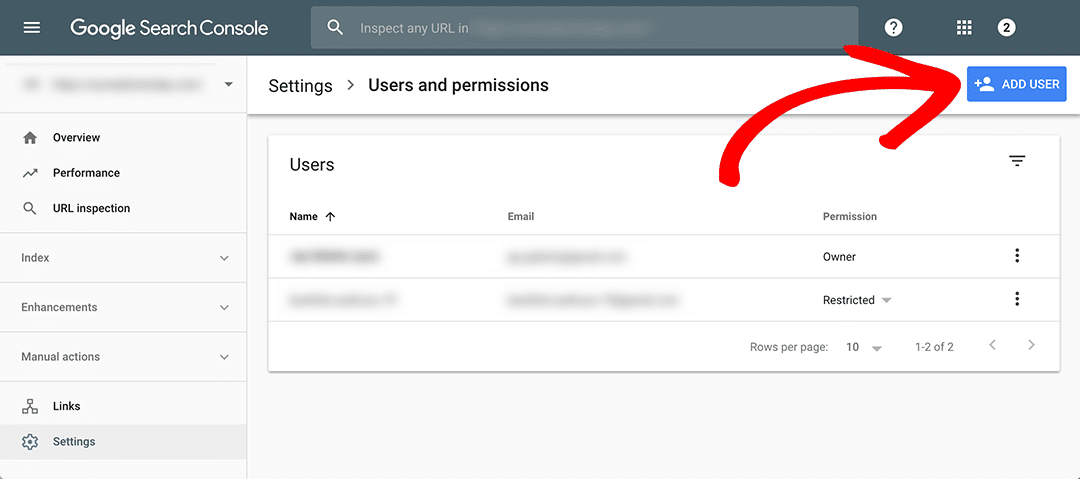
- When a user verifies site ownership in Google Search Console, the Google Site Verifier fetcher accesses your website to confirm verification.
- When someone uses a Google Cloud app that requests external resources (like RSS feeds), the fetch is triggered based on that action.
In both scenarios, these fetchers differ from typical crawlers because they don’t crawl for indexing, they fetch data on demand.
What’s more, Google clarifies that user-triggered fetchers generally ignore robots.txt rules, since they are performing an explicit action initiated by the user, not an automated scan.
So, if you spot Google-CWS in your logs, it is not trying to index your site or analyze it for SEO.
It is simply fetching the URL because a Chrome Web Store action, likely a developer submission or user verification required it.
How Does Google-CWS Fit into Chrome’s Ecosystem?
This update might seem like a small technical tweak. But in context, it is part of Google’s ongoing effort to make the Chrome Web Store more transparent and secure.
The Chrome Web Store, home to millions of extensions, themes and add-ons, relies heavily on metadata that developers provide which includes external links to privacy policies, help pages, changelogs and repositories.
Until now, when Google accessed those URLs, developers might have seen unexplained fetch requests in their logs without a clear understanding of where they came from.
The introduction of Google-CWS formalizes this behavior, letting developers know that these requests are part of legitimate, user-initiated Chrome processes.
In other words, Google is adding visibility and accountability to how Chrome Web Store interacts with external resources.
Why Does Google-CWS Ignore robots.txt?
Most web crawlers are expected to respect a site’s robots.txt file. But Google provides a reasonable explanation.
Since user-triggered fetchers are performing explicit actions requested by users such as verifying ownership, pulling content, or validating links, they are not considered general-purpose crawlers.
Here’s how Google puts it:
“Because the fetch was requested by a user, these fetchers generally ignore robots.txt rules.”
That said, the same technical properties of Google’s crawlers such as identifiable user-agent strings and standard access methods still apply.
So while Google-CWS won’t obey robots.txt, it is still a transparent and traceable agent, not an opaque system process.
For developers, this simply means: if you see Google-CWS in your logs, you don’t need to panic or block it. It’s not scraping or crawling. It is verifying and fetching for Chrome Web Store functions.
What Should Developers and Webmasters Expect?
If you maintain a website, especially one linked to a Chrome extension or theme, you might start noticing Google-CWS fetch requests in your logs.
This could happen, for example, when:
- You publish or update a Chrome extension with external links in your metadata.
- The Chrome Web Store verifies your extension’s listed URLs for policy compliance.
- A user-triggered process inside Chrome requests linked content for display or validation.
These fetches are lightweight, targeted, and generally infrequent, meaning they won’t affect your site’s crawl budget, performance, or analytics in a meaningful way.
However, this does mean developers should:
- Ensure their linked URLs are accessible and stable. Broken links in extension metadata might trigger failed fetches, which could affect Chrome Web Store listings.
- Monitor server logs periodically to confirm legitimate access from Google-CWS user agents.
- Avoid blocking user-agent activity unless you are absolutely sure it is unnecessary.
Why This Update Matters for SEO and Analytics Teams
This feels like a Chrome developer update. But there is a subtle SEO layer to it too.
Modern analytics and log analysis tools often categorize traffic by user agent. When a new one like Google-CWS appears, it can easily be mistaken for a bot or malicious actor if not documented properly.
By officially naming and documenting the user agent, Google helps SEO professionals, analysts and developers correctly classify and interpret these fetch events.
It also aligns with Google’s broader push for transparency in automated systems, ensuring that website owners know exactly which parts of Google’s ecosystem are interacting with their sites and why.
For teams working in technical SEO, this update highlights how Google continues to expand its web-facing systems beyond traditional crawlers.
Chrome, Android, Gemini, and even AI-powered SEO fetchers now represent part of the broader web interaction landscape.
Could This Be a Step Toward AI Integration in Chrome Web Store?
While Google has not said so directly, this update might be laying groundwork for something bigger.
In 2024, Google began integrating AI-powered models like Gemini into various products, including Chrome and Search.
As the Chrome Web Store evolves, it is likely that future versions will use AI to automatically evaluate extensions for security, content compliance, and metadata quality.
A standardized, identifiable user agent like Google-CWS makes it easier to track and manage those interactions transparently.
Today, it’s a fetcher for URLs. But tomorrow, it could be part of an AI-driven Chrome Store audit system, analyzing extension behavior for trustworthiness or content integrity.
TL;DR – Key Takeaways
- Google-CWS is a new Chrome Web Store user agent for user-triggered fetches.
- It requests URLs listed in the metadata of Chrome extensions and themes.
- These fetches are user-initiated, not automated crawls.
- robots.txt rules are ignored since the fetch is user-driven.
- Developers should ensure linked URLs remain accessible and valid.
- The change improves transparency in Chrome’s interaction with the web.

Dipti Arora
AuthorDipti Arora is a Senior Content Writer with over seven years of experience creating impactful content across Digital Marketing, SEO, technology, and business domains. She has a strong background in managing news verticals and delivering editorial excellence. Dipti has contributed to leading publications such as The Times of India and CEO News, where her research-driven storytelling and ability to simplify complex subjects have consistently stood out. She is passionate about crafting content that informs, engages, and drives meaningful results.
