
Google is testing a new “Answer Now” option in its Gemini app that lets users skip longer processing and receive an immediate response powered by the Gemini 3 Flash model.
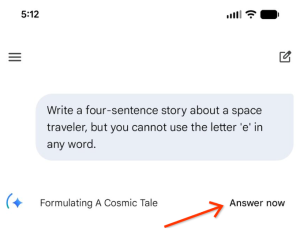
Google has begun rolling out a new feature inside the Gemini app called “Answer Now,” giving users more control over how quickly they receive responses.
The update allows people to interrupt Gemini while it is generating a response and request an immediate answer instead.
When tapped, the app switches to the Gemini 3 Flash model and delivers a reply without waiting for further processing.
The change was confirmed by Josh Woodward, Vice President at Google Labs responsible for Gemini and AI Studio, who shared the update publicly on X.
✅ Papercut fixed: You can now tap “Answer now” to stop @GeminiApp from thinking and answer right away (using the 3 Flash model) pic.twitter.com/OgVxBFKhDi
— Josh Woodward (@joshwoodward) January 21, 2026
According to his post, the button appears while Gemini is still working on a response, offering users a clear choice between waiting or moving on with a faster answer.
The feature is not yet visible to all users. Early sightings suggest Google is testing it gradually, which is typical for changes at this scale.
Why Google Is Adding This Option
The update reflects how people actually use AI tools throughout the day.
Many queries are simple and time-sensitive, such as checking a fact, confirming a detail, or getting a brief explanation. In these cases, waiting for a longer response can feel unnecessary.
By adding an explicit speed-focused option, Google acknowledges that not every interaction needs maximum depth.
The feature reduces friction for users who value quick answers, especially on mobile devices where patience is often limited.
At the same time, Google has not removed the slower, more thoughtful response path. Users who want a fuller answer can simply wait and let Gemini finish as usual.
What Users Should Expect From Faster Answers
The “Answer Now” button does not mean better or worse answers across the board. It changes the type of response users receive.
Faster replies are likely to be more concise and less detailed. They work best for clear, direct questions that do not require extended reasoning. More complex topics may still benefit from waiting for Gemini’s default response.
What This Signals About Google’s AI Direction
This update points to a gradual change in how AI tools are being shaped, with more attention on giving users simple, visible choices instead of locking them into a single experience.
Over time, features like this could lead to more transparent and adjustable AI experiences, where users select speed, depth, or style depending on their needs.
The Gemini app appears to be one of the first places where Google is testing this approach in a visible way.
Key Takeaways
- Google has added an “Answer Now” button to the Gemini app.
- The option delivers instant responses using the Gemini 3 Flash model.
- Users can interrupt longer processing if speed matters more.
- The feature is still rolling out and may not appear for all users.
- Choosing between speed and depth is now part of the Gemini experience.

Zulekha
AuthorZulekha is an emerging leader in the content marketing industry from India. She began her career in 2019 as a freelancer and, with over five years of experience, has made a significant impact in content writing. Recognized for her innovative approaches, deep knowledge of SEO, and exceptional storytelling skills, she continues to set new standards in the field. Her keen interest in news and current events, which started during an internship with The New Indian Express, further enriches her content. As an author and continuous learner, she has transformed numerous websites and digital marketing companies with customized content writing and marketing strategies.
