
Google has introduced its new Gemini 3 Pro model inside Search’s AI Mode for U.S. Google AI Pro and Ultra subscribers, bringing sharper reasoning, richer visual responses, and interactive tools directly into search results.
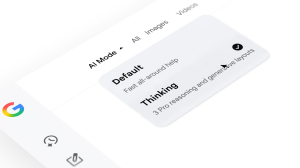
Google has activated Gemini 3 Pro in Search’s AI Mode for users in the United States on its premium AI Pro and Ultra plans.
The update allows Search to handle more layered questions, run several related queries at once, and display answers that look and feel more dynamic.
These changes were announced by the Search team, along with demonstrations showing how answers can now include images, tables, grids, and even small interactive tools created on the spot.
A Direct Upgrade to How Search Thinks
Gemini 3 Pro improves the reasoning power that Search relies on in AI Mode.
Instead of treating a question as a single prompt, the model can break it into multiple information requests and process them side by side. This raises the chance of capturing relevant pages and reduces the risk of missing useful sources.
The model also changes the way answers are assembled. Instead of returning a block of text with a few links, AI Mode can now arrange content visually.
If a table makes comparisons clearer or an illustration helps explain a process, the model can add those elements automatically.
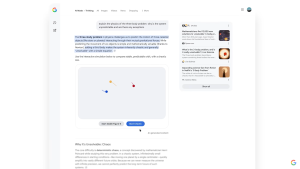
In demonstrations, Google showed examples such as a mortgage calculator and a physics simulation generated directly within the response.
Starting today, our most intelligent model – Gemini 3 – is bringing incredible reasoning capabilities to Search. This means it can understand your most complex questions and help you find exactly what you need.
I’m breaking down how Gemini 3 with generative layouts isn’t just an… pic.twitter.com/qfEydRRSOZ
— Robby Stein (@rmstein) November 19, 2025
What Users Will Notice First
Answers in AI Mode may feel more like miniature explainers built for your specific question.
When a topic is complex, the system can generate visuals or small interactive tools that help you explore different scenarios.
You might see timelines, sortable tables, step-by-step breakdowns, or simple widgets that allow you to adjust numbers and immediately view new results.
Users on the AI Pro or Ultra plan can enable this by selecting “Thinking” in the model menu within AI Mode. Google plans to expand availability in the United States to more users, with global expansion to follow later.
What This Means for Publishers and Content Creators
Gemini 3 Pro’s addition shifts how Search identifies and presents high-quality information.
Because the system now runs multiple queries at once, different sources may surface compared to older ranking methods. This has the potential to elevate pages that offer strong explanations, clear data, or unique expertise.
However, the presence of interactive tools inside Search may influence user behavior. If readers can complete a calculation or summary task within the response itself, they may not always click through to external pages. This makes the visibility of citations and link placement even more important.
Creators and publishers should closely observe how their pages appear in AI Mode, whether they are cited, and how their information is used in visuals or summaries. Google says it will continue linking to original sources, but the format surrounding those links is shifting.
Why These Changes Matter
Search is becoming more interpretive.
Instead of delivering a list of links, AI Mode aims to help users reach an answer faster and with more clarity. That creates both convenience and new questions. How should publishers optimize for answers that may include visual elements? How will referral traffic change as Search becomes more interactive? How will accuracy be monitored when answers blend several sources?
As Google refines its model routing system, tougher questions may be automatically handled by Gemini 3 Pro, while simpler ones use faster models. This could lead to more consistent quality but also more variation in how results appear.
Practical Advice
To help different groups make sense of these changes, here are clear steps that readers can apply right away.
For publishers and SEO teams
- Review how your pages are referenced in AI Mode and track whether links remain visible.
- Strengthen topical depth on key pages so the model recognizes your content as a reliable source.
- Include structured data wherever appropriate to improve clarity for automated systems.
- Avoid overly thin pages. The new model favors richly informative content.
- Monitor traffic patterns as AI Mode becomes more widely available.
For everyday users
- Use “Thinking” mode when your queries involve comparisons, calculations, or multi-step reasoning.
- Explore the interactive visuals, but verify important information using the cited links.
- Treat AI summaries as starting points and follow source pages for deeper detail.
- Test various prompts to see how the system handles complex questions.
- Provide feedback directly within AI Mode to help improve accuracy.
Key Takeaways
- Gemini 3 Pro now powers AI Mode in Google Search for U.S. AI Pro and Ultra users.
- The model improves understanding of complex questions by running multiple related queries at once.
- Answers can now include visuals and interactive elements created directly within Search.
- Publishers should track how their content is cited since user clicks may shift.
- Google will expand access and refine model selection based on user feedback.

Zulekha
AuthorZulekha is an emerging leader in the content marketing industry from India. She began her career in 2019 as a freelancer and, with over five years of experience, has made a significant impact in content writing. Recognized for her innovative approaches, deep knowledge of SEO, and exceptional storytelling skills, she continues to set new standards in the field. Her keen interest in news and current events, which started during an internship with The New Indian Express, further enriches her content. As an author and continuous learner, she has transformed numerous websites and digital marketing companies with customized content writing and marketing strategies.
