
Gmail is rolling out a major update powered by Gemini that reshapes how people read, write, and manage email. The changes introduce AI summaries, inbox questions, writing assistance, and smarter prioritization, with the rollout beginning now in the US and expanding through 2026.
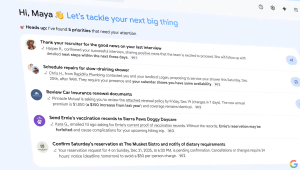
In early 2026, Google announced a significant evolution of Gmail, built around Gemini AI.
With nearly three billion users and email traffic continuing to grow, the company is repositioning Gmail as an active assistant rather than a passive inbox.
The update starts rolling out in the United States, initially in English, with more regions and languages planned in the months ahead.
The focus is on reducing the time people spend searching, scanning, and sorting.
Instead of forcing users to manage every detail manually, Gmail now surfaces information, drafts responses, and highlights priorities directly where work already happens.
AI Overviews Replace Digging With Clarity
One of the most visible additions is AI Overviews. Long email threads can now be condensed into short summaries that highlight decisions, next steps, and unresolved questions. This removes the need to read dozens of replies to understand what changed.

Users can also ask their inbox questions using natural language. Gemini scans email history and returns direct answers, pulling together names, dates, and context.
Asking something like who sent a quote last year or when a meeting was confirmed now produces a clear response instead of a list of search results.
Conversation summaries are available to all users at no cost, while inbox questions are part of Google AI Pro and Ultra plans.
Writing Support That Adapts to Context
Gmail’s writing tools are also expanding. Help Me Write can draft new emails or improve existing ones by adjusting tone and clarity. Suggested Replies have been upgraded to consider the full conversation, offering one-tap responses that sound closer to how the user typically writes.

A new Proofread option checks grammar, tone, and structure before an email is sent.

Help Me Write and Suggested Replies are available to everyone, while Proofread is reserved for Pro and Ultra subscribers.
Google has also confirmed that Help Me Write will soon draw context from other Google apps to make suggestions more relevant.
A New Way to See What Matters First
Another feature in early testing is AI Inbox.
Instead of treating every message the same, Gmail now identifies which emails deserve attention. It highlights tasks, deadlines, and messages from key contacts based on patterns such as frequent communication and saved relationships.
Important reminders, upcoming bills, or time-sensitive updates can surface automatically. Google says this processing follows existing privacy protections and keeps user data under its control. AI Inbox is currently available to a limited group, with broader access expected later this year.
Why This Update Matters
Email has slowly become harder to manage, not because people send worse messages, but because there are simply too many of them.
Gmail’s latest changes are a response to that reality. Instead of acting as a place where messages pile up, the inbox is starting to surface what people actually need to know.
The focus is on helping users grasp decisions, deadlines, and context faster, without forcing them to sift through long threads or run repeated searches.
The technology stays in the background, supporting everyday tasks rather than getting in the way.
How Users Can Benefit Right Away
Here are a few simple ways users can start seeing value from these changes without changing how they already use Gmail.
- Use conversation summaries on long or crowded threads to catch key points quickly.
- Rely on Help Me Write for routine replies, then tweak the wording so it still sounds like you.
- Watch what AI Inbox highlights once it’s available and adjust your habits so it learns what matters.
- Ask your inbox direct questions to find details buried in older emails without manual searching.
Key Takeaways
- Gmail now uses Gemini to summarize conversations and answer inbox questions
- Writing tools help draft, refine, and proofread emails inside Gmail
- AI Inbox surfaces tasks and time-sensitive messages automatically
- Core features are free, with advanced tools for Pro and Ultra users
- The rollout starts in the US and will expand globally

Zulekha
AuthorZulekha is an emerging leader in the content marketing industry from India. She began her career in 2019 as a freelancer and, with over five years of experience, has made a significant impact in content writing. Recognized for her innovative approaches, deep knowledge of SEO, and exceptional storytelling skills, she continues to set new standards in the field. Her keen interest in news and current events, which started during an internship with The New Indian Express, further enriches her content. As an author and continuous learner, she has transformed numerous websites and digital marketing companies with customized content writing and marketing strategies.
