Google has introduced a faster way for advertisers to set up location assets, which could save hours for anyone managing local campaigns.
Users can now add their business locations directly from Google Maps inside the Google Ads platform. No more jumping through hoops with Google Business Profile syncing or uploading bulky spreadsheets.
With a quick search, advertisers can link up to 10 locations in just a few clicks.
PPC expert Greg Kohler first spotted the feature and quickly caught attention across industry forums and social media.
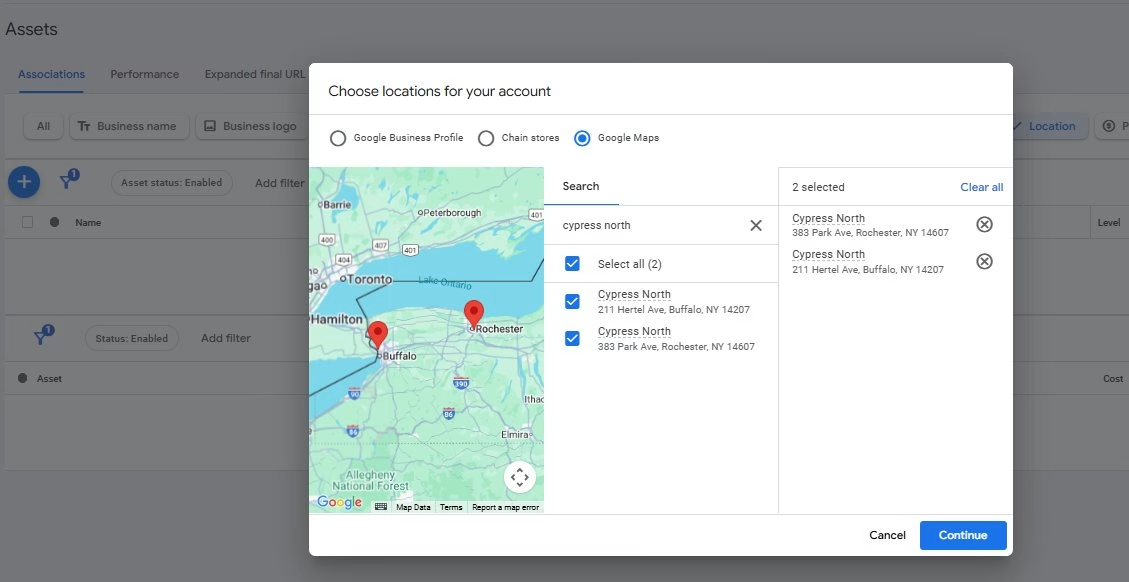
How the New Feature Works
The new option lives in the Location Manager section under Tools and Settings in Google Ads. From there, the process is straightforward:
- Open Location Manager.
- Click the plus icon and select Our Locations.
- Use the embedded Google Maps search to find your business by address or name.
- Select up to 10 locations you own.
- Apply them at the account level or limit them to specific campaigns or ad groups through Location Groups.
Google does warn that only locations you own should be linked. If you attempt to add someone else’s listing, expect a quick disapproval.
This is the kind of improvement that seems small but delivers a real quality-of-life boost for advertisers who have battled with the older methods.
Why This Update Matters
For years, adding location extensions has been one of those tedious tasks nobody looked forward to. You either had to sync with Google Business Profile, which wasn’t always practical for agencies onboarding new clients, or you had to type everything manually, prone to typos and inconsistencies.
Now, advertisers can search Google Maps directly from the Ads interface, select the correct listings, and confirm ownership. It’s faster, cleaner, and eliminates the copy-paste nightmare.
For agencies managing multiple accounts, this is a significant concern. The old workflow was one of the most time-consuming steps in account setup, especially for businesses with several locations. By eliminating unnecessary layers of verification, campaigns can go live more quickly without compromising accuracy.
What Advertisers Should Do Right Now
If you manage local ads, this is worth testing immediately. Here’s a practical action plan to take advantage of the update:
- Verify Your Maps Listings: Before adding anything, check that your locations on Google Maps have the correct address, phone number, and hours. If the listing is wrong, fix that first.
- Start Small: Add a few locations as a test before rolling out to all your accounts. This helps you catch any quirks.
- Use Location Groups Wisely: Linking at the account level is convenient, but you can still restrict which locations show for which campaigns. Use groups for better control.
- Track Local Metrics: After enabling new locations, keep an eye on store visits, calls from ads, and directions clicks. These metrics show whether the change improves engagement.
- Document Changes: Keep a simple log of who added which locations and when. This helps troubleshoot any future disapprovals.
Limits and Considerations
The feature has some boundaries you need to know:
- You can only add up to 10 locations using the Maps picker. For big chains, Google Business Profile syncing or bulk uploads are still necessary.
- Ownership is key. If you try to add a location that isn’t yours, it will not pass approval.
- Duplicate or inaccurate listings can create confusion. Always check that you’re selecting the correct version of your store from Maps.
- This doesn’t replace a proper measurement setup. Adding a location doesn’t automatically ensure store visit tracking or offline conversion measurement.
Who Benefits Most
Local businesses, franchises with fewer than 10 stores, and agencies onboarding new clients will see the biggest benefits. It’s especially useful for businesses that never got around to setting up Google Business Profile or that need a quick fix for upcoming campaigns.
Larger advertisers still need their current workflows, but even for them, the new feature could speed up temporary or pilot campaigns without messing with the main business profile sync.
What Comes Next
Google often rolls out incremental updates like this before adding bigger features. It wouldn’t be surprising if the Maps picker expands to allow bulk imports, higher location limits, or built-in verification indicators. For now, it’s a focused change that fixes a real pain point without overcomplicating the platform.
Key Takeaways
- You can now add business locations by searching Google Maps inside Google Ads.
- The limit is 10 locations per account using this method.
- Only add locations you own; others will be rejected.
- You can apply these locations to all campaigns or specific ones using Location Groups.
- Big chains should stick to bulk uploads or Business Profile sync for scale.

Dileep Thekkethil
AuthorDileep Thekkethil is the Director of Marketing at Stan Ventures, where he applies over 15 years of SEO and digital marketing expertise to drive growth and authority. A former journalist with six years of experience, he combines strategic storytelling with technical know-how to help brands navigate the shift toward AI-driven search and generative engines. Dileep is a strong advocate for Google’s EEAT standards, regularly sharing real-world use cases and scenarios to demystify complex marketing trends. He is an avid gardener of tropical fruits, a motor enthusiast, and a dedicated caretaker of his pair of cockatiels.
