
Google is taking a bold step toward a more secure web.
Beginning October 2026, with the release of Chrome 154, the world’s most widely used browser will automatically warn users before they access any public site that does not use HTTPS encryption.
How often do we type a URL, hit enter and assume the connection is safe? Google’s latest update suggests we should not take that for granted anymore.
This move, enabling the “Always Use Secure Connections” setting by default represents one of Chrome’s biggest user-safety updates in recent years, shifting from passive alerts to active protection.
But what does this mean for users, developers, and businesses still running HTTP sites?
What Exactly Is Changing in Google Chrome’s Security Settings?
Starting in October 2026, Chrome will automatically attempt to connect to every website using HTTPS (Hypertext Transfer Protocol Secure).
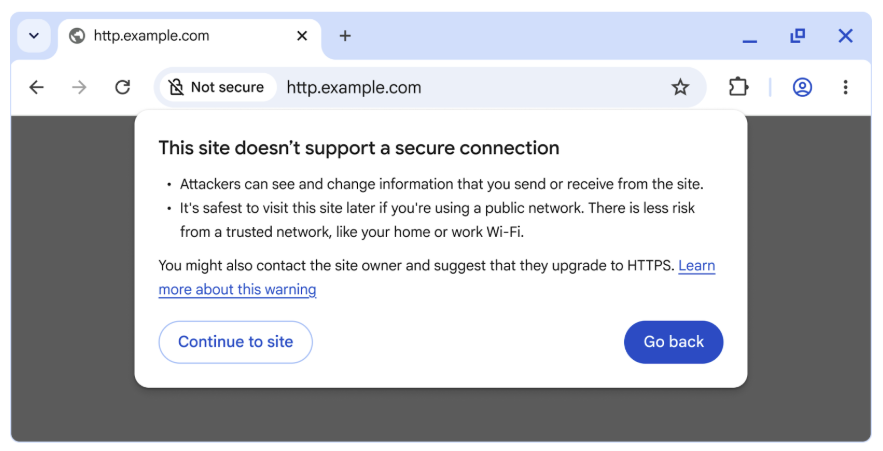
If HTTPS is not available, the browser will display a bypassable warning, alerting users that the connection is not secure before allowing them to proceed.
This feature “Always Use Secure Connections” is not new. It was first introduced as an optional security setting in 2022, allowing users to opt in to HTTPS-only browsing. But now, Google is making it the default for all users.
Here is how the rollout will happen:
- In April 2026, Chrome 147 will activate the feature for over 1 billion users who have opted into Enhanced Safe Browsing.
- By October 2026, with Chrome 154, the feature will be enabled globally for all users by default.
Once the rollout is complete, any attempt to visit a public HTTP site will trigger a warning like:
“This site does not use a secure connection. Attackers might be able to see the information you send or receive.”
Users can still bypass the warning if needed, but the message is clear, HTTP is no longer safe by default.
Why Is Google Making HTTPS the Default Standard?
Why enforce a change when 95% of the web is already on HTTPS?
Because the remaining 5% still represents millions of insecure navigations and as Google points out, “attackers only need one.”
Without HTTPS encryption, a user’s browser and a website communicate in plain text, which means anyone intercepting that connection (say, on public Wi-Fi) can read or modify the data.
Google’s Chrome Security Team, in their official post, explained it this way:
“When links don’t use HTTPS, an attacker can hijack the navigation and force users to load arbitrary, attacker-controlled resources.”
Such attacks can lead to malware installation, phishing, or even remote device exploitation.
HTTPS prevents this by encrypting all communication between your browser and the website, ensuring the page you see is the one the site intended to serve.
How Has HTTPS Adoption Progressed So Far?
Google has been tracking HTTPS adoption for over a decade through its HTTPS Transparency Report. Back in 2015, only 30–45% of Chrome traffic used HTTPS. But after years of awareness campaigns, free SSL certificate initiatives like Let’s Encrypt, and browser warnings for “Not Secure” sites, adoption skyrocketed to 95–99% by 2020.

However, since then, progress has plateaued.
According to the Chrome team:
“While it may seem that 95% HTTPS means the problem is mostly solved, the remaining 5% still represents millions of navigations that can expose users to attacks.”
This stagnation, coupled with the persistence of HTTP on private or legacy systems, convinced Google that it was time to push the remaining migration forward.
Will Chrome Warn for All HTTP Sites? What About Local Networks?
Good question and Google has an answer.

The upcoming HTTPS-by-default policy will apply only to public sites. That means private sites, such as:
- Local IP addresses (e.g., 192.168.0.1),
- Intranet pages (like intranet/), and
- Single-label hostnames,
will be excluded from warnings, at least for now.
Why? Because getting trusted HTTPS certificates for private addresses remains complex. These addresses are not globally unique, making them ineligible for standard SSL certificate validation.
That said, local HTTP traffic is not completely risk-free; attackers on the same Wi-Fi network can potentially exploit it. But Google notes that these risks are limited compared to public HTTP sites.
So, to strike a balance, Chrome will warn users only when visiting public HTTP sites while reducing friction for private networks and internal systems.
How Often Will Users See These Warnings?
One major concern is “warning fatigue”, the risk that users will start ignoring alerts if they appear too frequently.
To mitigate this, Chrome will display warnings only when visiting new or rarely accessed HTTP sites. If you frequently visit an insecure site (for example, an internal company portal), Chrome won’t repeatedly warn you about it.
In testing, Google found that:
- The median user sees fewer than one warning per week.
- Even the 95th percentile user sees fewer than three warnings per week.
That means the vast majority of users will rarely, if ever, see an HTTP warning but when they do, it will likely be for a new, potentially risky site.
What Does This Mean for Website Owners and Developers?
If you are still running an HTTP-only site, you now have a one-year countdown.
By October 2026, every visitor using Chrome will encounter a security warning before accessing your site. That could affect:
- User trust: Visitors may turn away before proceeding.
- Traffic: Even a small drop in user confidence can hurt engagement and conversions.
- SEO: While Google has long used HTTPS as a ranking signal, the new warnings will likely make HTTP pages less attractive to users and advertisers alike.
The Chrome team’s advice is straightforward:
“If you are a website developer or IT professional, enable ‘Always Use Secure Connections’ today to identify which sites need migration.”
Free SSL certificates are widely available, and implementing HTTPS through services like Let’s Encrypt, Cloudflare, or AWS Certificate Manager can usually be done in minutes.
How Is Google Balancing User Safety With Convenience?
Security is only as effective as its usability. Too many alerts can frustrate users, while too few can leave them vulnerable.
Google’s Chrome Security Team acknowledged this trade-off:
“While 95% HTTPS means the web is safer than ever, the remaining HTTP connections still pose risk. We must help the web move toward safer defaults without overburdening users.”
That’s why Chrome’s new system is adaptive:
- It won’t repeatedly warn users about the same site.
- It won’t block private or local traffic.
- It will gradually onboard users through staged releases in 2026.
Essentially, Google is taking a measured, user-first approach by prioritizing both safety and practicality.
What About Mixed Content and Local Devices?
One reason some sites still rely on HTTP is mixed content blocking, when secure (HTTPS) pages try to load resources (like images or APIs) over insecure HTTP connections.
In particular, devices on local networks like printers, routers, or IoT hubs often host configuration pages over HTTP.
To solve this, Google introduced a Local Network Access Permission feature that allows secure HTTPS pages to communicate with local devices once the user grants explicit consent.
This change unblocks developers from migrating such pages to HTTPS without losing functionality. So yes, even your smart thermostat can soon speak HTTPS.
What’s Next for Chrome and Internet Security?
Google describes this move as a “significant step forward” for web security but not the final one.
In the coming years, the company aims to:
- Further reduce barriers for HTTPS adoption on private and local sites.
- Continue improving visibility into secure versus insecure connections.
- Encourage developers and enterprises to adopt secure defaults across systems.
As the Chrome Security Team put it: “Our mission is to make it safe to click on links.”
With HTTPS now the near-universal standard, this update ensures that every connection, even that last 5%, finally meets the same bar of safety.
TL;DR – Key Takeaways
- October 2026: Chrome 154 will make “Always Use Secure Connections” the default for all users.
- Warnings for HTTP: Chrome will warn users before accessing any public site that lacks HTTPS.
- Private sites excluded: Local IPs and intranet pages won’t trigger warnings (for now).
- Gradual rollout: Enhanced Safe Browsing users get it first in April 2026.
- User-friendly design: Median users see fewer than one warning per week.
- HTTPS adoption: 95–99% of the web already uses HTTPS, but Google is targeting the rest.
- Action for site owners: Migrate to HTTPS within the next year to avoid warnings and maintain user trust.

Dipti Arora
AuthorDipti Arora is a Senior Content Writer with over seven years of experience creating impactful content across Digital Marketing, SEO, technology, and business domains. She has a strong background in managing news verticals and delivering editorial excellence. Dipti has contributed to leading publications such as The Times of India and CEO News, where her research-driven storytelling and ability to simplify complex subjects have consistently stood out. She is passionate about crafting content that informs, engages, and drives meaningful results.
