
Google has officially introduced a long-requested feature inside Search Console: custom annotations within performance reports.
This update now allows website owners, SEOs, developers, analysts, and marketing teams to add contextual notes directly onto traffic charts.
For years, many of us relied on spreadsheets, documents, and third-party tracking tools to monitor when major site changes happened and how they correlated with traffic shifts. Now Google is finally bringing that capability into the Search Console itself.
This launch immediately raises a practical question many teams are already asking: Will custom annotations finally simplify the messy task of connecting traffic drops or spikes to real-world actions?
What Exactly Do Custom Annotations Add to Search Console?
Custom annotations allow users to place contextual notes on specific dates inside Search Console’s performance charts. When you add one, a small marker appears on the graph, signaling a noteworthy event. When clicked, it reveals the short note you created.
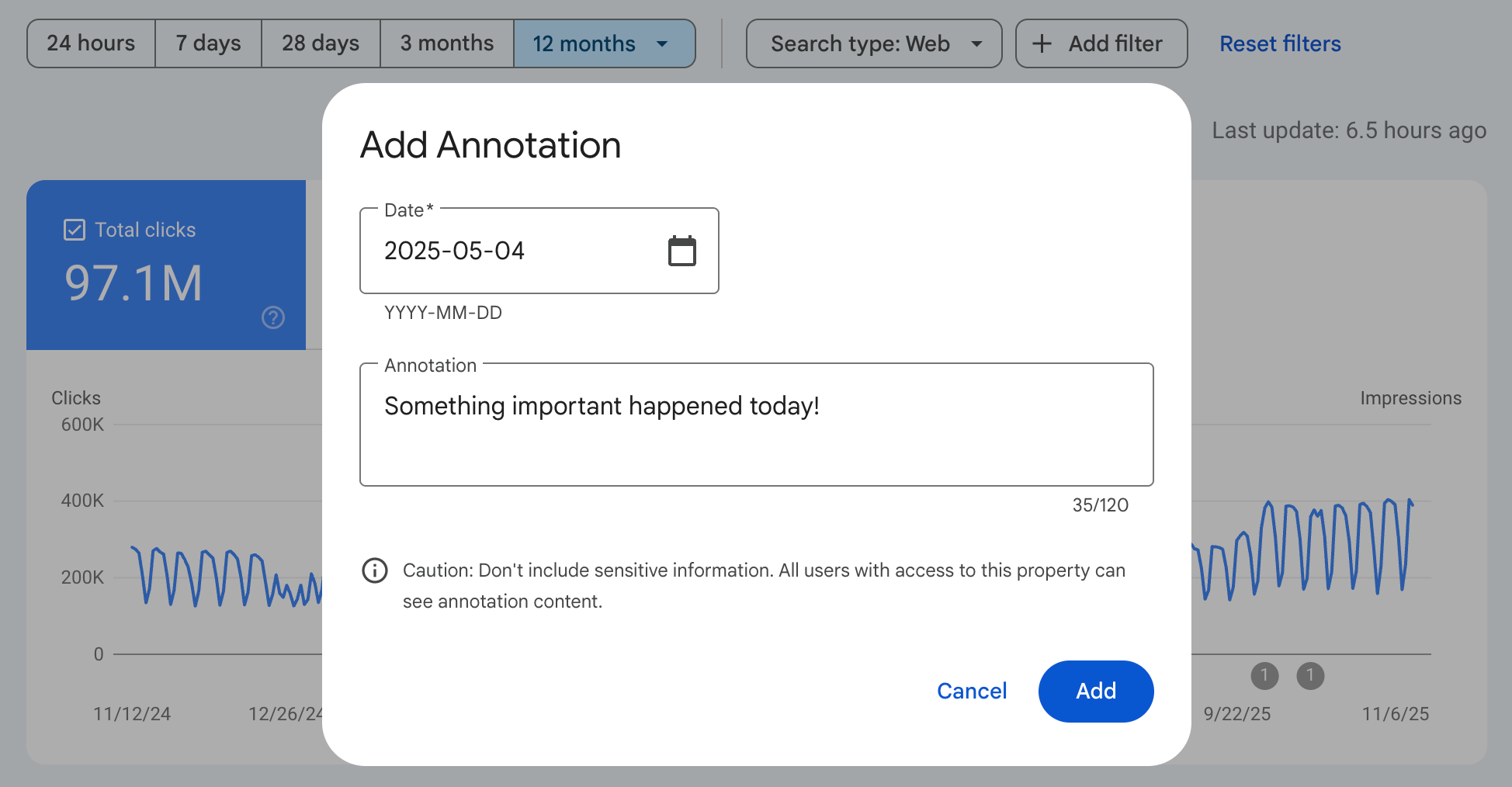
Google explains that these annotations are intended to capture moments such as technical updates, SEO improvements, content strategy changes, seasonal shifts, or external events that influence performance.
This is more than a cosmetic upgrade. Until now, Search Console did not offer any built-in way to track what actions corresponded to traffic movements.
Teams had to use manual documentation tools, spreadsheets, or workflow managers to maintain a timeline of changes. Now, this timeline can live inside the performance interface where the data actually sits.
What Are the Most Common Use Cases for Annotations?
Google highlighted several scenarios where annotations can be especially helpful. Let’s explore them in a grounded, real-world context.
1. Infrastructure and Technical Changes
When a site undergoes a server migration, CDN switch, major CMS update, or configuration tweak, traffic can fluctuate unexpectedly. Annotations let you tag the exact date of the change so you can later review whether traffic improvements or issues align with those updates.
2. SEO Implementation Work
If you roll out structured data, update metadata at scale, fix indexing issues, or publish significant technical SEO enhancements, marking these dates can help you confirm whether the effort produced meaningful changes in impressions, clicks, or visibility.
3. Content Strategy Shifts
Launching new topic clusters, rewriting large volumes of content, or removing thin pages often influences search performance. An annotation helps you tie those editorial decisions directly to chart data.
4. Business or External Events
Seasonal moments such as Black Friday, holiday periods SEO, industry events, product launches, or unexpected disruptions like weather or supply issues can affect search behavior. Tracking these moments provides richer context for unexplained traffic patterns.
These examples reflect how annotations function not as extra noise, but as a practical change log embedded directly into your primary performance analytics environment.
Why Does This New Feature Matter for SEOs and Teams?
For years, the lack of annotation capability in Search Console created an information gap. Teams who returned to review traffic months later often had difficulty remembering what caused spikes or declines.
They were forced to search through emails, project notes, Slack threads, or old tickets to reconstruct a timeline. The new feature eliminates that friction.
If you manage multiple properties or collaborate across departments, custom annotations create a shared historical record that everyone with Search Console access can use.
This makes it easier for new team members to understand the evolution of a site and allows agencies or consultants to communicate updates more transparently.
In short, annotations solve the problem of disconnected documentation. They finally bring the “what happened and when” narrative into the same place where the data lives.
How Do You Add Custom Annotations in Search Console?
Google has made the process simple and intuitive. To create one, you only need to:
- Right-click on any performance chart inside Search Console.
- Select “Add annotation.”

- Choose the specific date you want to mark.
- Enter your note, with a maximum of 120 characters.
Once saved, the annotation appears as a marker on the chart. Anyone with access to the Search Console property can click the marker to see the note.
Because annotations are shared across all users, Google recommends avoiding sensitive personal information or internal data that should remain confidential.
This unified visibility can significantly streamline communication for agencies, developers, and in-house teams managing large or evolving websites.
Will This Change How We Interpret SEO Data Long-Term?
The introduction of annotations may not seem revolutionary at first glance, but its impact could be substantial over time. Data without context often leads to misunderstandings or misinterpretation.
- A dip in traffic might look concerning until you realize it coincided with a large content cleanup.
- A sudden spike might appear promising until you remember it occurred during a seasonal event.
By integrating context directly into charts, Google enables users to interpret search data more intelligently and accurately.
The shift could also reduce the number of false conclusions drawn from short-term fluctuations, especially for large organizations where many individuals touch the same property.
Moreover, annotations can help teams establish a cleaner, more detailed historical record.
Months later, when someone reviews performance trends, they will not have to guess what happened, they can simply check the annotations. This alone can dramatically improve long-term strategy decisions.
Does This Feature Replace External Documentation Tools?
While annotations are incredibly useful, they are not intended to replace every external tracking system.
Many teams, especially enterprise AI SEO groups or agencies still require detailed documentation, testing logs, release notes, and developer change tracking.
However, leaving a high-level summary note in Search Console can bridge the gap between technical logs and performance analytics.
The feature acts more like a visible timeline of key events rather than a detailed archive. For many small and medium-sized websites, this may be all they need.
TL;DR – Key Takeaways
- Google Search Console now supports custom annotations inside performance charts.
- You can add notes to specific dates to track updates, releases, or external events.
- Annotations appear as markers on charts and are visible to all Search Console users for that property.
- They help teams connect traffic changes to real-world actions without relying on external documentation tools.
- You can add an annotation by right-clicking a chart, selecting “Add annotation,” picking a date, and adding text up to 120 characters.
- This update improves collaboration, historical tracking, and long-term analysis of SEO performance.

Dipti Arora
AuthorDipti Arora is a Senior Content Writer with over seven years of experience creating impactful content across Digital Marketing, SEO, technology, and business domains. She has a strong background in managing news verticals and delivering editorial excellence. Dipti has contributed to leading publications such as The Times of India and CEO News, where her research-driven storytelling and ability to simplify complex subjects have consistently stood out. She is passionate about crafting content that informs, engages, and drives meaningful results.
