Web development just got a whole lot easier. Google has launched an AI Assistance panel within Chrome DevTools, and it’s revolutionizing how developers debug, style, and code websites.
This AI-powered feature uses Google’s Gemini AI model to offer real-time insights, explanations, and even prototyped fixes, saving developers tons of time.
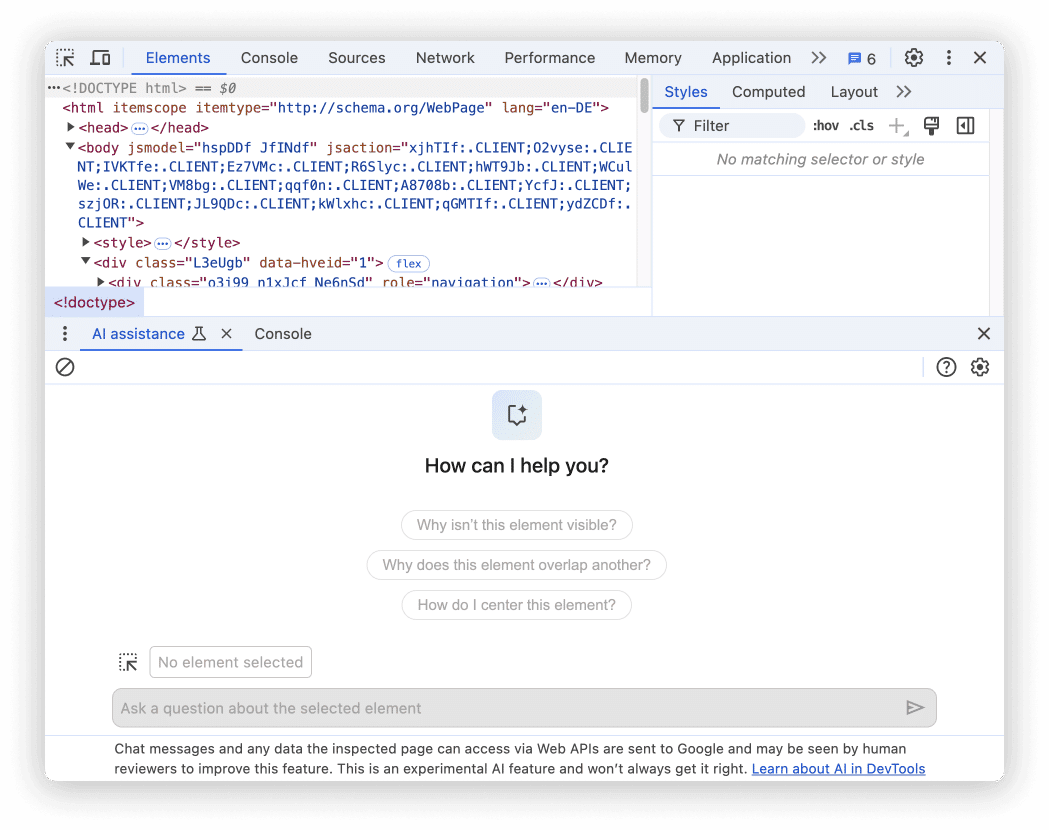
Let’s look into what this feature is all about, its potential impact, and what it means for the future of web development.
AI Assistance Comes to Chrome DevTools
If you’ve ever worked on web development, you know that debugging CSS or dealing with DOM (Document Object Model) structures can sometimes feel like pulling teeth. Styling issues, in particular, can be frustrating, especially for developers who don’t specialize in front-end development. Google has taken a bold step by integrating AI directly into Chrome DevTools to address these very issues.
This new feature allows developers to interact with an AI assistant—powered by Google’s advanced Gemini AI model—right within the Chrome environment.
The AI assistant doesn’t just throw out generic advice, it offers context-aware suggestions based on the specific webpage or issue you’re working on. Essentially, it’s like having a senior developer right by your side, offering personalized advice.
How It Works
The AI Assistance panel is now available in Chrome Canary 131 and later versions, currently as an experimental feature.
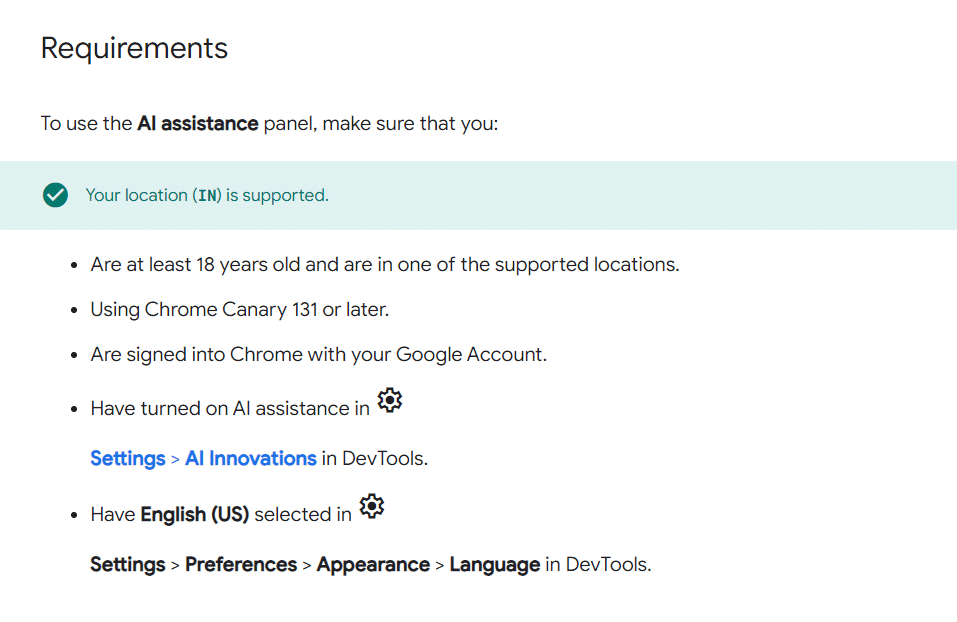
To access it, users need to turn on AI assistance under the DevTools settings and use the US-English language setting.
Once activated, the AI assistant becomes your personal guide, ready to help you with web page styling, debugging, and understanding how elements interact on the page.
In simple terms, you ask it questions—either from a set of pre-defined prompts or your own—and it gives you answers tailored to your webpage. These answers can be explanations, styling solutions, or even code snippets you can prototype in real time. But, like with all experimental tech, you might want to double-check the answers since large language models (LLMs) aren’t perfect yet.
AI To The Rescue: Solving CSS Mysteries and More
CSS debugging is notorious for being time-consuming, especially for back-end developers who may not have an in-depth understanding of the front-end.
The AI assistant tackles this problem head-on. Rather than spending hours manually adjusting margins, paddings, and properties, you can simply ask the AI assistant why a specific element isn’t behaving as expected or how different elements interact with one another.
The AI can suggest fixes, which are immediately reflected in the Chrome DevTools “Changes” panel.
What makes this especially useful is the assistant’s ability to offer real-time feedback and fixes. This means you don’t need to worry about breaking your code. You can experiment with various solutions, knowing you have a safety net.
A Closer Look at What It Offers
Google didn’t just stop at debugging and styling; the AI assistant is packed with useful tools for developers.
You can learn the “why” behind different technical details on your page and follow up with deeper questions if the first answer doesn’t fully solve your problem. This conversation-based interaction is a game-changer for developers who prefer to explore issues in a hands-on, iterative way.
And it’s not just for styling issues. The assistant taps into the broader complexities of web development, helping developers understand how different elements in the DOM work together and providing insightful explanations.
One of the most exciting features is prototyping fixes in real time. You no longer need to jump between different environments or worry about breaking your code.
The AI provides suggestions, applies them in real time, and lets you see the results immediately. This interactive workflow means you can tweak your site with confidence, knowing the AI is there to help.
Why This Matters: The Big Impact
So, why is this AI assistant such a big deal for developers? First off, it saves an enormous amount of time.
Debugging CSS or figuring out why an element isn’t aligning properly can eat up hours of work. With the AI assistant, many of these tasks are simplified. You just ask a question, get an answer, and often a fix. It’s like cutting out the trial-and-error phase entirely.
But beyond time savings, this assistant can also empower newer developers. For those who aren’t experts in front-end work, it can be intimidating to troubleshoot complex styling or interaction issues.
Having an AI guide makes the learning curve a little less steep, offering insights that would otherwise take years of experience to fully grasp.
Furthermore, this tool boosts developer productivity. More experienced developers may find themselves moving faster and spending less time on repetitive tasks, allowing them to focus on more high-level decision-making or innovative projects. As AI continues to evolve, the potential productivity boost will only increase.
From Console Insights to AI Assistance
This AI Assistance panel didn’t come out of nowhere. It’s part of a broader AI push by Google, starting with Console Insights.
The Console Insights tool, also powered by Gemini, was a first attempt at integrating AI into DevTools, providing high-level insights into the performance and errors on a web page.
Building on the success of Console Insights, the team has expanded the role of AI within DevTools to help tackle one of the most complex aspects of web development: CSS and DOM debugging. And the AI Assistance panel does just that, offering a deeper and more interactive experience than its predecessor.
Looking Ahead: What’s Next?
As exciting as the AI Assistance panel is, Google is clear that this is still very much an experimental feature. Developers using Chrome Canary have the first crack at it, and their feedback will help shape the future of this tool.
Google is actively working to improve the accuracy of the AI’s responses, but as with all LLMs, there are potential pitfalls. The model might suggest non-existent CSS properties or offer answers that sound plausible but are ultimately wrong.
Despite these limitations, this marks a new era of web development, where AI can assist developers in ways previously thought impossible.
Over time, we can expect even more features, such as deeper AI integration into other aspects of DevTools or even more sophisticated AI suggestions that account for entire project architectures rather than single-page issues.
Practical Tips for Developers
Since the AI Assistance panel is still in its experimental phase, navigating it effectively will require a few adjustments to your usual workflow. Here’s a how to set it up, use it efficiently, and maximize its potential, all while keeping in mind some key considerations about accuracy and privacy.
Get Canary: To try this new feature, you’ll need the latest version of Chrome Canary. It’s not yet available in stable releases.
Check Settings: Make sure you have AI assistance turned on in DevTools settings, and ensure that your language is set to US English.
Use It Wisely: While the AI assistant is incredibly helpful, it’s still an experimental feature. Always double-check the fixes or suggestions it provides, especially before applying them to live projects.
Feedback is Key: Since the feature is still experimental, your feedback can directly influence its development. If you notice bugs or misleading answers, report them!
Don’t Forget Privacy: Be mindful of the kind of data you’re feeding into the AI. Google collects and stores this data to improve the product, so avoid sharing sensitive information(AI assistance panel).
Key Takeaways
- AI Assistance in Chrome DevTools saves time by providing real-time insights and CSS debugging solutions.
- Developers can experiment with code safely, using AI to prototype fixes in real-time without breaking their code.
- Google’s Gemini AI offers context-aware advice, making it feel like a senior developer is assisting you.
- This is an experimental feature and available only in Chrome Canary for now, but it’s poised to evolve.
- User feedback is crucial in shaping the future of this tool, helping Google fine-tune its capabilities.

Dileep Thekkethil
AuthorDileep Thekkethil is the Director of Marketing at Stan Ventures, where he applies over 15 years of SEO and digital marketing expertise to drive growth and authority. A former journalist with six years of experience, he combines strategic storytelling with technical know-how to help brands navigate the shift toward AI-driven search and generative engines. Dileep is a strong advocate for Google’s EEAT standards, regularly sharing real-world use cases and scenarios to demystify complex marketing trends. He is an avid gardener of tropical fruits, a motor enthusiast, and a dedicated caretaker of his pair of cockatiels.
