
If your website relies on JavaScript, you may be unknowingly damaging your search rankings. Google’s Martin Splitt has identified several common JavaScript SEO mistakes that prevent Googlebot from properly indexing pages, leading to ranking losses, wasted crawl budgets, and even disappearing content.
With JavaScript playing an integral role in modern web development, website owners, marketers, and developers must understand these pitfalls to maintain search visibility.

What Googlebot Really Sees
Many SEO professionals still believe that Google indexes a webpage based on its original source HTML. That assumption is wrong.
Speaking at the SEO for Paws Conference, Splitt stressed that Google doesn’t analyze the raw source code—it processes the rendered HTML, the final version of a page after JavaScript has executed.
“A lot of people are still looking at view source. That is not what we use for indexing. We use the rendered HTML,” he revealed.
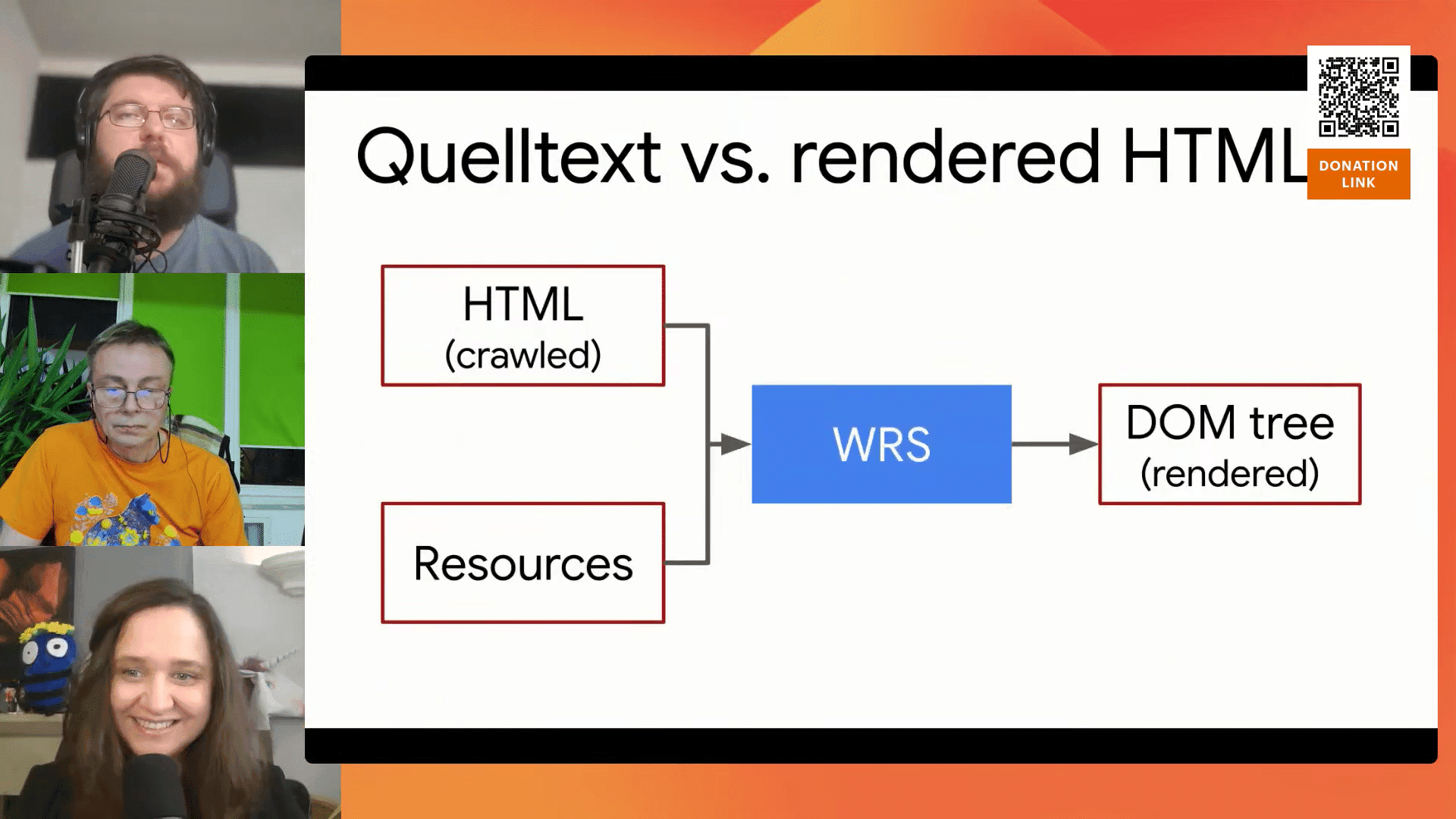
If JavaScript alters or removes key content before Google indexes the page, your rankings could take a hit.
JavaScript Processing Delays Could Harm Rankings
Google doesn’t process JavaScript instantly. Instead, it first indexes what it can from the initial HTML response. Then, JavaScript-rendered content enters a separate render queue, which can introduce indexing delays.
“You might see pages that are indexed, but missing key content. That’s because JavaScript rendering takes extra time,” Splitt explained.
For SEO-critical elements, relying solely on JavaScript rendering could mean they don’t appear in search results for days or weeks. To prevent this, developers should implement server-side rendering (SSR) or hybrid rendering to ensure important content is immediately available.
Error Pages That Trick Google
A little-known but damaging mistake involves JavaScript-heavy websites serving error pages that wrongly return a 200 OK status instead of the correct 404 response.
Well, why does this happen? In single-page applications (SPAs), the server often sends a 200 response before JavaScript checks if the requested page actually exists. As a result, error pages appear valid to Googlebot—and they get indexed like regular pages.
Splitt warns that, “Instead of responding with 404, it just responds with 200 … always showing a page based on the JavaScript execution.”
When Google indexes non-existent pages, it dilutes your website’s authority and clogs search results with irrelevant content.
So, what’s the best solution? Make sure your server is set up to provide 404 responses properly when pages aren’t found, even if JavaScript is involved.
Geolocation Walls: The Silent SEO Killer
Many websites request geolocation access to tailor user experiences. However, Googlebot always declines these requests, which means that if a webpage’s content depends on geolocation, Google may see nothing at all.
Splitt says that, “Googlebot does not say yes on that popup. It says no on all these requests.”

If your page requires location access but lacks a backup plan, it could appear completely blank to search engines, leading to major indexing failures.
To avoid this, always provide an alternative version of content that doesn’t rely on user permissions.
Lazy Loading Can Hide Important Content from Search Engines
Lazy loading improves page speed by delaying image and content loading until a user scrolls. However, if improperly implemented, this can prevent Google from seeing crucial page elements.
To prevent this issue:
- Use native lazy loading (loading=’lazy’) where possible.
- Ensure that important content loads within the initial viewport.
- Implement server-side rendering for critical elements.
Diagnosing JavaScript SEO Problems Like a Pro
Fixing JavaScript SEO mistakes isn’t guesswork—it requires a methodical approach. Splitt outlined key strategies to uncover and resolve these issues:
Use Google Search Console’s URL Inspection Tool: This shows the rendered HTML Googlebot sees, which may differ from your source code.
Verify HTTP Status Codes: If error pages return a 200 response instead of 404, adjust your server settings immediately.
Analyze JavaScript Behavior with Developer Tools: Browser dev tools reveal which scripts are injecting or modifying content.
Ensure Content Is Always Visible: Avoid requiring clicks, scrolls, or permissions for critical content—Googlebot won’t interact with them.
How to Stay Ahead in the SEO Game
Here’s what professionals must focus on to stay ahead:
Master the Difference Between Source and Rendered HTML: Know what Googlebot actually sees.
Use Advanced Debugging Tools: Search Console and browser developer tools are essential for modern SEO troubleshooting.
Work Closely with Developers: Align SEO strategies with web development best practices.
Stay Up-to-Date on Technical Trends: Client-side rendering, JavaScript frameworks, and AI-driven SEO are the future.
Key Takeaways
- Google does not index the raw source HTML but rather the rendered HTML, meaning any JavaScript modifications to content can directly impact search rankings.
- Websites using JavaScript incorrectly may serve error pages that return a 200 OK status instead of a proper 404 response.
- Googlebot automatically declines geolocation access requests, so websites relying solely on location-based content may appear blank in search results.
- Using tools like Google Search Console’s URL Inspection and browser developer tools is essential to diagnose and fix JavaScript SEO issues before they harm rankings.
- Following JavaScript SEO best practices is crucial to ensuring that JavaScript-powered websites remain discoverable and competitive in search results.

Dileep Thekkethil
AuthorDileep Thekkethil is the Director of Marketing at Stan Ventures, where he applies over 15 years of SEO and digital marketing expertise to drive growth and authority. A former journalist with six years of experience, he combines strategic storytelling with technical know-how to help brands navigate the shift toward AI-driven search and generative engines. Dileep is a strong advocate for Google’s EEAT standards, regularly sharing real-world use cases and scenarios to demystify complex marketing trends. He is an avid gardener of tropical fruits, a motor enthusiast, and a dedicated caretaker of his pair of cockatiels.
