
Thinking why is GA4 showing traffic from China, Singapore, or Lanzhou? This spike is caused by non-human bot traffic that currently bypasses GA4’s automatic bot filters. Google has confirmed the issue, noting that the traffic appears as “Direct,” shows no engagement, and originates from regions like China and Singapore — including cities such as Lanzhou. Until Google deploys a permanent fix, this traffic can distort reports and inflate session counts.
After weeks of growing concern from site owners, Google Product Experts have confirmed the issue, identified the cause and shared interim solutions while a long-term fix is being developed.
Let’s see what’s actually happening and why this issue has rattled so many marketers, publishers, and analysts.
What Exactly Is Happening With GA4 Traffic From China and Singapore?
The issue surfaced when WordPress site owners noticed a sudden flood of “Direct” traffic in GA4 dashboards, heavily concentrated in locations like Singapore, Lanzhou (China), and other unexpected cities.

For many, this traffic made up anywhere from 30% to 60% of total sessions almost overnight.
At first, it looked like a traffic windfall. But a closer inspection told a different story. Sessions showed:
- Extremely low engagement
- Only basic events like session_start and page_view
- No scrolling, clicks, or conversions
- Frequent (not set) values for landing pages and technical dimensions
That combination set off alarm bells. This was not user growth. It was bot traffic.
Is This Legitimate Traffic or Bot Activity?
Google has now confirmed what many suspected: this traffic is not legitimate.
According to Raúl Revuelta, a Google Analytics Gold Product Expert, the spikes are caused by a new, targeted form of non-human traffic that is currently bypassing GA4’s standard bot filtering systems.
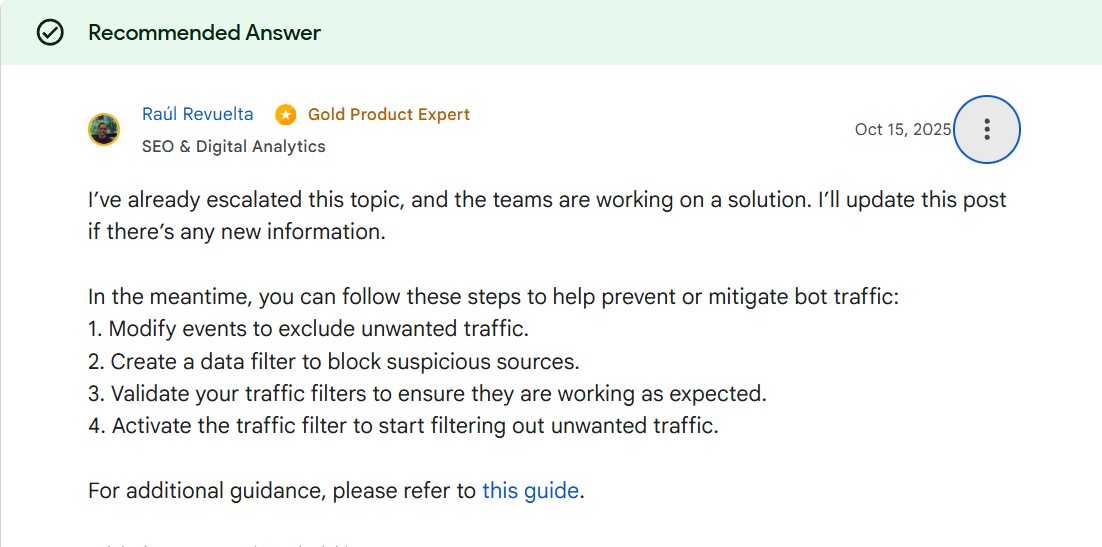
“This is inauthentic, non-human traffic,” Revuelta explained, adding that while self-identifying bots are already filtered, this newer pattern does not yet trigger automatic exclusions.
Why Is This Traffic So Damaging to GA4 Data?
The problem is not just inflated session counts. It’s data contamination.
This bot traffic:
- Skews engagement rate
- Lowers session duration averages
- Distorts geographic reporting
- Breaks conversion funnels
- Inflates GA360 billing in some cases
For publishers and ad-driven sites, it directly impacts RPMs and monetization decisions. For businesses, it undermines trust in performance reporting.
One site owner from Portugal reported traffic increasing by 15,000% in just three day, entirely from China and Singapore. Another saw traffic double overnight, with zero business relevance.
At that point, GA4 dashboards become noise instead of insight.
What Has Google Officially Said About the Issue?
Google has confirmed:
- The issue has been identified internally
- Teams are actively working on improved protection
- A long-term spam detection fix is in development
Revuelta stated that Google is aware the issue is skewing GA data and inflating costs, and that closing the gap is now a priority.
However, Google also admitted something important: GA4 cannot block every bot automatically.
That admission explains why site owners are being asked to intervene manually, for now.
What Is Google’s Recommended Workaround Right Now?
Google’s immediate recommendation is not to permanently filter traffic yet, but to use Segments inside Explore reports to view clean data.
Here’s the logic behind that approach: Segments allow analysts to exclude spam sessions without deleting data, ensuring legitimate traffic isn’t accidentally removed.
The suggested process is:
- Identify spam “fingerprints” (country + low engagement)
- Build exclusion segments (e.g., Singapore + session duration < 10 seconds)
- Apply those segments in Explore reports
- This provides immediate clarity but only in Explore.
And that is where frustration begins.
Why Are Site Owners Frustrated With GA4’s Limitations?
Multiple users, including the original poster, voiced strong dissatisfaction with GA4’s architecture.
The biggest complaints are:
- Standard reports cannot use segments
- Explore reports are limited to 14 months of data
- Year-over-year analysis becomes nearly impossible
- Teams must be retrained just to see clean data
One site owner summed it up bluntly: “GA4 really feels like a poorly thought-out, half-baked miss from Google.”
Universal Analytics allowed global filters and reusable segments. GA4 does not. And during incidents like this, that design choice hurts.
Can This Traffic Be Blocked at the Source?
Some site owners are taking more aggressive steps outside GA4, including:
- Blocking countries via hosting providers
- Using Cloudflare firewall rules
- Filtering traffic at the server or CDN level
These methods work but they come with risks. Blocking entire countries can exclude legitimate users, bots used for indexing, or future business opportunities.
Google’s guidance remains cautious: filter for analysis, don’t over-block unless necessary.
Is This Related to AI Bots or Scraping?
While Google hasn’t explicitly labeled the traffic as “AI bots,” several users speculated that it may be related to AI training or scraping activity, given the geographic patterns and behavior.
Google has not confirmed this theory. What is confirmed is that this traffic that it Is non-human, this is new in pattern, it is actively being addressed and until detection improves, site owners remain on the defensive.
Key Takeaways
- GA4 is seeing a surge of inauthentic bot traffic from China and Singapore.
- Google confirmed the traffic is non-human and bypassing standard filters.
- The bot activity causes low engagement and distorted analytics data.
- Google is working on a long-term spam detection fix.
- Temporary relief comes via Explore report segments, not standard reports.
- Site owners remain frustrated by GA4’s limited global filtering options.

Dipti Arora
AuthorDipti Arora is a Senior Content Writer with over seven years of experience creating impactful content across Digital Marketing, SEO, technology, and business domains. She has a strong background in managing news verticals and delivering editorial excellence. Dipti has contributed to leading publications such as The Times of India and CEO News, where her research-driven storytelling and ability to simplify complex subjects have consistently stood out. She is passionate about crafting content that informs, engages, and drives meaningful results.
