
In a new episode of Google’s Search Off the Record, CSS gets the spotlight but not for its design flair but for its potential impact on SEO.
Google’s John Mueller and Martin Splitt explored how elements like display: none, blocked CSS files and content visibility can influence how Google crawls and understands a page.
This is not about rankings or keywords but about the foundation of what is actually seen and indexed.
Let’s be honest: many of us never considered that styling choices could affect how search engines interpret our content. But when John mentions how CSS might cause important elements to be skipped over or misread, it starts to make sense.
So, does this mean every developer needs to rethink how they use CSS? Not exactly.
But it is a reminder that SEO is not just about content, metadata and backlinks. Sometimes, it is in the hidden layers.
CSS: Just Style or a Silent SEO Player?
We have heard for years that “HTML is for content. CSS is for style.” But Google now urges SEOs to look at CSS a bit more seriously.
While CSS class names or declarations like !important are not direct ranking factors, Mueller and Splitt emphasize something critical rendering.
If Google can not fully render your content due to bloated, inaccessible or incorrectly implemented CSS, you are not just losing style but losing visibility.
“Googlebot now renders pages almost like a modern browser,” says Splitt. “If something is hidden via CSS or not accessible in the DOM, we likely won’t index it.”
So here is the key message: CSS does not affect SEO directly but it can influence how Google sees your page and that is where things get interesting.
The Bloating Crisis: Are Your CSS Files Too Big?
According to HTTP Archive, the median CSS file size in 2022 was hovering around 68–72kB. That is a reasonable size.
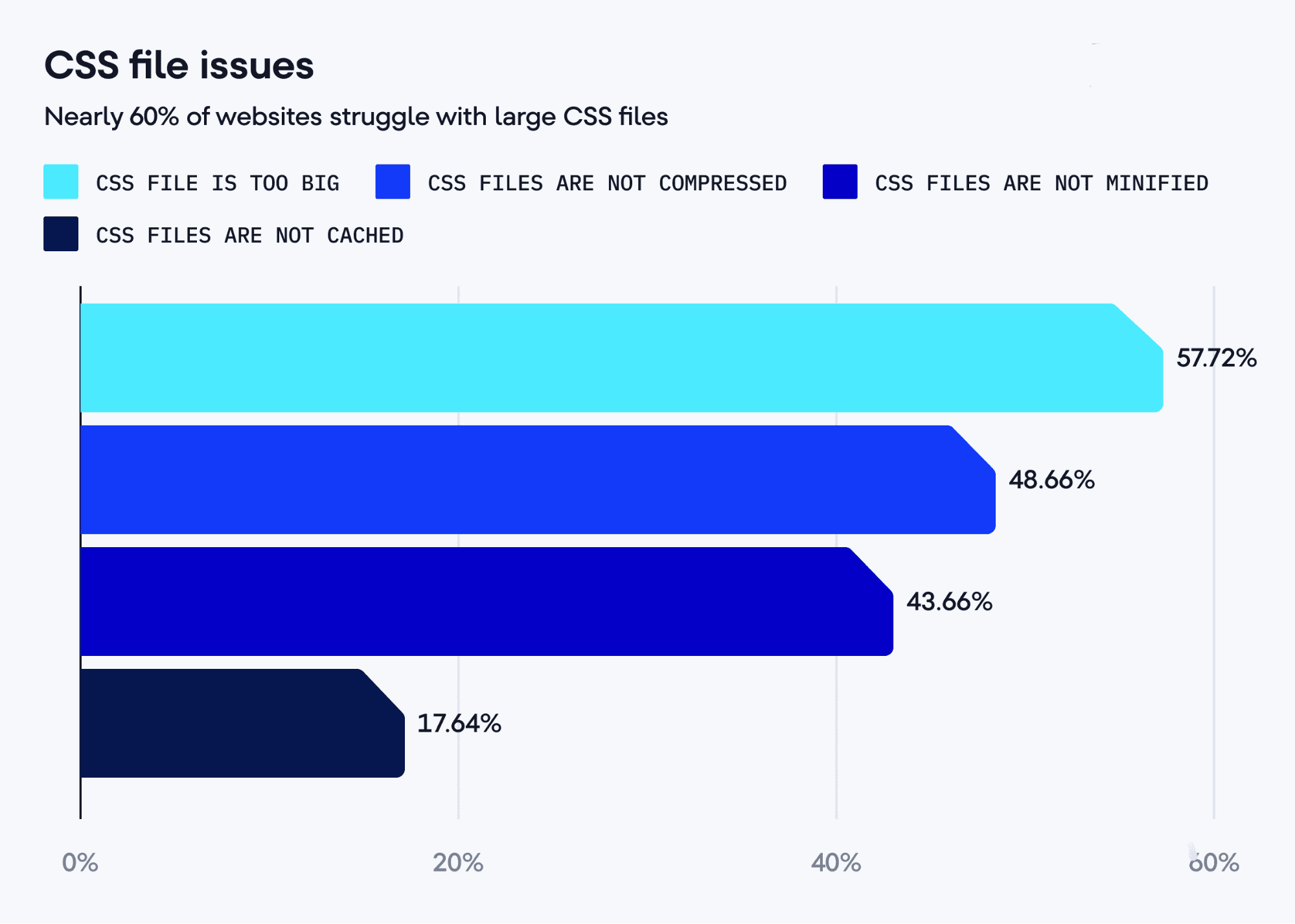
But frameworks and libraries? They can get massive. In one shocking example mentioned during the talk, a website was found serving a 78MB CSS file.
Yes, megabytes but not kilobytes. Think about that.
For a search engine crawler trying to render your page quickly and efficiently, that is a major burden. Not only does it delay full rendering but it also consumes more crawl resources.
And let us face it that most of that 78MB CSS probably is not even being used.
Here is one direct tip from Google: Use CSS splitting, critical CSS and purging unused styles to lighten the load.
Tools like PurgeCSS, and PostCSS can help you eliminate unnecessary bloat.
The Great Class Name Misconception
Ever wondered if naming your CSS class .best-seo-keyword could help your rankings?
Short answer: Definitely no.
John Mueller clarified: “Class names have no direct SEO impact. They are stripped during crawling and not considered as content.”
So, calling your button .buy-now-sale-discount-keyword may help your developer friends organize code but do not expect Google to treat that like page copy. It won’t.
What matters more is whether the content styled by that class is actually present in the HTML and visible.
What About !Important and Pseudo Elements?
Let’s address the two CSS quirks that often confuse SEOs: !important and pseudo-elements like ::before and ::after.
- !important simply forces a style rule to override others. While it may look “important,” it’s purely for CSS specificity. Google does not care about your specificity wars.
- But pseudo-elements? Now here is where things get SEO-relevant.
Content inserted with ::before or ::after is not part of the HTML DOM and Google won’t index it.
“If you are using ::before to insert a ‘#’ in front of a tag or important callout, stop,” says Splitt. “That text won’t be seen.”
So yes, adding a label like “NEW!” before a product name via CSS might be visually effective but if it matters contextually then it must live in the HTML.
Are Viewport Units (100vh) Problematic for SEO?
Modern web design loves using 100vh to fill the screen, especially on hero sections.
But as Google engineers pointed out, using full-height layouts without restraint can lead to rendering quirks, particularly in Google’s mobile preview tools.
That hero image might expand and push real content way down or worse, make it look like the page has no relevant text at all.
That is not an indexing issue per se but it might mess up Google’s perception of layout and UX, which does impact rankings indirectly.
So what is the fix? It is simple: you have to add a max-height or consider alternate units for better responsiveness.
The Hidden Content Debate — Alive and Well
It is wrong to pretend people are not still hiding content with CSS.
In the early SEO days, tricks like using white text on a white background were rampant. Today, display: none or visibility: hidden are the go-to.
While these tactics might not always be malicious, Google is still cautious.
“If something is hidden and never shown to users, Google might treat it as non-existent,” Mueller said.
The recommendation? If content is important, show it. Use accordions, tabs or lazy loading responsibly and just make sure it is accessible in the DOM and renders correctly.
Background Images vs. HTML <img> Tags: Not All Images Are Equal
Designers often lean into background images using background-image for visual flair. But Google does not index CSS background images.
If that image is important, say, a product photo or an infographic then it needs to be in an <img> or <picture> tag. Only then will it appear in image search and gain SEO value.
Background images? Purely decorative.
CSS for Tables? Proceed With Caution
Another great tip: Do not use CSS to simulate tabular data. For example, do not build this with
<div class=”row”> and flexbox:
Product | Price | Rating
——- | —– | ——
Widget | $10 | ★★★★☆
Use a proper <table>. Why?
- Google recognizes tabular HTML elements
- It helps screen readers parse structure
- It is semantically correct
And most important, never confuse structure with style. A screen reader or bot won’t know a “fake” table is supposed to be a table.
Key Takeaways
So, what is the verdict?
CSS won’t make or break your SEO directly but when it interferes with rendering, hides content, bloats load time or moves meaningful text outside of the DOM then you are setting yourself up for indexing issues.
SEO is now rendering, UX, accessibility and performance and CSS sits at the heart of all four. Let’s recap what Google wants:
- Keep CSS lean and crawlable
- Never hide important content
- Don’t insert meaningful words with pseudo-elements
- Use semantic HTML for content
- Treat images with intent — <img> for real content, CSS for design
- Test mobile rendering and layout quirks
As last Mueller put it:
“Think of CSS not as something separate from SEO but as a part of the whole experience. If users can’t see or interact with something, neither can Google.”

Dileep Thekkethil
AuthorDileep Thekkethil is the Director of Marketing at Stan Ventures, where he applies over 15 years of SEO and digital marketing expertise to drive growth and authority. A former journalist with six years of experience, he combines strategic storytelling with technical know-how to help brands navigate the shift toward AI-driven search and generative engines. Dileep is a strong advocate for Google’s EEAT standards, regularly sharing real-world use cases and scenarios to demystify complex marketing trends. He is an avid gardener of tropical fruits, a motor enthusiast, and a dedicated caretaker of his pair of cockatiels.
