Google has just announced something new that could quietly reshape how retailers build trust with customers online. The company rolled out a three-tier store widget program. It is a simple tool that merchants can embed on their websites to showcase credibility, reviews and store policies.
If you are wondering why this matters, think about the last time you shopped online. Did you hesitate before clicking “Buy Now”?
Did you scroll down to read reviews, or look for reassurance about return policies? That hesitation is exactly what Google is targeting. And let’s see how this new program fits into the bigger picture
What Exactly Is Google’s New Store Widget Program?
The store widget is Google’s way of helping retailers show credibility right where it matters on their own websites.
The program was previously limited to a single badge for select merchants. Now, it has expanded into three different versions, based on a store’s standing in Google Merchant Center.
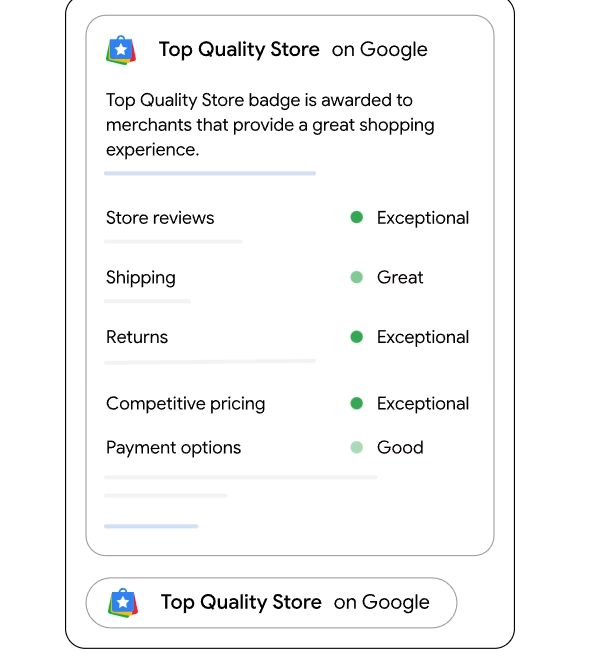
The first tier is the Top Quality Store widget, which is reserved for merchants recognized for excellence. This version puts front and center the store’s ratings, customer reviews and policies.
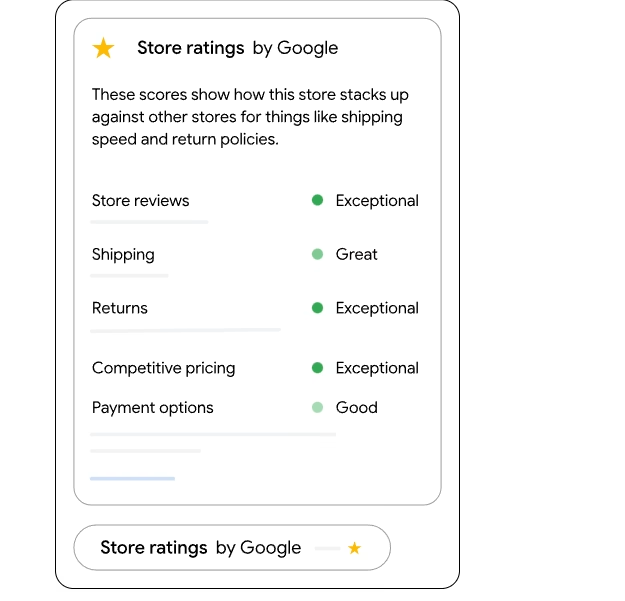
The second tier is the Store Rating widget, designed for merchants who do have ratings but have not yet achieved top-quality status. It still displays reviews and key details like shipping and returns.
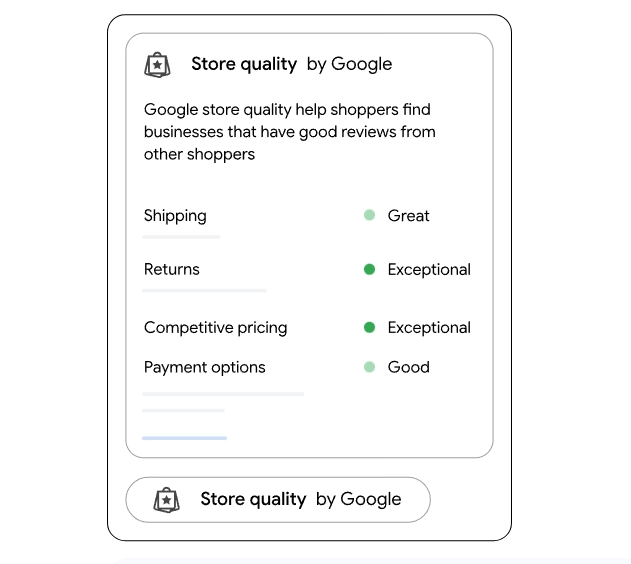
For businesses that are just starting out and don’t have any ratings yet, Google offers the Store Quality widget. This one highlights store policies, giving newer merchants a way to still reassure visitors.
The important takeaway? Every merchant, no matter their size or reputation level, now has access to a widget. Google has shifted from exclusivity to inclusivity, which ensures even smaller businesses can build trust with shoppers.
Why Did Google Introduce a Three-Tier Structure?
You might be wondering, why now and why three levels?
Google explains:
“When shoppers are online, knowing which store to buy from can be a tough decision. The new store widget powered by Google brings valuable information directly to a merchant’s website, which can turn shopper hesitation into sales.
It addresses two fundamental challenges ecommerce retailers face: boosting visibility and establishing legitimacy.”
In other words, Google wants to democratize trust signals.
Instead of reserving credibility badges only for top-rated merchants, the company is opening the door for everyone to display reassurance even if it is just policies like shipping and returns.
What Are the Benefits of Using the Store Widget?
Let’s see what value this widget actually brings to retailers. According to Google:
- Increased Conversions – Stores using the widget reportedly saw up to 8% higher sales within 90 days compared to similar businesses without it. That’s a huge lift in ecommerce terms.
- Enhanced Information for Shoppers – The widget shows not just ratings, but also return policies, shipping details and even live customer reviews.
- Seamless Integration – Merchants can embed it with a simple code snippet, much like adding analytics or a chat widget.
- Automatic Updates – The widget pulls real-time data from Google Merchant Center, meaning you don’t have to manually update ratings or reviews.
The bigger picture? Trust signals displayed directly on your checkout or product page can be the final nudge customers need to hit purchase.
How Do the Three Widget Types Work?
Let’s break down each tier.
- Top Quality Store Widget
- Reserved for merchants who qualify as “Top Quality Stores” by Google.
- Displays reviews, ratings, shipping and return policies, and a badge that signals excellence.
- Essentially, the VIP badge of ecommerce.
- Store Rating Widget
- For merchants who have ratings but haven’t reached “Top Quality” level.
- Displays customer reviews, key store policies, and ratings.
- A mid-level credibility booster.
- Store Quality Widget
- For merchants without ratings yet.
- Focuses on policies like shipping and returns.
- Acts as a stepping stone for newer businesses building their reputation.
The benefit of this system? The widget automatically updates as your store status changes. If you move from no ratings to having ratings, your widget evolves with you.
How Can Merchants Add the Store Widget?
Adding the widget is surprisingly simple. Google provides a small HTML/JavaScript snippet that merchants can paste into their website.
- The code can be placed in the <head> section of your website template.
- By default, it shows up at the bottom-right of the page (but you can move it to the bottom-left).
- It is mobile-friendly and automatically responsive.
- Customization options allow you to adjust margins and widget placement.
So technically speaking, setting it up is a 5–10 minute job, especially if you already have someone managing your website.
Where Should You Place the Widget for Maximum Impact?
Google recommends prioritizing product pages. This is the moment when a shopper is weighing whether to add an item to the cart and reassurance about ratings or policies can make the difference.
Checkout pages are also prime real estate, since cart abandonment remains a persistent issue across ecommerce.
Some retailers may also choose to display the widget on their homepage or landing pages, especially for first-time visitors. The guiding principle is simple: put it where hesitation is most likely to strike, so trust signals can smooth the path to purchase.
How Does This Update Compare to the Previous Store Badge?
Last year, Google introduced a single store badge that displayed only for select merchants. While it worked as a trust signal, it excluded many smaller retailers.

With this new three-tier system, even merchants without reviews yet can show a widget. That’s a big deal because it means early-stage businesses are not left out of the credibility game.
Essentially, Google went from an exclusive club to an inclusive ecosystem.
Why Does This Matter for Ecommerce Retailers?
This move matters because it aligns perfectly with current ecommerce challenges:
- Shoppers demand transparency. They want to know your return policy before they buy.
- Competition is fierce. With so many options, trust becomes the differentiator.
- Cart abandonment is real. According to Baymard Institute, nearly 70% of online carts are abandoned, often due to lack of trust at checkout.
By embedding Google’s trusted signals directly onto your site, you are essentially letting a neutral authority vouch for you.
Think about it—would you buy from a store with zero trust indicators, or one that carries a credibility badge backed by Google?
Google calls this just the beginning. The company says the widget is under active development, meaning more features and customization options are coming.

Dileep Thekkethil
AuthorDileep Thekkethil is the Director of Marketing at Stan Ventures, where he applies over 15 years of SEO and digital marketing expertise to drive growth and authority. A former journalist with six years of experience, he combines strategic storytelling with technical know-how to help brands navigate the shift toward AI-driven search and generative engines. Dileep is a strong advocate for Google’s EEAT standards, regularly sharing real-world use cases and scenarios to demystify complex marketing trends. He is an avid gardener of tropical fruits, a motor enthusiast, and a dedicated caretaker of his pair of cockatiels.
