
Google has rolled out Nano Banana Pro (Gemini 3 Pro Image), a model that dramatically elevates the standards for AI-powered image generation and editing.
Designed with advanced reasoning, real-world knowledge grounding, multilingual text capabilities and studio-quality controls, this release signals Google’s most significant leap in visual AI to date.
By blending creativity with factual intelligence, Nano Banana Pro empowers creators, educators, product designers and marketing teams to build accurate, high-quality visual content with unprecedented ease and confidence.
How Does Nano Banana Pro Improve Educational, Informational and Data-Driven Visuals?
One of the strongest capabilities showcased during the announcement was its ability to create context-rich infographics, diagrams and educational explainers.
Nano Banana Pro handles data from the real world, processes it with Gemini’s reasoning engine, and turns it into structured, appealing visuals.
For example, an infographic on the “String of Turtles” houseplant doesn’t just display decorative graphics. It includes origins, care guidelines, environmental requirements, and growth patterns, accurately represented and visually organized.
Similarly, when generating a recipe flow for elaichi chai, the steps reflect real preparation methods, not imagined approximations.
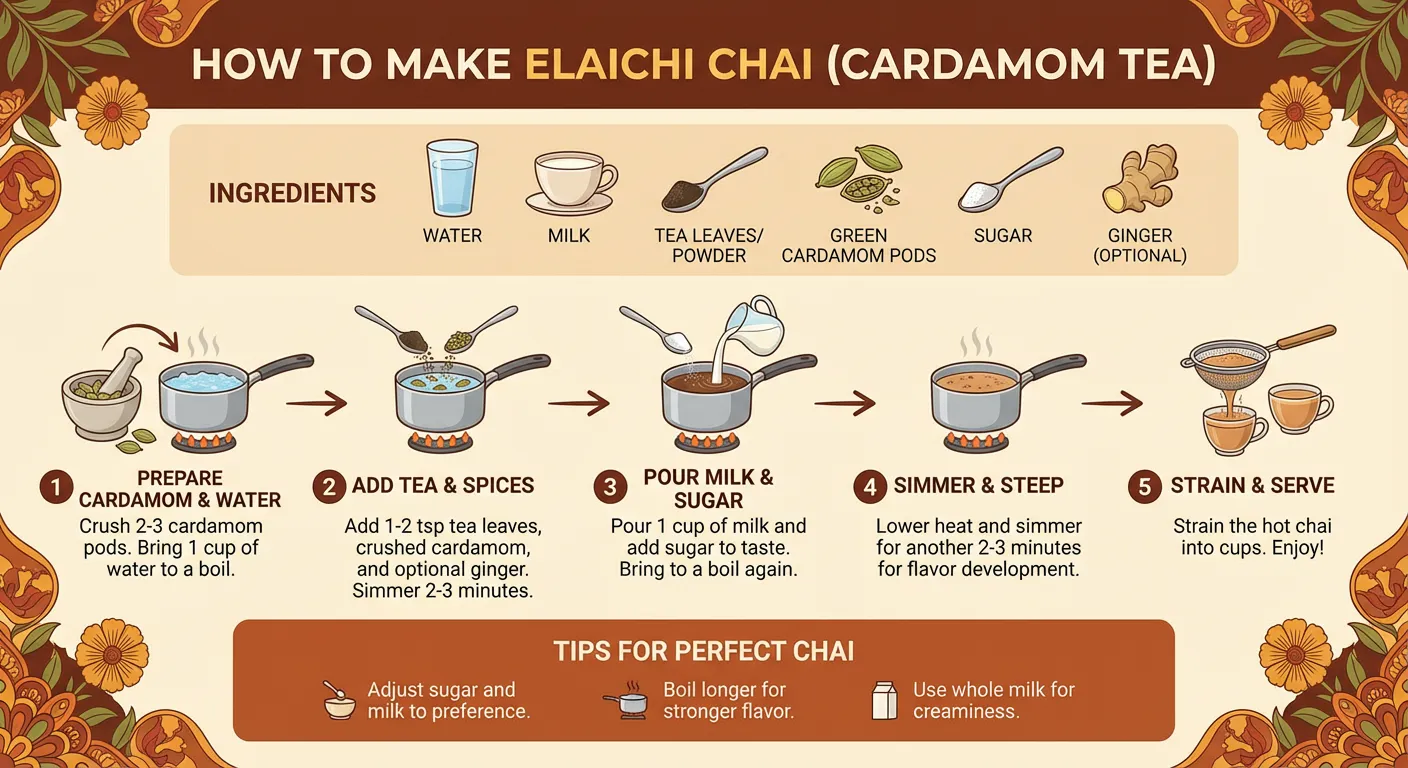
The model can also visualize real-time information such as live weather data, current sports results, or trending topics, giving creatives access to dynamic, up-to-date content that previously required manual research and design.
How Well Does the New Model Render Text Directly Inside Images?
This is one of the biggest breakthroughs.
AI image generators have long struggled with rendering clean, readable text.
Letters fused together, distorted fonts, or inaccurate spellings have been common issues.
Nano Banana Pro changes that significantly by delivering some of the clearest and most accurate text rendering available in any Google image model to date.
It can generate short taglines, long paragraphs, multi-line layouts, expressive typography, and even multilingual scripts such as Korean calligraphy, all directly inside the image.
This means:
- Posters look realistic
- Mockups carry production-ready text
- Logos gain expressive word-forms
- Translations remain accurate and visually consistent
For global brands or creators targeting multilingual audiences, this is a substantial upgrade, allowing seamless localization without compromising design quality.
How Does the Model Maintain Consistency Across Characters and Elements?
When working with multiple inputs especially human faces most AI models struggle with accuracy or consistency.
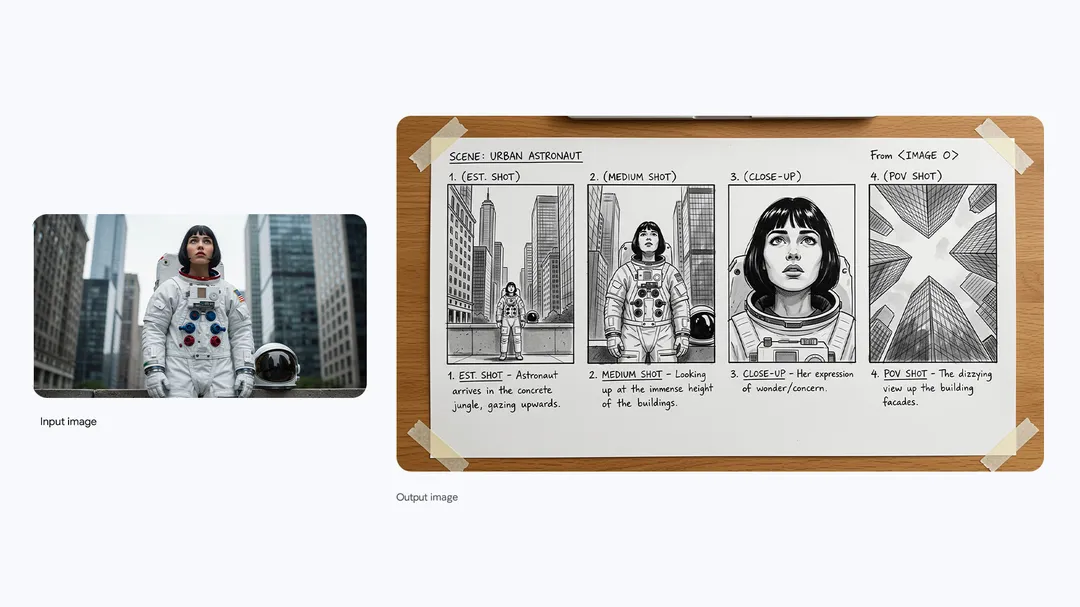
Nano Banana Pro directly addresses this limitation by allowing up to 14 images to be blended into a single composition while preserving the identity of up to five individuals.
This brings possibilities such as cinematic group scenes, editorial fashion spreads, storyboard sequences, product prototypes, or multi-character creative shots where everyone retains their original identity.
Even when the scene changes, lighting, background, angle the characters remain recognizable.
For creative professionals, filmmakers, advertisers, or storytellers, this is an invaluable addition that narrows the gap between AI-generated imagination and human-level consistency.
How Much Control Can Creators Exercise Over Lighting, Focus, and Style?
Nano Banana Pro introduces a suite of advanced creative controls that replicate real studio-level manipulation.
Users can adjust camera angles, transform lighting conditions (like shifting from day to night), apply color grading styles, refine depth-of-field, or isolate and edit specific regions of an image.
Need to change the spotlight intensity? Alter the mood? Sharpen the focus on flowers while softening the background? Transform a rough sketch into a polished mockup?
The model offers direct manipulations that previously required a mix of manual tools such as Photoshop, Lightroom, and 3D rendering software.
Creators can also export images in 2K or 4K resolution, choose multiple aspect ratios, and adapt scenes for platforms like social media, print materials, digital ads, or cinematic formats.
Where Is Nano Banana Pro Available and Who Can Use It?
Google is rolling out Nano Banana Pro across its ecosystem in a phased global deployment.
Professionals will experience the power of Nano Banana Pro within Google Ads, Google Slides and Google Vids, enabling more precise creatives, mockups, and ad variations.
Developers and enterprises will see the rollout through the Gemini API, Google AI Studio, Google Antigravity and Vertex AI, opening opportunities for large-scale creative automation and UX prototyping.
Meanwhile, filmmakers, creative directors, and marketers using Flow, Google’s AI filmmaking tool, will gain more cinematic control thanks to Nano Banana Pro’s advanced capabilities.
How Will Users Identify AI-Generated Images Created by Nano Banana Pro?
Transparency remains a key focus for Google. All Nano Banana Pro-generated media will carry SynthID, an imperceptible digital watermark that can be detected by verification tools.
Within the Gemini app, users can upload any image and simply ask whether it was created by Google AI.
For free-tier and Pro users, there will also be a visible watermark, the familiar Gemini sparkle.
However, recognizing that professional users need clean outputs, Google will remove visible markings for AI Ultra subscribers and for images generated inside Google AI Studio.
This dual-layered system aims to balance transparency with professional usability.
TL;DR – Key Takeaways
- Nano Banana Pro is Google’s most advanced image generation model, built on Gemini 3 Pro with enhanced reasoning and real-time knowledge grounding.
- It produces accurate, information-rich visuals, including infographics, diagrams, and real-time data-based graphics.
- The model significantly improves text rendering, offering clear, accurate, multilingual typography directly inside images.
- It maintains visual consistency for up to 14 input images and 5 individuals, ideal for group scenes, cinematic shots, and design prototypes.
- Offers powerful creative controls, lighting, camera angles, depth-of-field, color grading, and aspect ratio manipulation.
- Rolling out across Google’s ecosystem, including Gemini app, Google Ads, Slides, Vids, API, Vertex AI, and Flow.

Dipti Arora
AuthorDipti Arora is a Senior Content Writer with over seven years of experience creating impactful content across Digital Marketing, SEO, technology, and business domains. She has a strong background in managing news verticals and delivering editorial excellence. Dipti has contributed to leading publications such as The Times of India and CEO News, where her research-driven storytelling and ability to simplify complex subjects have consistently stood out. She is passionate about crafting content that informs, engages, and drives meaningful results.
