
Google has started rolling out a Gemini-powered update to Google Trends that helps users discover, compare, and understand search trends more easily through AI-driven suggestions and a refreshed visual design.
Google is updating Google Trends with built-in Gemini capabilities, marking a notable change in how people explore search data.
The new experience is rolling out gradually on desktop and is already visible to some users.
According to Google, the update is meant to help users find relevant search terms more easily and understand how related topics perform over time without relying on trial and error.
Gemini Brings Guided Exploration to Trends
The most significant addition is a new side panel on the Explorer page that includes a “Suggest search terms” button in the top-right corner.
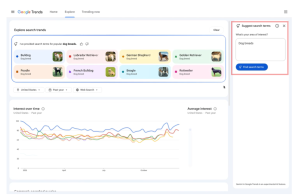
Instead of manually testing variations of a keyword, users can now enter a single term or even a full sentence describing what they want to explore.
Gemini analyzes that input and returns a set of related search terms that can be compared instantly. It also suggests follow-up prompts, helping users expand their research naturally.
This turns Google Trends into a more guided experience, especially for people who know the topic they want to study but are unsure which queries best capture it.
Rather than replacing user judgment, the tool helps narrow options and surface connections that might otherwise be overlooked.
A Cleaner Design That Makes Data Easier to Read
Google has paired the AI update with a visual refresh of the Explorer page.
Each search term now has its own icon and color, making it easier to track individual trend lines when several topics are compared at once.
The update also allows more search terms to be compared in a single view. In addition, Google has doubled the number of rising queries shown on each timeline.
This provides more context around why a topic is gaining traction and helps users spot early signals instead of reacting only after a trend peaks.
Overall, the new design focuses on clarity. Charts are easier to scan, comparisons feel less cluttered, and the data tells a more complete story at a glance.
Why This Change Is Important
Google Trends has long been a useful research tool, but it often worked best for users who already knew which queries to test.
Exploring a topic typically involved trying several variations before reaching a comparison that offered real insight.
The Gemini update reduces that friction by guiding users toward relevant comparisons more quickly, with less reliance on trial and error.
The impact varies by audience. Journalists can surface related angles while a story is still developing, rather than discovering them after interest has peaked.
Marketers and SEO teams gain earlier visibility into content ideas and seasonal signals. Researchers spend less time refining search inputs and more time interpreting patterns within the data.
The update also shows how Google is adding Gemini features to existing research tools, emphasizing guidance and clarity without changing how the underlying data is collected.
This helps explain why interest in AI SEO services is growing, as teams look for better ways to interpret AI-influenced search behavior while maintaining strong research fundamentals.
How to Get More Value From the New Explorer Page
Here are a few ways to make better use of the updated interface:
- Enter full questions or descriptive phrases instead of short keywords to receive broader and more contextual search term suggestions.
- Compare Gemini-recommended terms side by side to spot differences in timing, interest levels, or regional behavior that may not be obvious at first glance.
- Review the expanded list of rising queries to understand what is driving sudden spikes and to identify emerging topics earlier.
- Revisit familiar subjects using the new interface, as the added context and suggestions can surface related queries that were previously easy to miss.
Gradual Rollout Still Underway
Google says the Gemini-powered Explorer page is rolling out gradually, which means some users will see the update before others.
The changes are currently limited to desktop, and the company has not shared details about when broader access or mobile support may arrive.
The update adds new discovery features to Google Trends without changing how the underlying data works, focusing on how users explore and compare information rather than introducing new metrics.
Key Takeaways
- Google has added Gemini-powered assistance to the Google Trends Explorer page to help users discover and compare relevant search terms automatically.
- The new “Suggest search terms” feature allows users to enter full questions or keywords and receive AI-generated query suggestions tied to real Trends data.
- A redesigned Explorer interface introduces clearer visual tracking through dedicated colors and icons for each search term.
- Google has expanded comparison limits and doubled the number of rising queries shown, giving users more context around why topics gain attention.
- The update is rolling out gradually on desktop, signaling Google’s continued effort to embed Gemini into research and discovery tools rather than changing how Trends data is collected.

Zulekha
AuthorZulekha is an emerging leader in the content marketing industry from India. She began her career in 2019 as a freelancer and, with over five years of experience, has made a significant impact in content writing. Recognized for her innovative approaches, deep knowledge of SEO, and exceptional storytelling skills, she continues to set new standards in the field. Her keen interest in news and current events, which started during an internship with The New Indian Express, further enriches her content. As an author and continuous learner, she has transformed numerous websites and digital marketing companies with customized content writing and marketing strategies.
