Google has updated its Read Aloud documentation, clarifying where the feature runs and how it handles web content. The company says the service uses AI to interpret pages for audio playback, but does not store any of that data for model training.
Google has updated its developer documentation for the Read Aloud feature, a text-to-speech tool that turns written web content into spoken audio, offering long-awaited clarity for website owners, developers, and accessibility advocates.
The change outlines where the Read Aloud user agent appears, how it interacts with pages, and what happens to the data it processes.
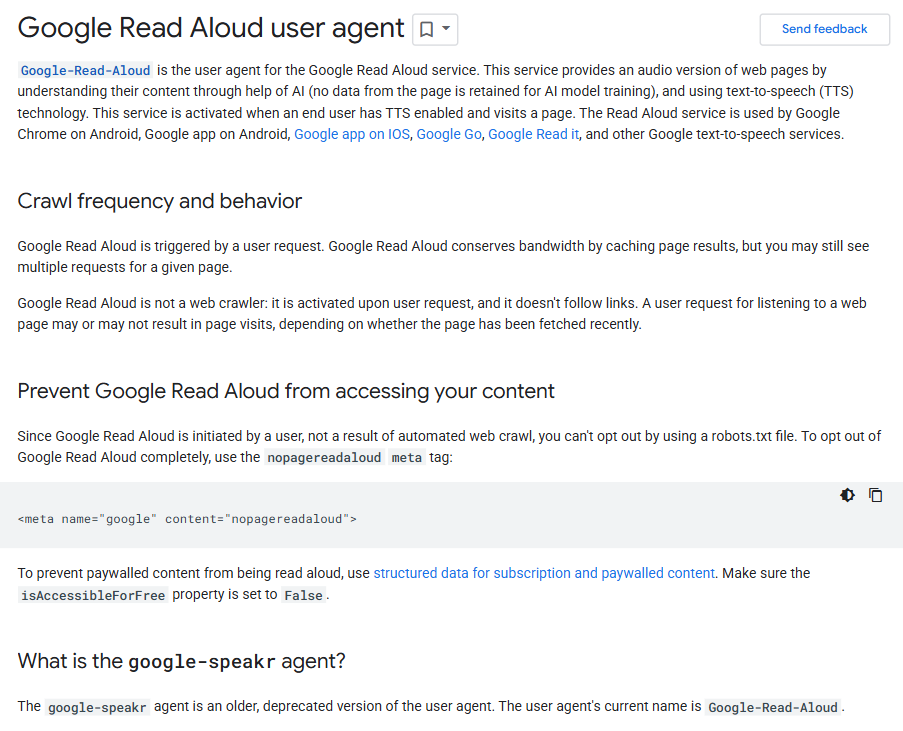
According to the new entry in Google’s Search Central documentation, the Read Aloud user agent is used in several products, including Chrome on Android, the Google app on both Android and iOS, Google Go, and Google Read It, along with other text-to-speech services.
The document also confirms that when a user activates Read Aloud, Google’s systems use artificial intelligence to “understand” the content of the page in order to generate the audio, but the data “is not retained for AI model training.”
Why This Update Matters
Developers have been seeing the “Google-Read-Aloud” label in their site logs for months without a clear idea of what triggered it. Until now, documentation offered few details on which apps triggered it or how it behaved.
The new update changes that, providing a direct explanation that could prevent unnecessary blocking or mislabeling of traffic.
The Read Aloud feature is user-driven, meaning it only fetches a page when someone actively chooses to have it read aloud.
Unlike automated crawlers such as Googlebot, this agent isn’t continuously scanning the web. Instead, it requests the content in real time so that text-to-speech can process it for playback.
Still, that distinction matters for webmasters managing access. Because Read Aloud acts on behalf of a user rather than an automated crawl, it doesn’t necessarily obey the same rules as standard bots when it comes to robots.txt exclusions.
To address this, Google has introduced a “nopagereadaloud” meta tag, which allows publishers to opt out of the feature altogether if they prefer not to have their pages fetched for audio.
Keeping It Transparent
Transparency has been an ongoing issue for web publishers as more services rely on automated access to deliver features. From AI summarizers to voice assistants, website owners are increasingly seeking insights into what’s using their content and how.
Google’s update seems to acknowledge that concern.
By specifying where the Read Aloud user agent operates and emphasizing that it doesn’t store page content, the company is offering a measure of reassurance, or at least traceability.
It also brings some technical consistency by aligning the Read Aloud user agent with current browser versions, reducing the risk that sites will mistakenly block requests based on outdated agent strings.
What Website Owners Should Do
If you manage a website and you’ve noticed the “Google-Read-Aloud” user agent in your logs, here are a few steps worth taking:
- Check your analytics to see how often Read Aloud is accessing your site.
- Update filters and firewalls to recognize the revised user agent, ensuring legitimate user requests aren’t blocked.
- Add the “nopagereadaloud” meta tag to any pages you don’t want to be fetched for audio.
- Test your site with Read Aloud to confirm it reads cleanly — especially if accessibility is part of your audience focus.
- Monitor Google’s developer updates regularly, as the company continues to adjust user agent behavior for new apps and devices.
The Bottom Line
This change might look small, but it shows Google paying attention. People want to know when their content is being used and why. A simple explanation like this goes a long way in rebuilding trust, something the tech industry could use more of right now.
Key Takeaways
- Google listed all apps and services that use the Read Aloud user agent, including Chrome on Android and the Google app on iOS and Android.
- The company clarified that Read Aloud uses AI to generate spoken content but does not retain any data for AI model training.
- Publishers can now block the service using the “nopagereadaloud” meta tag.
- The update aligns user agent strings with newer browsers for better compatibility.
- The move signals Google’s growing effort to clarify how its AI-powered features interact with web content.

Zulekha
AuthorZulekha is an emerging leader in the content marketing industry from India. She began her career in 2019 as a freelancer and, with over five years of experience, has made a significant impact in content writing. Recognized for her innovative approaches, deep knowledge of SEO, and exceptional storytelling skills, she continues to set new standards in the field. Her keen interest in news and current events, which started during an internship with The New Indian Express, further enriches her content. As an author and continuous learner, she has transformed numerous websites and digital marketing companies with customized content writing and marketing strategies.
