Google has officially introduced a new user agent called Google-Pinpoint. It allows servers to clearly identify when someone using Google’s Pinpoint tool fetches a specific URL for research. This update brings more transparency to how Pinpoint interacts with public websites.
Google has added Google-Pinpoint to its list of user agents, confirming that the fetcher is used when a Pinpoint user supplies a URL for the tool to retrieve.
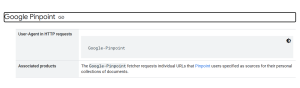
The addition appears in updated Google Search Central documentation and highlights Google’s effort to help website owners understand how the tool accesses content.
Pinpoint is widely used by journalists and academic researchers, so the update matters to newsrooms, developers, and anyone who monitors server activity.
Why Google Added a Pinpoint-Specific User Agent
Google maintains a list of fetchers that handle different types of requests. The company’s decision to list Google-Pinpoint gives site operators a simple way to spot when traffic is coming from a researcher using the tool rather than from Google’s standard crawlers.
This clarity matters. It helps web teams distinguish research activity from automated crawling, unusual spikes, or security concerns. It also helps reduce misunderstandings between researchers and site administrators who want to know why a tool is requesting specific pages.
What Pinpoint Actually Does
Pinpoint is part of Google’s Journalist Studio and is built to help reporters and researchers review large volumes of content.
Users can upload documents, audio, video, emails, PDFs, images, and handwritten notes. The tool then analyzes those materials, finds names and references, and makes the entire collection searchable.
Many investigative reporters rely on Pinpoint to find patterns across thousands of files.
Because users sometimes need to pull information directly from a live webpage, Google-Pinpoint steps in to fetch that URL on their behalf.
The documentation also reiterates that the tool is meant specifically for journalistic and academic work, with terms that reflect that responsibility.
What This Means for Site Owners and Developers
Server admins who review logs will now see Google-Pinpoint whenever the tool fetches a URL that a researcher supplied. This traffic is user-initiated. It is not part of Google’s indexing systems.
This distinction is helpful in several ways:
- It makes it easier to understand the purpose of unusual traffic.
- It prevents confusion with general crawling performed by Googlebot.
- It helps teams adjust monitoring or filtering rules without accidentally blocking legitimate research.
If your systems rely on allowlists or alerts based on user agents, you may want to add Google-Pinpoint so that these requests are recognized correctly.
Does This Affect Indexing or Search?
Google’s documentation treats Pinpoint differently from traditional crawlers.
A request made through Google-Pinpoint does not signal that Google intends to index the content. It simply reflects that a researcher asked the tool to fetch a page.
Anyone concerned about indexing behavior should continue referring to standard Googlebot guidance rather than treating Pinpoint activity as a ranking or crawling signal.
What Journalists Should Keep in Mind
If you use Pinpoint in a newsroom or university setting, create a habit of tracking which URLs you add to your collection.
If someone contacts you asking about the fetch, you will be able to explain clearly why the request was made and what it supported.
Documenting source material is common in investigative work, and the addition of the Google-Pinpoint user agent makes those conversations easier.
Helpful Tips for Teams
Here are a few pointers that teams can use to manage and understand Pinpoint-related traffic with less confusion.
- Review your server logs to identify where Pinpoint requests appear.
- Add the Google-Pinpoint label to monitoring tools to avoid mistaking research activity for suspicious traffic.
- Double-check robots.txt rules if you want to manage how automated tools access your site. Remember that Pinpoint requests reflect human intent.
- Encourage researchers to keep notes on any external links added to Pinpoint collections.
Key Takeaways
- Google now shows Pinpoint fetches through a clear user agent called Google-Pinpoint.
- Pinpoint supports journalists and researchers working with large document collections.
- These fetches come from user actions, not from automated crawling.
- Pinpoint activity has no automatic impact on indexing.
- Transparent logs help both site operators and researchers avoid confusion.

Zulekha
AuthorZulekha is an emerging leader in the content marketing industry from India. She began her career in 2019 as a freelancer and, with over five years of experience, has made a significant impact in content writing. Recognized for her innovative approaches, deep knowledge of SEO, and exceptional storytelling skills, she continues to set new standards in the field. Her keen interest in news and current events, which started during an internship with The New Indian Express, further enriches her content. As an author and continuous learner, she has transformed numerous websites and digital marketing companies with customized content writing and marketing strategies.
