
Google Search Advocate John Mueller has explained that when Search Console shows pages indexed without content or blank HTML renders, the issue is rarely related to JavaScript or on-page content. Instead, it usually points to server-level or CDN-level blocking that prevents Googlebot from receiving usable page content. Mueller warned that when this happens, pages may already be dropping out of Google’s index.

The clarification came during a discussion on Reddit, after a site owner reported a sudden ranking drop. According to the post, their homepage fell from position one to around position 15 shortly after Google Search Console began flagging the URL as indexed without content.
The site owner said the page had been indexing normally and that no recent changes had been made to the site. Despite appearing fine to users, Search Console showed that Google was rendering the page without any visible HTML content.
The Real Cause: Googlebot Is Being Blocked
Mueller pushed back on the assumption that this type of issue is caused by JavaScript rendering failures.
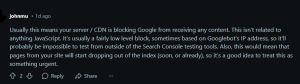
He explained that when Google indexes a page but shows no content, it usually means Googlebot successfully requested the URL and received a response, but that response contained no usable HTML.
According to Mueller, this is typically caused by low-level blocking at the server or CDN layer.
These blocks are often based on factors such as IP address, user agent, or bot detection rules. Because of that, the problem can be difficult to identify using standard testing methods.
What This Is Not
Mueller was clear about what does not usually cause this issue.
- It is not related to JavaScript rendering.
- It is not caused by meta tags or robots.txt rules.
- It usually cannot be reproduced in a normal browser or third-party crawler.
That mismatch is what makes the issue confusing. Everything can appear normal to users while Google is effectively seeing an empty page.
Common Triggers Behind Googlebot Blocking
While Mueller did not diagnose the specific configuration involved, the discussion reflects several known causes that often surface in real-world cases.
One common trigger is CDN bot protection. Services such as Cloudflare may flag Googlebot traffic, apply rate limits, or serve altered responses to bots.
Another source can be hosting-level security modules. Firewalls or security layers may block or sanitize responses for known crawlers.
IP-based blocking is also a frequent factor. Some setups restrict access from data center IPs or non-residential traffic, which includes Googlebot.
Edge caching issues can also play a role. Misconfigured caching rules may serve blank responses or strip HTML only for specific user agents.
Why You Can’t Reliably Test This Yourself
This aspect of the issue caused confusion in the Reddit thread.
The site owner reported running curl requests, checking JavaScript behavior, and using Google’s Rich Results Test. Desktop inspection tools returned errors, while mobile inspection worked.
Mueller explained that this behavior is expected. Because the block targets Googlebot specifically, most external tools will not surface the problem. Chrome, curl, and third-party crawlers may all show the page loading correctly.
In these cases, Google Search Console remains the most reliable signal. If URL Inspection shows blank renders, that reflects what Google is actually receiving.
Why This Is An SEO Emergency
Mueller warned that this issue rarely stays isolated.
Once Google repeatedly receives empty responses:
- Pages can lose trust
- Content may be treated as missing or thin
- URLs can begin dropping out of the index
- Internal links pointing to those pages weaken
- Crawl quality across the site can decline
Delaying a fix can allow a single technical issue to turn into wider visibility loss.
How To Fix It: Immediate Action Plan
Here are the immediate steps teams can take to diagnose server-level blocking and restore proper indexing.
Step 1: Whitelist Googlebot Properly
The first step is to ensure that Googlebot is explicitly allowed at the server and CDN level. This means whitelisting verified Googlebot IP ranges rather than relying only on user agent strings, which can be spoofed.
Google recommends validating Googlebot traffic using reverse DNS to confirm authenticity.
Once verified, those requests should receive the same response as a normal user without filtering or modification.
Step 2: Review CDN And WAF Logs
Next, site owners should review CDN and Web Application Firewall logs to see how Googlebot requests are handled.
These logs can reveal blocked, challenged, throttled, or altered responses that do not appear in browser-based tests.
Comparing responses served to Googlebot with those served to standard browsers often highlights empty responses, unexpected status codes, or modified payloads.
Step 3: Disable Bot Challenges For Google
The third step is to remove any security challenges applied to verified Googlebot traffic.
JavaScript challenges, CAPTCHA, and aggressive rate limiting are designed for human visitors and can prevent Google from retrieving content.
Bot management tools should be configured so that origin HTML is passed through cleanly, without injecting interstitials or stripping content.
Step 4: Retest In Search Console
Finally, changes should be validated in Google Search Console. Live URL Inspection should be used to confirm that rendered HTML is visible and complete. Screenshots and rendered code should be reviewed carefully.
Only after successful validation should reindexing be requested, as doing so too early can slow recovery.
Issues like server-level Googlebot blocking often require coordination across engineering, hosting, and search teams, which is why many sites turn to professional SEO services to audit crawl paths and prevent index loss.
The Bottom Line
When Google indexes a page without content, the issue is rarely visible on the surface and rarely related to what’s on the page. As John Mueller explained, this status almost always signals a server or CDN configuration that is blocking Googlebot. Left unresolved, it can quickly lead to lost rankings and shrinking index coverage.
Key Takeaways
- “Indexed without content” usually means Googlebot is blocked at the server or CDN level
- JavaScript and on-page content are rarely the cause
- External testing tools often fail to reveal the problem
- Search Console provides the most accurate signal of what Google sees
- Fast action can prevent pages from dropping out of the index

Zulekha
AuthorZulekha is an emerging leader in the content marketing industry from India. She began her career in 2019 as a freelancer and, with over five years of experience, has made a significant impact in content writing. Recognized for her innovative approaches, deep knowledge of SEO, and exceptional storytelling skills, she continues to set new standards in the field. Her keen interest in news and current events, which started during an internship with The New Indian Express, further enriches her content. As an author and continuous learner, she has transformed numerous websites and digital marketing companies with customized content writing and marketing strategies.
