Millions of websites compete for attention on Google, but some never make it into the search results. Why? Crawling errors. Martin Splitt from Google Search Central reveals the top three ways to identify and fix these errors that might be keeping your site out of Google’s index.
Here’s a deep dive into his advice, the implications for your website, and how to take action today.

The Root of the Problem: Why Crawling Matters
Crawling is the first step Google uses to index web pages and display them in search results. Without successful crawling, your content doesn’t even get a chance to compete in the ranking process.
What complicates the issue is that crawling errors can be invisible to the untrained eye. “Just because you can access a page in your browser doesn’t mean Googlebot can,” explains Splitt.
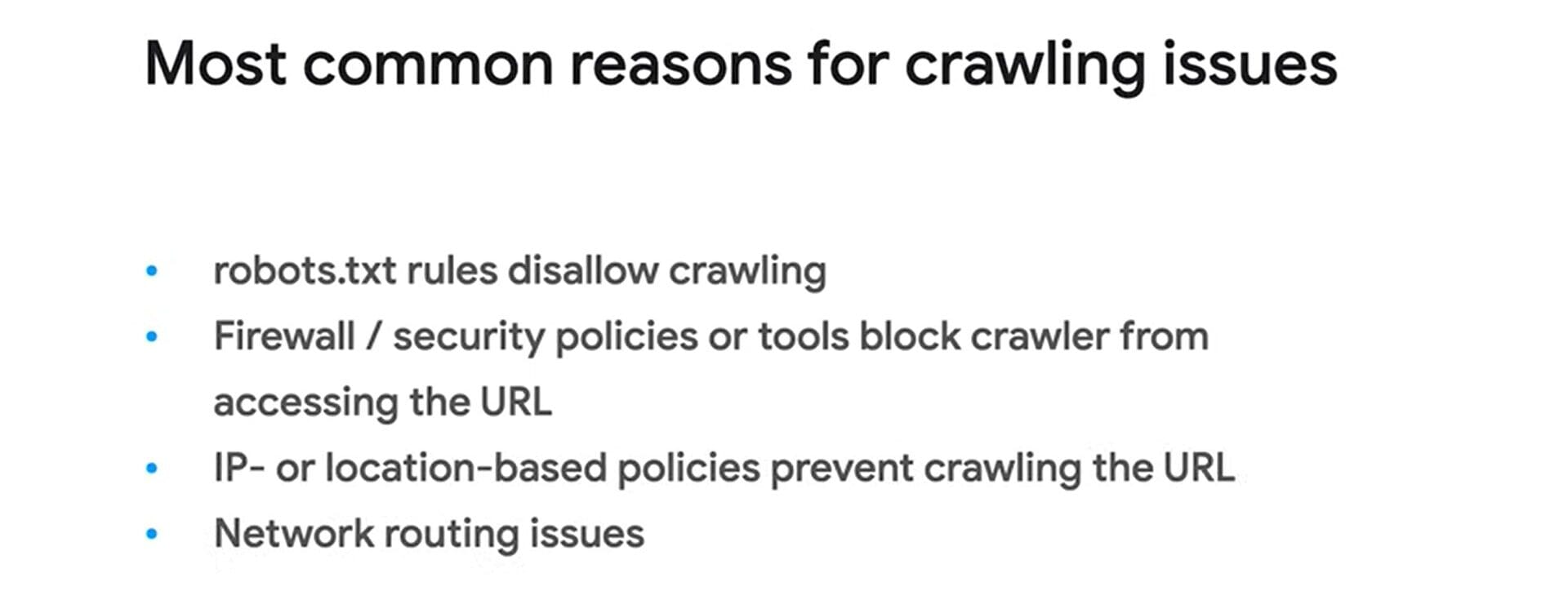
Key issues that block crawling include:
- Blocked URLs: Misconfigured robots.txt files or overly strict firewall settings can deny Googlebot access to certain pages.
- Server-side Errors: Repeated 500 status codes, DNS failures, and timeouts prevent bots from successfully crawling your site.
- Fake Googlebots: Scrapers posing as Googlebot can confuse your analysis and mask legitimate crawling issues.
Ignoring these problems can snowball into reduced visibility, delayed indexing, and lost opportunities to reach your target audience.
Three Tips to Solve Crawling Problems
Here are Martin Splitt’s top three tips to troubleshoot and resolve crawling errors, ensuring your website stays accessible to Googlebot and visible in search results.
1. Stop Guessing—Test with Google Tools

Splitt’s first recommendation is to use Google Search Console’s URL Inspection Tool. This tool checks if Googlebot can crawl and render your webpage properly.
He suggests looking at the rendered HTML of your page. If you find your content there, crawling isn’t the issue. Otherwise, you need to act fast.
2. Analyze Crawl Stats
The Crawl Stats Report in Google Search Console can reveal patterns in how your server responds to Googlebot. A high number of 500 errors, timeouts, or DNS issues are red flags.
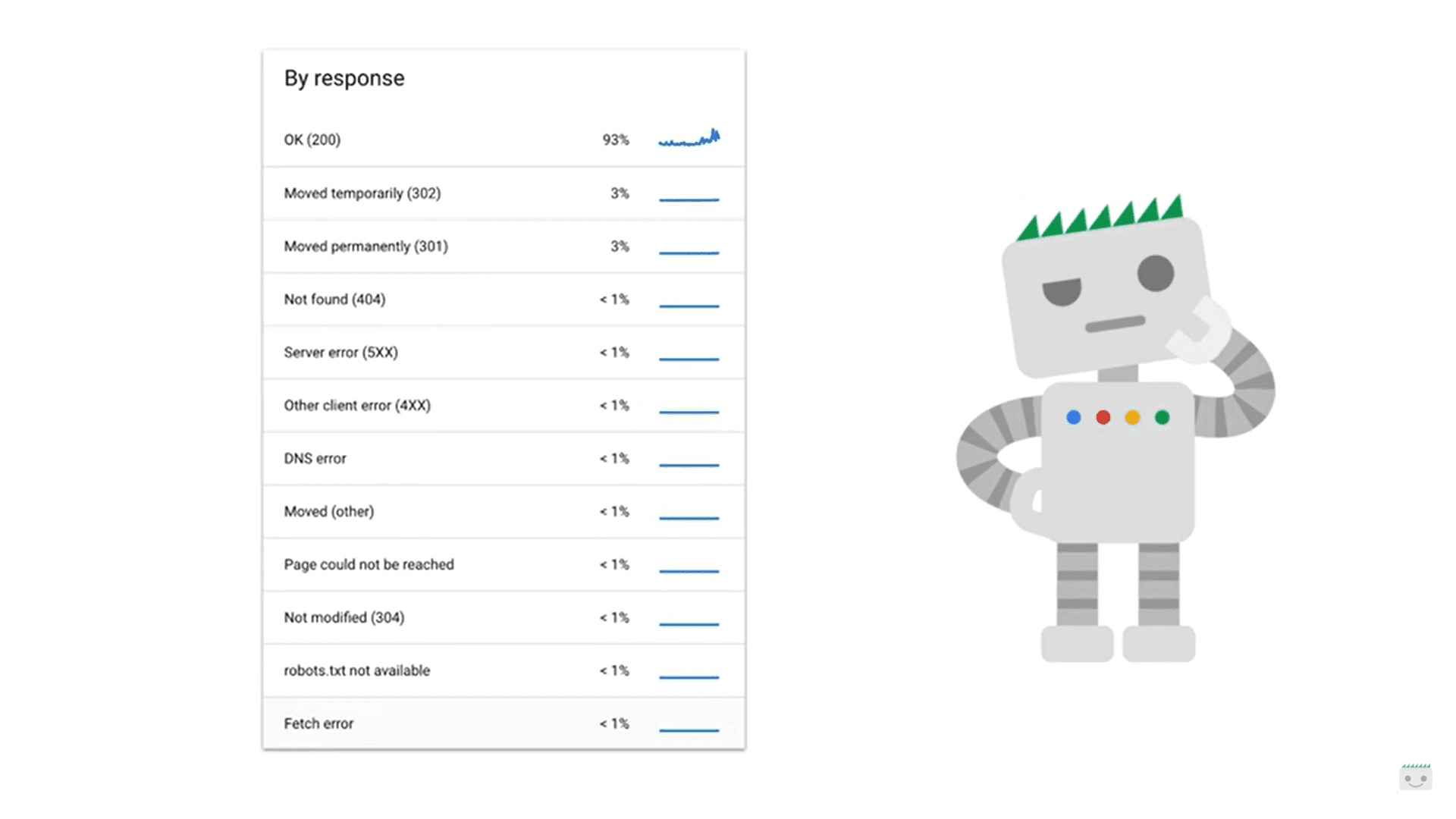
While occasional errors may resolve on their own, frequent or spiking errors need investigation. Splitt emphasizes that such errors, especially on large sites, can drastically slow down crawling and indexing.
3. Use Server Logs to Identify Hidden Problems

For advanced troubleshooting, Splitt advises checking your web server logs. These logs provide valuable details on how your server responds to requests. Be cautious of fake Googlebots—some scrapers pretend to be legitimate crawlers.
While analyzing server logs requires technical expertise, it can uncover critical problems like persistent errors or unusual request patterns.
Why Fixing Crawling Errors Is Critical
Crawling errors can have a domino effect on your website’s performance. If Googlebot can’t access your pages, they can’t be indexed—meaning they’ll never appear in search results.
For businesses relying on organic search traffic, this translates to:
- Lost Sales: E-commerce sites lose revenue when product pages don’t appear in search results.
- Missed Leads: Service-based businesses lose visibility, hurting their ability to attract new clients.
- Brand Impact: Being invisible on Google can harm credibility and competitiveness.
Why Crawling Errors Still Happen
Crawling has historically been overlooked because of its technical complexity. However, with tools like Search Console, diagnosing and fixing these issues has become more manageable. The rise of advanced bots and scrapers complicates matters, but vigilance and regular monitoring can prevent long-term problems.
Preparing for a Crawl-Friendly Future
Webmasters can future-proof their sites by:
Auditing Regularly: Schedule routine checks with tools like the URL Inspection Tool and Crawl Stats Report.
Collaborating with Experts: For complex issues, work with developers or hosting providers to address server-level problems.
Automating Monitoring: Use alerts and monitoring tools to catch spikes in crawl errors early.
Key Takeaways
- Browser access doesn’t guarantee Googlebot access—use Google’s tools to confirm.
- Server logs are key to diagnosing issues but often need expert interpretation.
- High 500 errors or DNS problems can delay crawling and hurt rankings.
- Scrapers pretending to be Googlebot can skew your data—watch for them.
- Proactive maintenance is essential to ensure long-term visibility on Google.

Dileep Thekkethil
AuthorDileep Thekkethil is the Director of Marketing at Stan Ventures, where he applies over 15 years of SEO and digital marketing expertise to drive growth and authority. A former journalist with six years of experience, he combines strategic storytelling with technical know-how to help brands navigate the shift toward AI-driven search and generative engines. Dileep is a strong advocate for Google’s EEAT standards, regularly sharing real-world use cases and scenarios to demystify complex marketing trends. He is an avid gardener of tropical fruits, a motor enthusiast, and a dedicated caretaker of his pair of cockatiels.
