In my 15 years in the SEO industry, I’ve seen a lot of panic around JavaScript SEO. We used to tell developers to avoid it completely because we feared Google couldn’t see the content.
This fear didn’t come out of nowhere. It came directly from Google’s own webmaster guidelines, which we all treated as the ultimate truth.
For years, the official documentation gave us this exact warning:
“Design for accessibility: Create pages for users, not just search engines. When you’re designing your site, think about the needs of your users…”
“…including those who may not be using a JavaScript-capable browser (for example, people who use screen readers or less advanced mobile devices).”
“One of the easiest ways to test your site’s accessibility is to preview it in your browser with JavaScript turned off, or to view it in a text-only browser such as Lynx.”
“Viewing a site as text-only can also help you identify other content which may be hard for Google to see, such as text embedded in images.”
Back in the day, I religiously followed these directives. I am pretty sure if you dig up my old audit reports, you will find strong suggestions telling clients to remove their heavy scripts.
But over time, I literally forgot this documentation even existed.
Why? Because I kept seeing websites built entirely on modern frameworks ranking right at the top of the search results anyway.
There are always those avant-garde website owners who just want to push boundaries. They want to try new things and build highly interactive experiences for their audience.
They never worried too much about search engine bots because they knew exactly what their users wanted. They prioritized user experience over strict technical compliance.
And guess what? Google’s algorithm eventually caught up to them.
Google recently removed that entire outdated section from their developer docs. Here is the exact update they posted in their changelog to replace it:
“The information was out of date and not as helpful as it used to be.”
“Google Search has been rendering JavaScript for multiple years now, so using JavaScript to load content is not ‘making it harder for Google Search’.”
“Most assistive technologies are able to work with JavaScript now as well.”
This is a massive shift in their official messaging. But let’s be real, relying entirely on client-side scripts still makes things harder for top search engines.
It is no longer an automatic roadblock for indexing, but it forces Google to do extra work.
Google’s rendering service uses a modern headless Chromium browser to see your pages. However, rendering that code still eats up crawl budget and delays indexation.
While Google is giving this a green light, it is not a free pass. Here is why your technical strategy still requires deep attention.
The Reality of the Render Queue
When Googlebot visits your page, it doesn’t process everything instantly. First, it downloads the raw HTML to grab immediate links and metadata.
If your main content requires client-side scripts to load, Google puts that URL into a render queue.
Later, its headless browser executes the code, renders the document object model, and finally indexes your actual content.
While Google is incredibly fast today, relying purely on these scripts means a delay in indexing your core text.
Beyond Googlebot: AI and Social Scrapers
As marketers, we aren’t just optimizing for Google anymore. Think about what happens when someone shares this Stan Ventures article online.
Platforms like X, LinkedIn, and Slack rely heavily on raw HTML meta tags to generate link previews.
If a script is required to inject your Open Graph tags, your social media link previews will likely show up blank.
Furthermore, many modern AI search engines prefer raw HTML. Rendering complex code at scale is computationally expensive for them.
The Page Speed Factor
Even if search engines read your code perfectly, heavy scripts will severely slow down your page for actual users.
Imagine a potential client trying to load your site on a mid-range phone over a spotty mobile network.
If your scripts take too long to execute, your Core Web Vitals will tank. This is a confirmed Google ranking factor that will drop your traffic.
How to Verify Your Pages in Search Console
As the Director of Marketing, I always tell my team to verify rather than blindly trust.
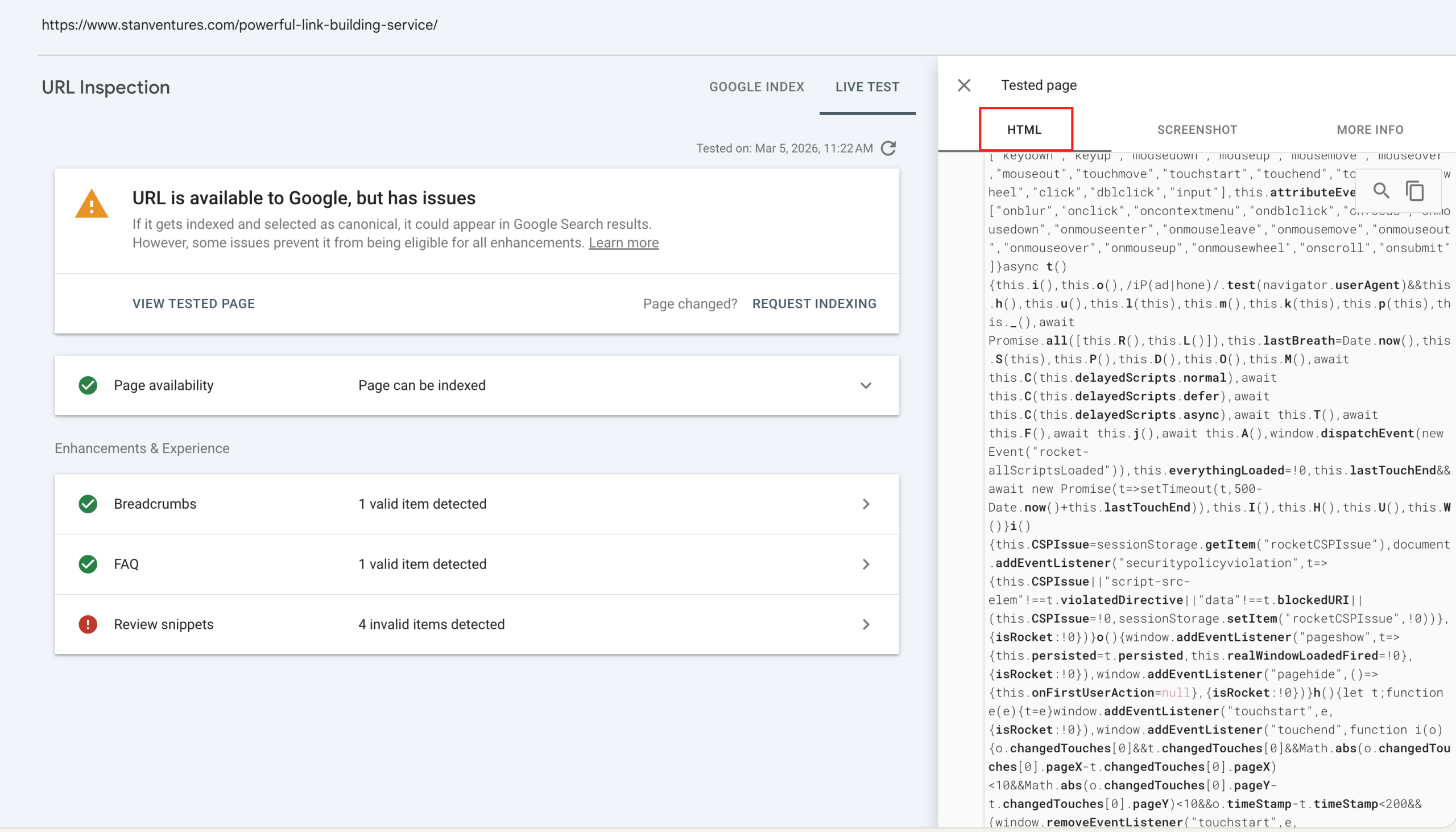
Here is the step-by-step process you should use in the Google Search Console URL Inspection tool to see exactly what Googlebot sees.
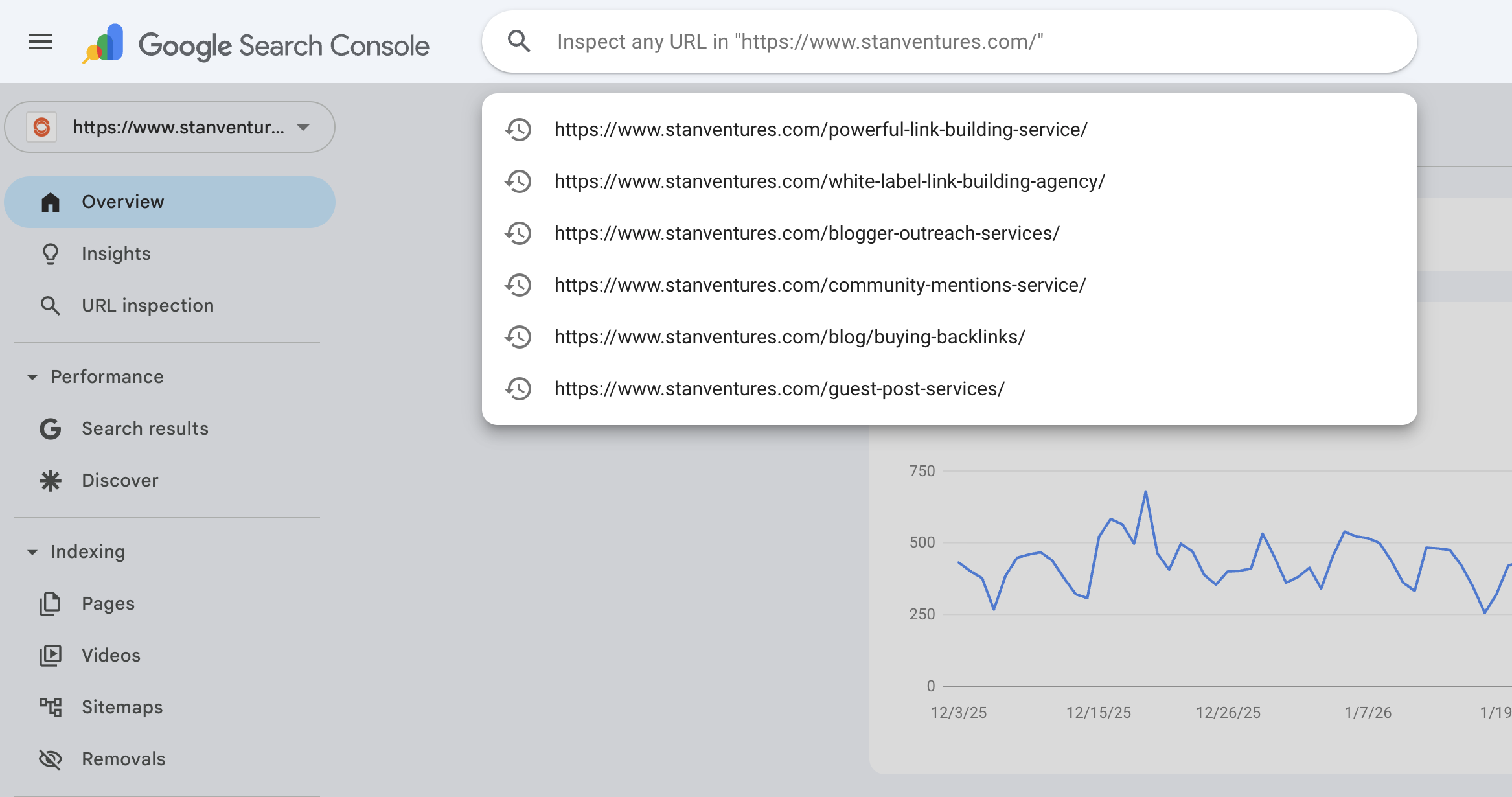
Step 1: Inspect the URL Log in to your account and paste the exact URL of the page you want to check into the top search bar. Press enter.
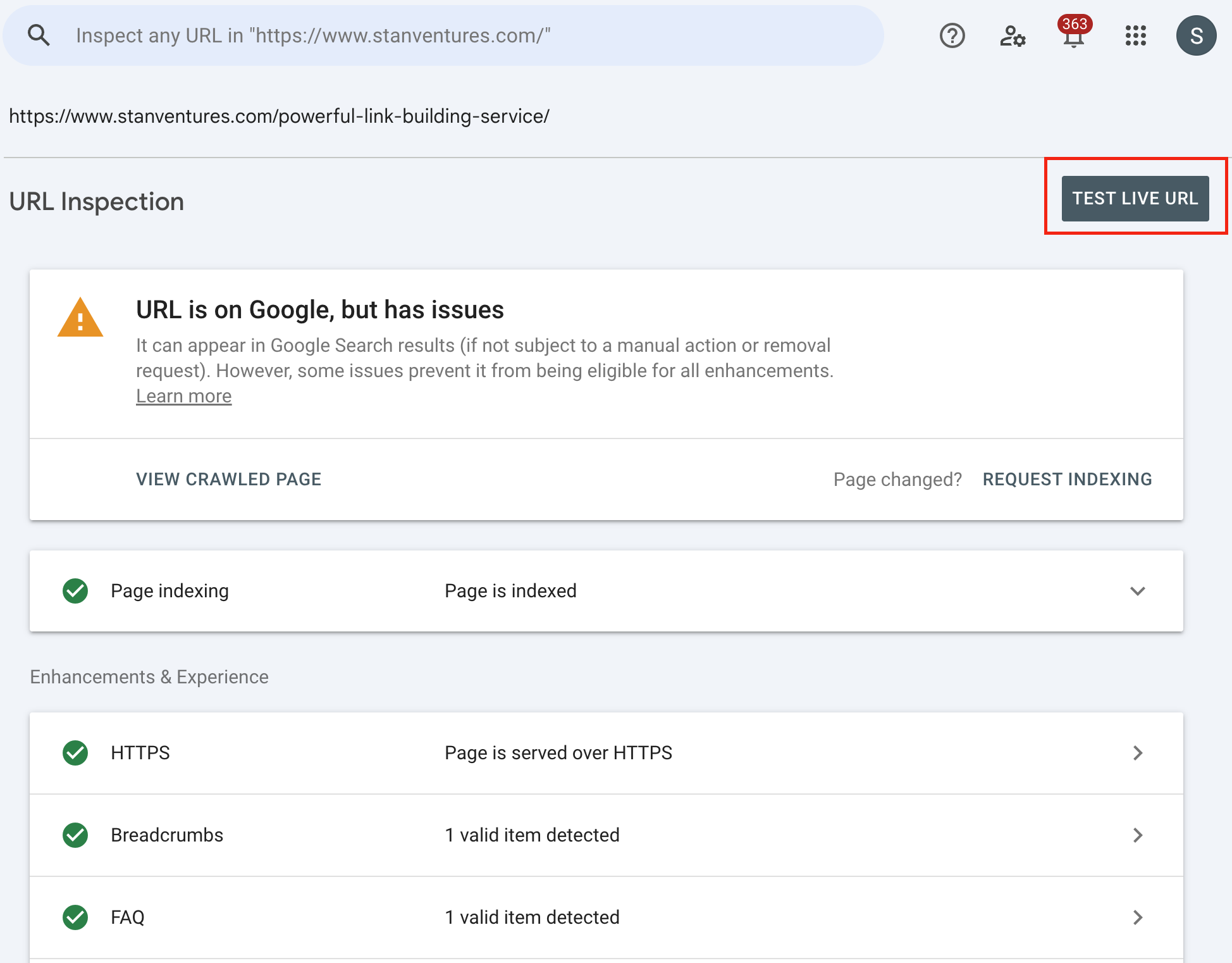
Step 2: Run a Live Test Google will first show you its older, indexed version. You need real-time data, so click the white TEST LIVE URL button in the top right.
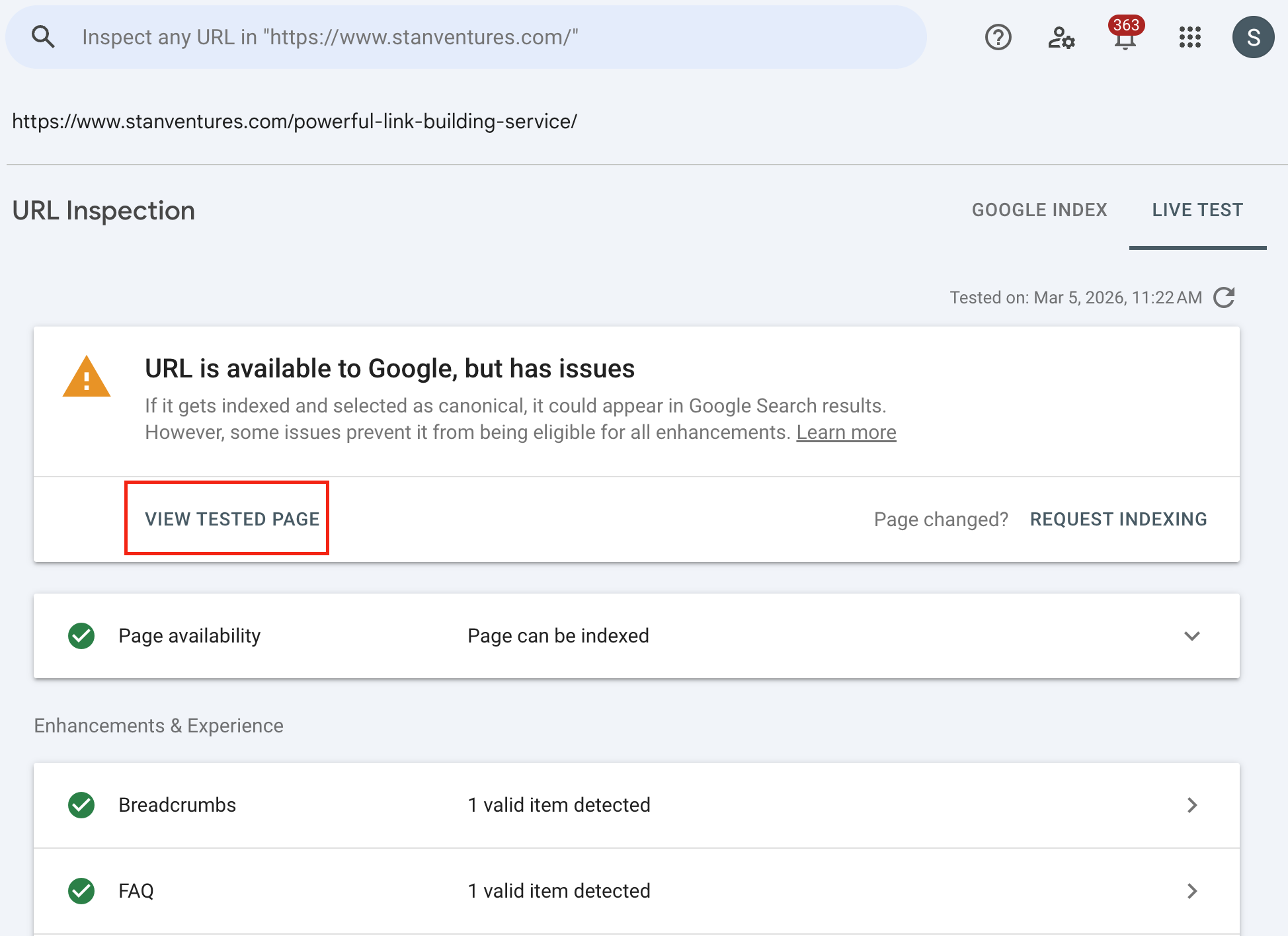
Step 3: View the Tested Page Once the live test finishes, a new menu will appear on the right side. Click the button labeled VIEW TESTED PAGE.
Step 4: Check the Visuals and Code A side panel will open. First, check the Screenshot tab to see if your core article text or product description is visually there.
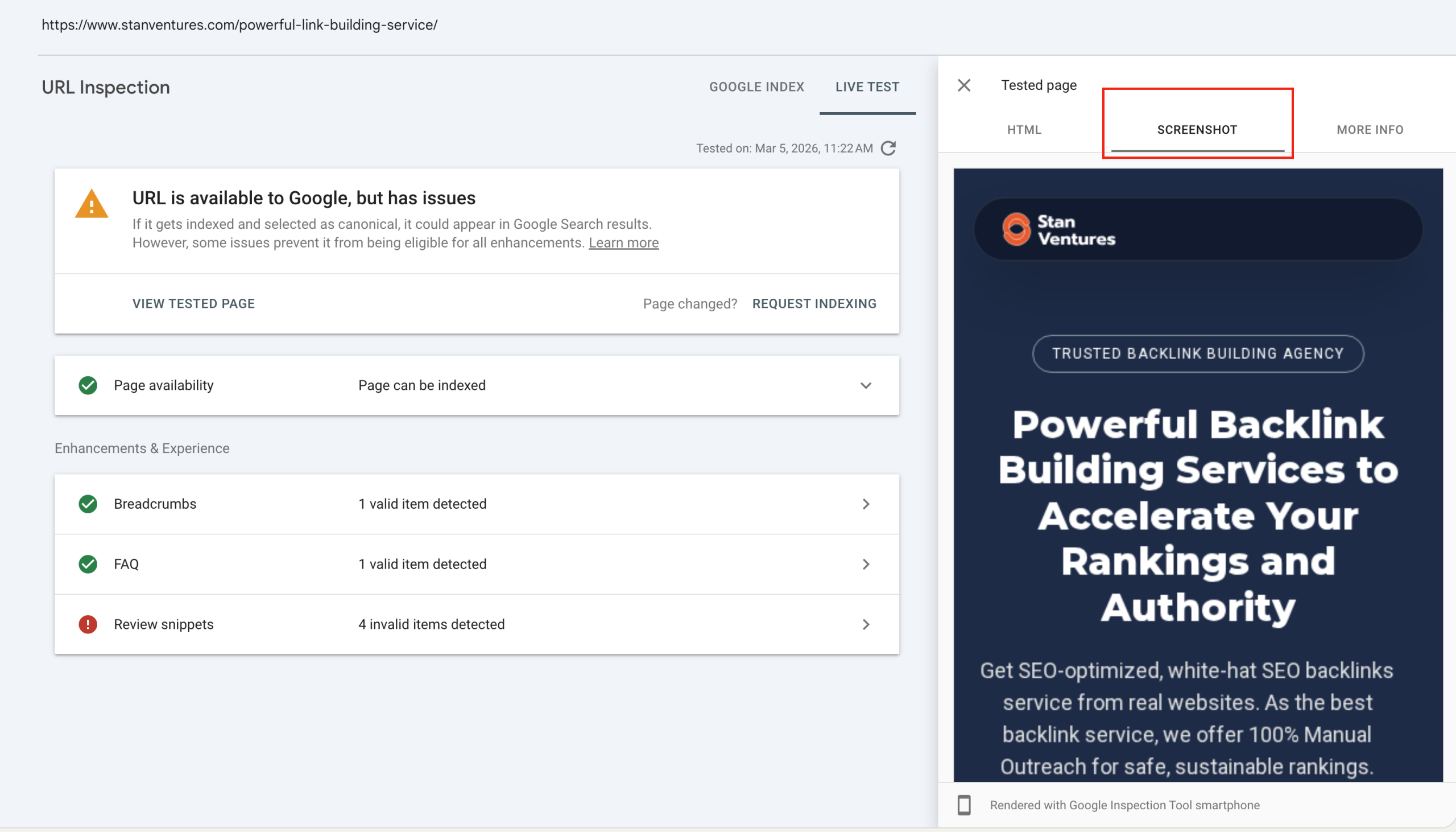
Next, click the HTML tab. Do a quick text search for a specific sentence from your content. If it is there, Google is successfully reading it.
Don’t Panic Over Blocked Scripts
During this test, you might look at the Page Resources tab and see a list of errors.
You will likely see third-party scripts failing to load. Common examples include Google Analytics or Microsoft Clarity tracking codes.
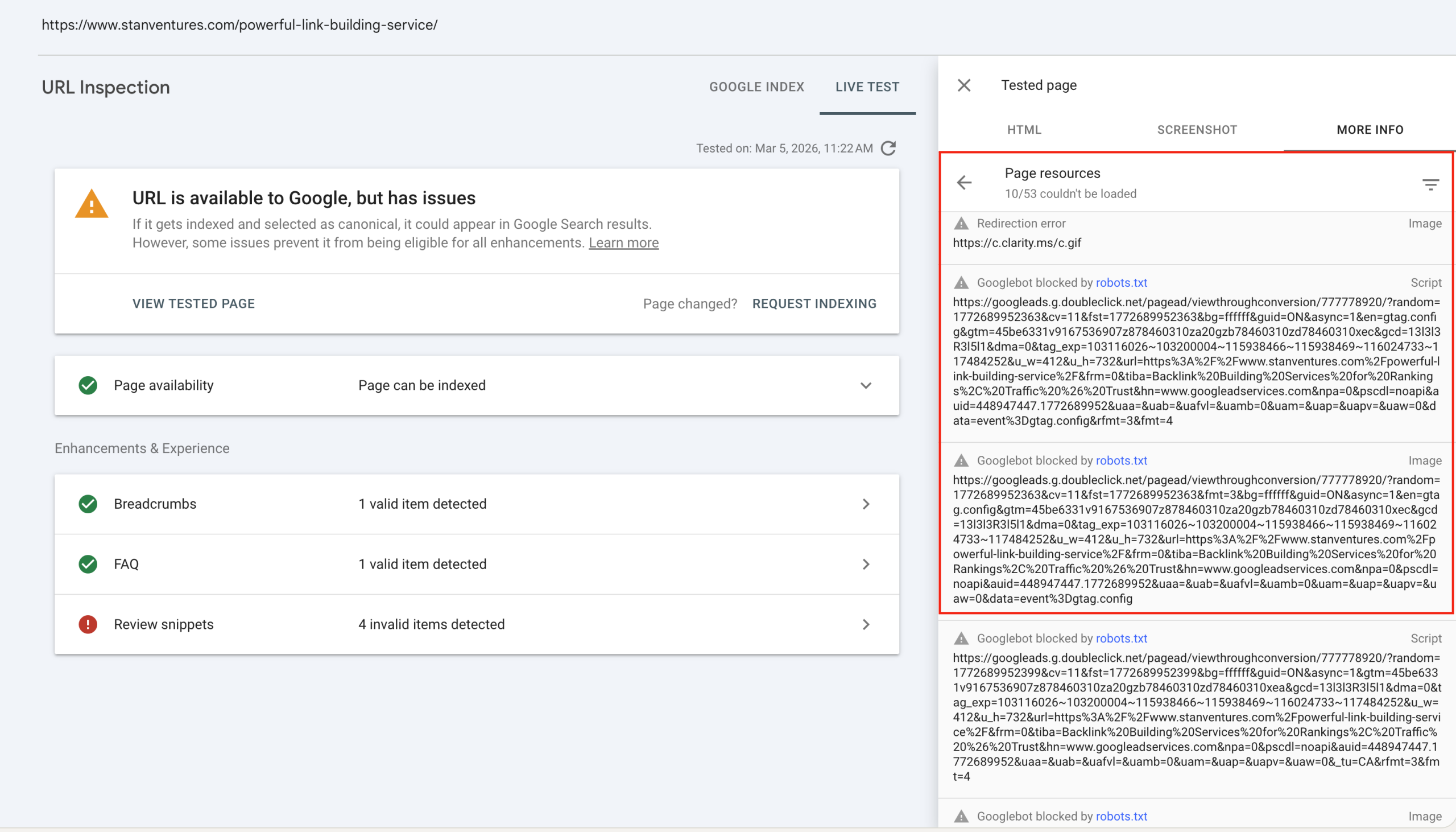
This is completely natural and expected. Googlebot intentionally blocks these scripts to save server resources.
Since tracking codes don’t add value to the main content, blocking them is actually a good thing. As long as your main text is there, your rankings are safe.
Key Takeaway
Google’s update simply means we don’t have to fear client-side rendering anymore.
However, the gold standard for enterprise sites remains server-side rendering using frameworks like Next.js.
This approach gives you the interactive benefits of modern web design while feeding search engines a fully-formed HTML document instantly.

Dileep Thekkethil
AuthorDileep Thekkethil is the Director of Marketing at Stan Ventures, where he applies over 15 years of SEO and digital marketing expertise to drive growth and authority. A former journalist with six years of experience, he combines strategic storytelling with technical know-how to help brands navigate the shift toward AI-driven search and generative engines. Dileep is a strong advocate for Google’s EEAT standards, regularly sharing real-world use cases and scenarios to demystify complex marketing trends. He is an avid gardener of tropical fruits, a motor enthusiast, and a dedicated caretaker of his pair of cockatiels.
