
Having an understanding of what is canonical and how you can properly use it is essential for SEO. Implementing canonical incorrectly can lead to a wide range of issues that impact your website’s ranking negatively.
First introduced in 2009, canonical tags have helped webmasters solve the problem of vastly-similar or duplicate content accessible on different URLs. However, if you want to use the canonical tag, you need to have an understanding of what it is, how it works, and how you can implement it.
This guide will help you do the same. Read on to learn more about canonical tag.
What is Canonical Tag – The Definition
Canonical Tag is an HTML element that tells the search engine to ignore all other versions of a page and consider the one marked within the canonical URL for ranking purposes.
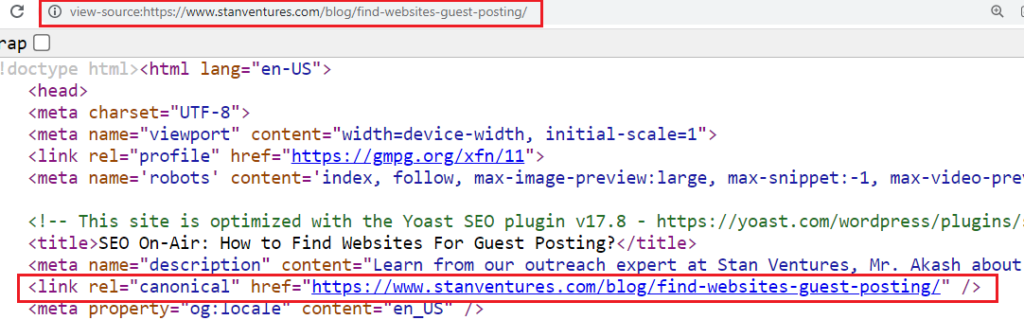
This comes in handy when you have multiple pages with similar content and you don’t want search engines to categorize them as duplicate content.
They can be found in a page’s HTML code under the head tag. To consolidate signals to search engines, they can either point to their own URL or to some other page’s URL.
A canonical link or URL is the version of the content you want your audience and Google to see instead of other duplicate pages.
How Does a Canonical Tag Look?
A canonical tag is an easy-to-use syntax that is placed under the <head> section of your web page. This is how it looks:
<link rel=“canonical” href=“https://website.com/sample-page/” />
SEO Benefits of Canonicalization & Why Does It Matter?
Search engines do not appreciate duplicate content.
That’s because it makes finding the correct version of a page difficult for both index and ranking purposes.
Also, duplicate pages cause cannibalization issues wherein ‘link equity’ gets split between multiple pages with the same content.
This way, neither of the pages gets a ranking advantage.
Additionally, having a lot of duplicate content on your website can negatively impact your crawl budget.
This means that search engines will be wasting more time crawling the same page’s multiple versions instead of finding important content.
You should avoid duplicate content as you don’t want search engines to waste their time crawling through pages that you don’t want to rank for.
However, according to Google, even if you have duplicate content, it won’t be an issue.
If your website has less than a few thousand URLs, in most cases, it will be efficiently crawled.
If you are facing issues because of the crawl budget, canonical tags can help solve these.
Through these, search engines will know which page’s version they are supposed to index and rank.
So what happens when you haven’t specified a canonical page?
If you don’t add a canonical URL, search engines will use their discretion and identify a page that their algorithm thinks is the best version.
This can be an issue if they select a version you don’t want to rank for.
By the way, search engines might not always respect the canonical URL you set.
They don’t use the tags as directives but as hints.
Using best practices for canonical tags should mitigate the risk of search engines using an undesirable version as canonical.
Make sure that the pages you canonicalize are related.
Reasons Why Duplicate Content Exists
Creating duplicate or “appreciably similar” pages is sometimes intentional, as they serve different purposes.
Consider an example where you have customers in different countries.
In this case, you will need two product pages with different prices but are otherwise nearly identical.
You can use canonical tags for these pages to tell search engines which page to serve depending on the visitor’s location.
Also, there might be some technical reasons for having duplicate content, and you might not even know about them.
You might have duplicate content if you have a dynamic website or are using content management systems.
Some websites automatically add tags, allowing multiple paths to the same content parameters like sorts, searches, or currencies.
So, this might create multiple duplicate URLs on your website without your awareness.
Thankfully, with canonical URLs, search engines can identify different variations of a page and avoid issues associated with duplicate content.
Multiple URLs with Same Content – What’s the Dilemma?
When there is duplicate content on your website, it can affect your rankings and make you lose traffic. These losses come from the following two issues:
- Search engines don’t show multiple versions of the content in order to provide the best experience. So, they choose a version that they think is the best result. If this happens with you, the visibility of your duplicates will be diluted.
- It can also dilute the link equity as other websites choose between the duplicates too. So, instead of inbound links pointing to one content, they will link to different pages and spread the link equity.
Duplicate content can also create issues for the search engines:
- They don’t know the version that should be included or excluded from the index.
- They don’t know whether they should direct the link metrics to one page or separate it between different pages.
- They don’t know which page should be ranked for query results.
Canonical Tag Best Practices
Implementing canonicals is easy. Here are some of the best practices you can use:
- Using absolute URLs
You shouldn’t use relative paths for the rel=“canonical” link element. So, instead of using this structure:
<link rel=“canonical” href=”/sample-page/” />
You should use this structure:
<link rel=“canonical” href=“https://website.com/sample-page/” />
- Using lowercase URLs
Search engines might treat lowercase and uppercase URLs differently. Force lowercase URLs on your website and use the same for your canonical tags.
- Using the correct version of the domain (HTTPS vs. HTTP)
You shouldn’t declare non-SSL URLs in the canonical tags if switching to SSL. By doing this, it might lead to unexpected results and a lot of confusion.
Use the HTTPS version for your canonical URLs if your website is on a secure domain. Here is how it should look:
<link rel=“canonical” href=“https://example.com/sample-page/” />
On the other hand, if your website is not using HTTPS, then the canonical URL should also be HTTP. Here is the appropriate version:
<link rel=“canonical” href=“http://example.com/sample-page/” />
- Use the self-referential canonical tag
A self-referential canonical tag points to the same page. Although using self-referential canonical tags is not mandatory, it is recommended. This is because it makes it clear to search engines what pages have to be indexed. Different URL variations can occur because of parameters in the end or because of upper/lower case. A rel canonical tag cleans up all of this.
So, if the URL is https://example.com/sample-page, the self-referential canonical will be:
<link rel=“canonical” href=“https://example.com/sample-page” />
There are some popular CMS that will automatically add a self-referencing URL. In the case of custom CMS, you might need a developer to hardcode this.
- Using one canonical tag per page
If your web page has several canonical tags, all of them will be ignored by the search engines.
How to accurately Implement the rel=canonical Tag
Setting Canonical URL using HTML Tag
The simplest way to specify the canonical URL is using the rel=canonical tag. You can add the following syntax to the duplicate page’s <head> section:
<link rel=“canonical” href=“https://example.com/canonical-page/” />
For example, if your web page’s content can be accessed via other URLs, you add the canonical tag to the duplicate pages. If you use CMS, you won’t have to mess with the code.
Setting a Canonical URL on Magento and Magento 2
To set the canonical URL on Magento, here is what you can do:
Step 1: Sign in to the ‘Admin Panel’. Click on the ‘Stores’ tab followed by ‘Settings’ and ‘Configuration’.
Step 2: Click on the ‘Catalog’ option and choose ‘Catalog’ from the drop-down menu. Then, you have to open the ‘Search Engine Optimization’ section. After that, you have to make the following changes:
If you want to index the pages with only the complete category URL path, here is what you can do:
Step 3: Use Canonical Link Meta Tag for Categories – ‘Yes’;
Step 4: Use Canonical Link Meta Tag for Products – ‘No’;
If you want only to index the product page, you have to complete the following settings:
Step 5: Use Canonical Link Meta Tag for Categories – ‘No’;
Step 6: Use Canonical Link Meta Tag for Products – ‘Yes’;
If you want to index products and categories, you have to enable both options:
Step 7: Use Canonical Link Meta Tag for Categories – ‘Yes’;
Step 8: Use Canonical Link Meta Tag for Products – ‘Yes’;
Once you are done, you have to clear the cache and save the changes.
Setting a Canonical URL on WordPress
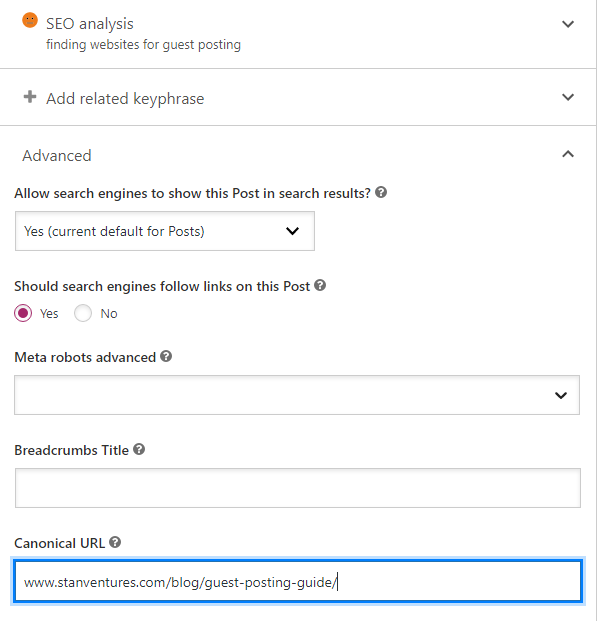
To set the Canonical URL on WordPress, you have to Install Yoast SEO. It will automatically add the self-referencing canonical tags. In order to set the custom canonicals, you need to use the ‘Advanced’ section.
Setting a Canonical URL on Wix
On Wix, the canonical URL is automatically created for all the pages.
If you want to change the canonical tab or have multiple URLs going to the same page, you can make the changes accordingly in the Advanced SEO tab.
Setting a Canonical URL on Shopify
If you are using Shopify, self-referencing canonical URLs are automatically added to blog posts and products.
You can edit the template files directly to set custom canonical URLs.
Setting a Canonical tag in HTTP Header
In the case of documents such as PDFs, there isn’t a <head> section where you can place the canonical tags.
You can easily do this by adding the canonical code in the header section of your PHP file.
Canonical URLs in Sitemaps
According to Google, you shouldn’t include non-canonical pages in sitemaps. You should only list canonical URLs.
This is because Google uses the pages in the sitemap as recommended canonicals.
However, this doesn’t always mean that the URLs listed in sitemaps will be selected as canonicals.
It helps them define canonicals for a big website, and sitemaps can tell the search engine the pages that you consider most important.
Setting canonicals with 301 redirects
You can use 301 redirects to divert traffic away from duplicate URLs and to the canonical URL.
You can do the same for www/no-www and HTTPs/HTTP versions of the website.
You must select a canonical version and redirect duplicate ones to that version.
However, canonical and 301 serve different purposes.
A 301 redirect will physically send the user to a different URL, whereas a canonical tag informs search engines about the preferred URL version for indexing.
They can be used together but are not interchangeable.
Advanced uses of rel=canonical
Now, let’s talk about some of the advanced uses of rel=canonical that not everyone knows about:
- Using rel=canonical on different pages
When it comes to rel=canonical, Google honors it to an extreme extent, which means that you can canonicalize a piece of content to a different piece of content.
However, if you are caught doing this, it is possible that the search engine won’t trust your canonicals anymore.
- Using rel=canonical with hreflang
While using hreflang, the canonical of each language must point to itself.
If you are implementing hreflang, ensure you know how to properly use canonical; otherwise, you might end up killing your hreflang implementation.
Common Canonicalization Mistakes and Fixes
Canonical points to 4XX
You will get this warning when you have pages canonicalized to a 4XX URL.
Search engines won’t index these pages and will ignore any canonical tags that point to such pages.
As a result, it will end up indexing the wrong version of the page.
After reviewing the pages, you have to use the links to the working page to replace the dead canonical links.
Canonical points to 5XX
The 5XX status codes mean that there are server issues that will lead to an inaccessible page.
Search engines won’t index these pages and ignore them if you canonicalize them.
What you need to do is replace erroneous canonical URLs.
If the canonical seems correct, you should check for server misconfigurations.
However, if you get this warning while your site’s server is overloaded or when your site is down for maintenance, it is just a temporary issue.
Canonical points to redirect
When pages are canonicalized to a 301 redirected URL, it’s again a reason for concern.
The canonicals must have an authoritative version of the page.
If you add a redirect URL, the search engines ignore or misinterpret the canonical.
Duplicate pages without canonical
Since there is no canonical URL, search engines will try identifying the most appropriate version.
However, this might not be the page you want to be indexed.
Canonical URL has no incoming internal links
When your specified canonical URLs don’t have any internal incoming links, also called an orphan page, it becomes inaccessible to your visitors and search engines.
Instead, they can be redirected to the web page’s non-canonical version.
Non-canonical page in sitemap
If you have non-canonical pages listed in the sitemap, Google may consider these pages as suggested canonicals.
To fix this, you should remove these non-canonical URLs from the sitemap.
Non-canonical pages specified as the canonical ones
This issue is triggered when you specify a canonical URL that is canonicalized to a different page as well, resulting in a canonical chain.
This can confuse the search engines.
For example, if A is canonicalized to B and B is canonicalized to C, you have to replace A’s canonical link with C’s canonical link.
Open Graph URL not match canonical
This happens when the canonical URL you specified does not match the Open Graph URL on the pages.
This results in the non-canonical version shared on social networks.
The Open Graph URL should be replaced with the canonical URL, and both URLs should be the same.
Canonical from HTTPS to HTTP
This occurs when you have HTTPs pages with a non-secure HTTP version as canonical.
To solve this, you should be redirecting the HTTP page to its HTTPS equivalent.
If you can’t do this, add the HTTP version’s ref=”canonical” link to the HTTPS one.
Canonical from HTTP to HTTPS
This warning is triggered when you have secure HTTP pages with a secure HTTPS version as canonical.
You should start by implementing a 301 redirect from HTTP to HTTPS and then move on to replacing the HTTP version’s internal links directly with the HTPPS version.
Non-canonical page receives organic traffic
If non-canonical pages continue to show up on search results and receive organic search traffic, this means that the search engine has ignored your specified canonical.
To fix this, you have to ensure that rel=canonical tags are correctly set up.
Next, you should check the URL Inspection tool to see if the canonical URL you specified is canonical.
Blocking the canonicalized URL via robots.txt
If you block a canonicalized URL in robots.txt, the search engine won’t be able to crawl it, meaning they won’t see the canonical tags on that webpage.
This prevents the search engine from transferring link equity from non-canonical to canonical URLs.
Setting the canonicalized URL to ‘noindex’
You should not rel=canonical and noindex as they are contradictory instructions. It is important to note that Google prioritizes the canonical tag over the ‘noindex’ tag.
If you want to canonical and noindex a URL, you can use a 301 redirect or rel=canonical.
How to audit canonical tags for SEO
While auditing canonical tags, you have to check a number of things for optimal SEO performance, including:
- Whether or not the page has a canonical tag?
- If it does have a canonical tag, does it point to the right page?
- Is the page indexable and crawlable?
Here are a few ways you can inspect and audit the canonical tags:
1. View-Source
To check the source code, you should right-click on the browser and hit ‘view-source’. You can also type it in the address bar as view-source:(address of the page).
2. SEO software solutions
There are several SEO tools available online that helps you audit canonical tags in bulk.
As mentioned before, canonicalization is an important concept for SEO. Without proper implementation, your website won’t work at its peak performance. That being said, once you have an understanding of what is canonical URL, what is a canonical tag, what they do, and how you can fix canonicalization issues, you will be able to use them correctly and take care of duplicate content on your website.
Google Updated its rel=canonical Documentation for 2026 and Beyond
Google has updated its rel=canonical documentation to better explain its approach to extracting rel=canonical annotations.
This update does not indicate a change in Google’s processing of these annotations but aims to provide more explicit guidance on their handling.
Rel=canonical Link Relation and RFC 5988: Google references RFC 5988, a standard by the Internet Engineering Task Force (IETF), for its use of the canonical link relation.
This standard outlines specifications for internet and networking technologies, including the HTML rel link attribute, which is a fundamental component of HTML webpages, modified by the Rel attribute for various purposes.
RFC 6596 elaborates on the canonical link relation introduced in RFC 5988, emphasizing its role in designating a preferred Internationalized Resource Identifier (IRI) among duplicate content.
This is aimed at specifying the preferred version of an IRI to avoid duplication caused by parameters such as session IDs or to favor a single-page version over multiple component pages.
Google’s Methodology for Canonical Link Elements: Google utilizes the parameters defined for the canonical link element to determine the original version of duplicate documents.
Documentation Updates on Canonical Annotations: The recent documentation updates focus on rel=”canonical” link annotations beyond the duplication context, including minor modifications. The notable changes include clarifying Google’s support for “explicit” rel=canonical link annotations as outlined in RFC 6596, emphasizing adherence to established standards.
A significant addition to the documentation advises against using rel=”canonical” for non-duplicative purposes, like alternate language or media pages. Instead, it suggests using appropriate annotations such as rel=”alternate” hreflang for these cases.
This guidance reinforces Google’s consistent approach to canonical and alternate link elements, clarifying the use of rel=”canonical” annotations with specific attributes for canonicalization. Google’s documentation now explicitly states that annotations suggesting alternate versions of a page are disregarded for canonicalization purposes, underlining the importance of using designated link annotations for alternate versions.
For further details, refer to Google’s updated documentation on this subject.

Dileep Thekkethil
AuthorDileep Thekkethil is the Director of Marketing at Stan Ventures, where he applies over 15 years of SEO and digital marketing expertise to drive growth and authority. A former journalist with six years of experience, he combines strategic storytelling with technical know-how to help brands navigate the shift toward AI-driven search and generative engines. Dileep is a strong advocate for Google’s EEAT standards, regularly sharing real-world use cases and scenarios to demystify complex marketing trends. He is an avid gardener of tropical fruits, a motor enthusiast, and a dedicated caretaker of his pair of cockatiels.
