
Have you ever Googled your own name or your company’s and felt that sting of disappointment when no polished information box appeared on the screen?
Instead of that neatly designed profile with a bio, image, links and verified facts, you just got a regular list of links.
Meanwhile, your competitors, industry leaders, or even niche players have that highlighted Google Knowledge Panel sitting right at the top.
So, what exactly is this Knowledge Panel that seems to be the silent badge of credibility in the digital age? And how does one get featured in it? Let’s see.
Knowledge Panels Are Now Central to SEO Credibility
Google introduced Knowledge Panels back in 2012 alongside the Knowledge Graph, and ever since, they have become one of the strongest trust signals online.

In simple terms, a Knowledge Panel is that informational box that pops up on the right-hand side of desktop results or at the top on mobile when you search for an entity: a company, a celebrity, a country, a landmark, even a fictional character.
But here is where it gets interesting. Unlike a Google Business Profile, which you create and manage directly, the Knowledge Panel is automatically generated by Google’s algorithms.
That means you can’t “make” one. Google decides if you are notable enough to deserve one. And when it does? It’s almost like Google saying: “We know you. We trust you.”
In entity-first search and AI-driven results, getting that recognition is becoming one of the smartest SEO strategies out there.
Knowledge Panel vs. Knowledge Graph: Clearing the Confusion
A lot of people confuse the Knowledge Panel with the Knowledge Graph. Think of it like this:
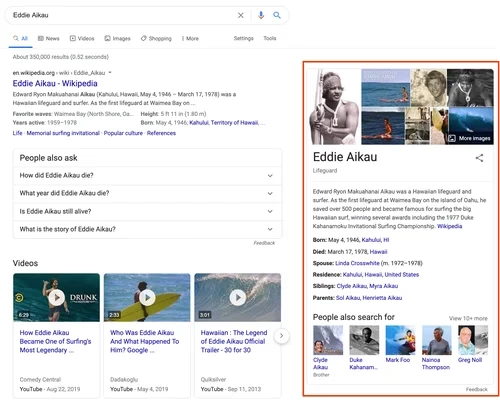
- The Knowledge Graph is Google’s massive internal database, filled with billions of facts about people, places, companies, books, films—you name it.
- The Knowledge Panel is the visual, public-facing box Google displays based on data from the Knowledge Graph.
So, while we don’t see the Knowledge Graph, we see its output in the form of these panels.
Type “Apple” in Google and you will see a crisp Knowledge Panel showcasing its logo, stock ticker, headquarters, founding date, and even recent product links. Search “Taylor Swift” and you will get a real-time summary of her life: age, music albums, social media handles and even her concert schedules.
Interestingly, Taylor Swift’s Knowledge Panel is far more dynamic than Australia’s. Why?
Because her life produces a constant stream of data including albums, events, public appearances, whereas Australia’s facts are mostly static. That is how Google prioritizes what it shows.
Why Should Businesses Care About a Google Knowledge Panel?
Here is the big question: why should businesses and professionals even care?
The Knowledge Panel does something that no organic SEO rank can guarantee: it gives you permanent, high-authority real estate on the SERP (Search Engine Results Page).
It dominates the right-hand side on desktop, pushes competitors away, and instantly creates an impression of authority.
For users, it is the difference between seeing your brand as just another search result or perceiving you as an established, trusted entity.
And if we are being honest—when was the last time you scrolled past a Knowledge Panel without clicking one of its links?
The SEO Advantages
Beyond visibility, the Knowledge Panel offers tangible SEO benefits:
- It boosts click-through rates because people naturally gravitate toward verified, structured information.
- It builds trust and credibility, since only well-recognized entities get one.
- It helps in AI and voice search results, where assistants like Google Assistant or Gemini often pull direct answers from the Knowledge Graph.
Let’s see an example: when you ask, “What does a CRM do?”, chances are Google will answer with information linked to HubSpot’s Knowledge Panel, because HubSpot has validated, structured entity data in the Knowledge Graph.
The Voice Search Factor
Now think about voice assistants. When someone asks, “Who founded Tesla?”, the assistant doesn’t give you a list of links. It gives you a direct answer—thanks to the Knowledge Graph. If your brand isn’t in there, you miss out on being the first and only spoken response.
As voice search continues to rise, the Knowledge Panel is no longer just an SEO bonus. It’s becoming the foundation of how AI-driven platforms recognize authority.
How Does Google Build a Knowledge Panel?
Google gathers data from multiple trusted sources like Wikipedia, Wikidata, official websites, schema markup, social media, Crunchbase, Bloomberg, government databases, Google Books, Music, Scholars and even licensed data like stock prices or sports scores.
Then, based on the query, it picks a template. For example, a search for “Taylor Swift albums” highlights her discography in the panel, while just “Taylor Swift” shows her bio, age, and photos. The entity stays the same but the panel adapts to the searcher’s intent.
Who Qualifies for a Knowledge Panel?
The eligibility criteria are not published but from years of observation, three factors stand out:
- Search Interest: If enough people search for you, Google considers you notable.
- Citations & Mentions: Being covered by reputable sources strengthens credibility.
- Unique Identifiers: Consistent details like your name, address, Wikidata ID, ISBN (for authors), or social links build a verifiable footprint.
Translation? If Google sees you everywhere, consistently and credibly, you are far more likely to get a panel.
Triggering a Knowledge Panel: Steps That Work
So, how do you actually trigger one? Let’s see.
First, it is important to bust a myth: Wikipedia is not everything.
Yes, it helps with visibility, but today, Wikidata is the real key because it provides structured, machine-readable data that feeds directly into Google’s Knowledge Graph. A Wikipedia page is optional but Wikidata is essential.
Beyond that:
- Keep your brand information consistent across the web—same name, same logo, same bio.
- Optimize your schema markup with details like founder, founding date and sameAs links to official profiles.
- Build high-authority coverage through news mentions, profiles on Crunchbase or LinkedIn and guest features in respected outlets.
- Maintain accurate business listings across platforms.
A study by Kalicube suggests Google may look for at least 30 trusted third-party sources before creating a Knowledge Panel. Not an official rule, but a useful benchmark.
Claiming and Editing Your Knowledge Panel
If you already see your panel, congratulations. But don’t stop there. Claim it.
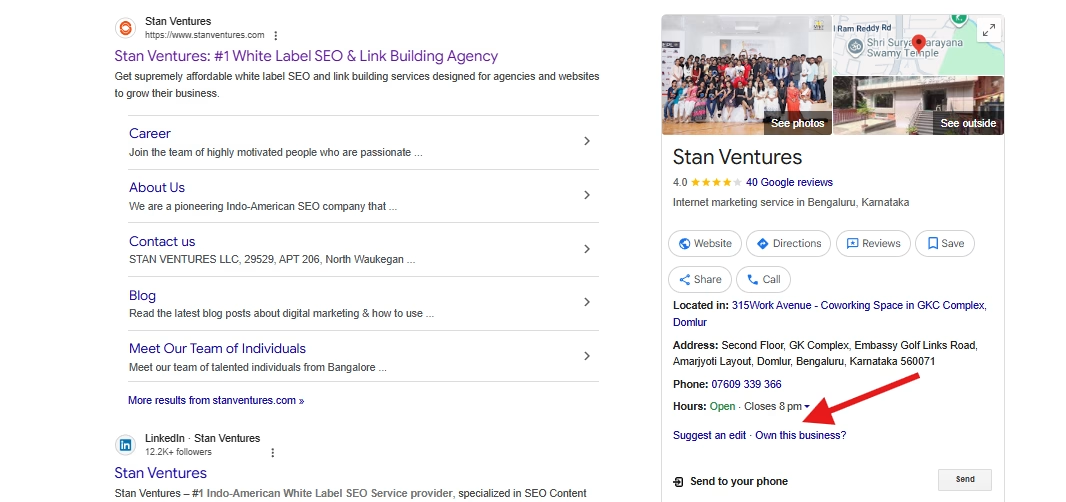
Google allows you to verify ownership via your Google account and connected social media profiles. Once claimed, you can suggest edits—your logo, social links or even descriptions. While you can’t fully control it, you can guide it.
And yes, updates can take days or even weeks to reflect, depending on what you change.
Expanding Your Knowledge Panel
The more active you are, the more Google rewards you. Panels today are expandable, with drop-downs for deeper insights. To maximize that:
- Keep updating your site’s structured data.
- Publish authoritative content and link to credible third-party mentions.
- Be active on relevant Google-owned platforms like YouTube or Google Books.
- Stay consistent on social media, since panels often feature recent posts or follower counts.
The formula is simple: feed Google with quality, consistent signals and it will keep rewarding your entity with richer recognition.

Dileep Thekkethil
AuthorDileep Thekkethil is the Director of Marketing at Stan Ventures, where he applies over 15 years of SEO and digital marketing expertise to drive growth and authority. A former journalist with six years of experience, he combines strategic storytelling with technical know-how to help brands navigate the shift toward AI-driven search and generative engines. Dileep is a strong advocate for Google’s EEAT standards, regularly sharing real-world use cases and scenarios to demystify complex marketing trends. He is an avid gardener of tropical fruits, a motor enthusiast, and a dedicated caretaker of his pair of cockatiels.
