Rooted in evergreen SEO principles and best practices, this checklist can help you achieve real results—no matter where you fall on the scale of SEO knowledge.

Scoring a first-page ranking on Google can feel like a one-in-a-million shot—especially when your competitors are already ranking.
However, don’t be blinded by the marketing myth that the more lottery tickets you buy, the better your chances are of “winning.”
SEO isn’t luck-of-the-draw, and crossing your fingers won’t increase organic traffic to your website.
Completing this SEO checklist isn’t a gamble.
What if all you had to do was exert that initial force, like reading this list of basic SEO tips?
Don’t sit this one out. Start checking off this simple and effective SEO checklist (one step at a time).
Chapter 1: SEO Basics
This SEO checklist is not a meal that needs to be swallowed in one bite. I recommend taking any strategy in bites, chewing on what you learn, and then coming back for more as you go.
But before you snack away at these basic SEO tips and best practices, you have to start with the non-negotiables. In this case, these non-negotiables are the tools you use to create and execute SEO strategies.
Here are the must-have tools you’ll need to increase website traffic.
1) Google Search Console
Google Search Console is a tool that was created by Google to help businesses understand their overall performance on their search engine.
When used correctly, you’ll have a better understanding of your website’s baseline and what you can do to improve your rankings. It’s like having an expert field guide’s advice on hand at all times for free.
You just need to sign up and know what to look for.
Here’s a quick primer on the setup, which should only take a few minutes.
Start by registering your site in the system. Head to the homepage and click the Get Started button. You’ll then want to select the “Domain” option (so you can track your entire website).
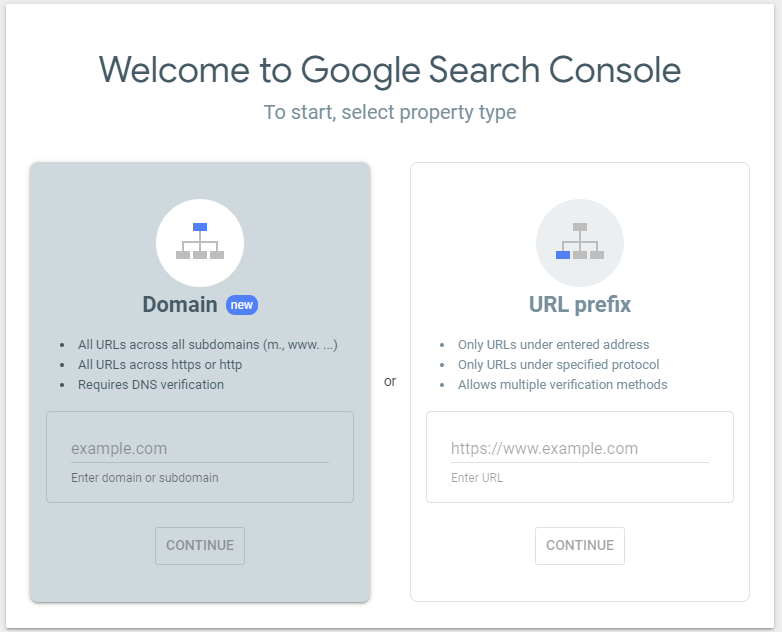

And once you’ve verified! You now have access to the Search Console’s suite of tools for your site.
A word of warning: it can definitely be a bit overwhelming at first. When you log in, you’ll be greeted by a variety of metrics and menu options:
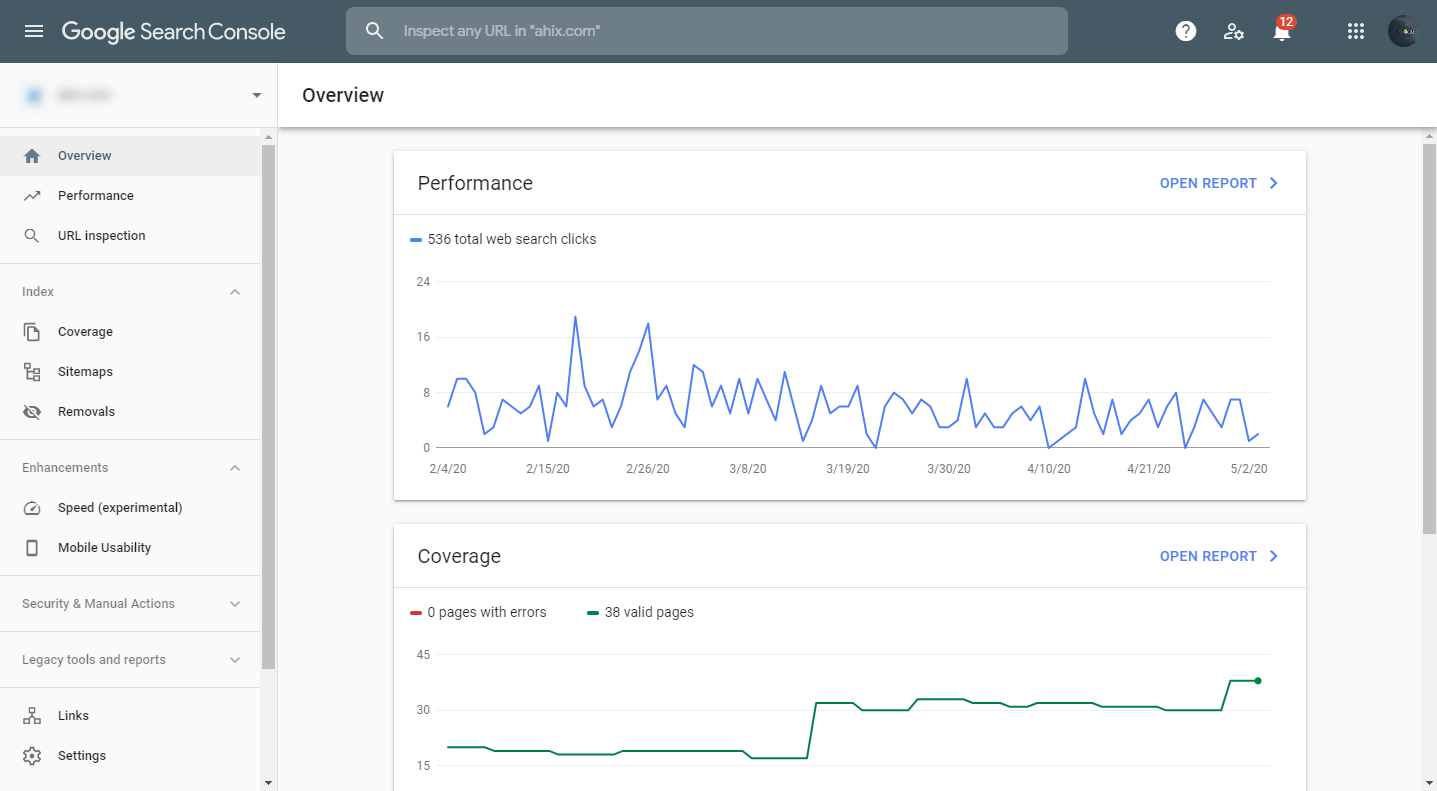
It will take time, patience, experience, and a lot of reading up to understand how to use each of these effectively. But once you know the ropes, you’ll be able to complete (at least) the following items:
- Submit an XML sitemap (this helps Google to find and index your website’s pages)
- View Queries (aka, the keywords that searchers use to find your site)
- Identify your most-visited pages
- Ensure mobile usability/compatibility
- See the sites that link to you
- Check for broken links on your website
- Monitor how often your site appears in Google search results
- Be notified of crawl errors and areas to improve your website.
In short, you can gain clear insights, action items, and a path forward to achieve an increase in organic traffic. It’s very much like having a close friend who knows SEO and can answer the questions that keep you up at night. To learn more about Google Search Console, you can check out this guide from Backlinko.
2) Bing Webmaster Tools
Sometimes, traffic can come from unexpected sources — and that includes search engines that aren’t at the top of your list.
The search engine marketing industry puts a lot of emphasis on Google, and rightfully so. Recent market share estimates put the search engine giant at about 92.4% of the total market share — with the nearest competitor Bing at 2.48%.
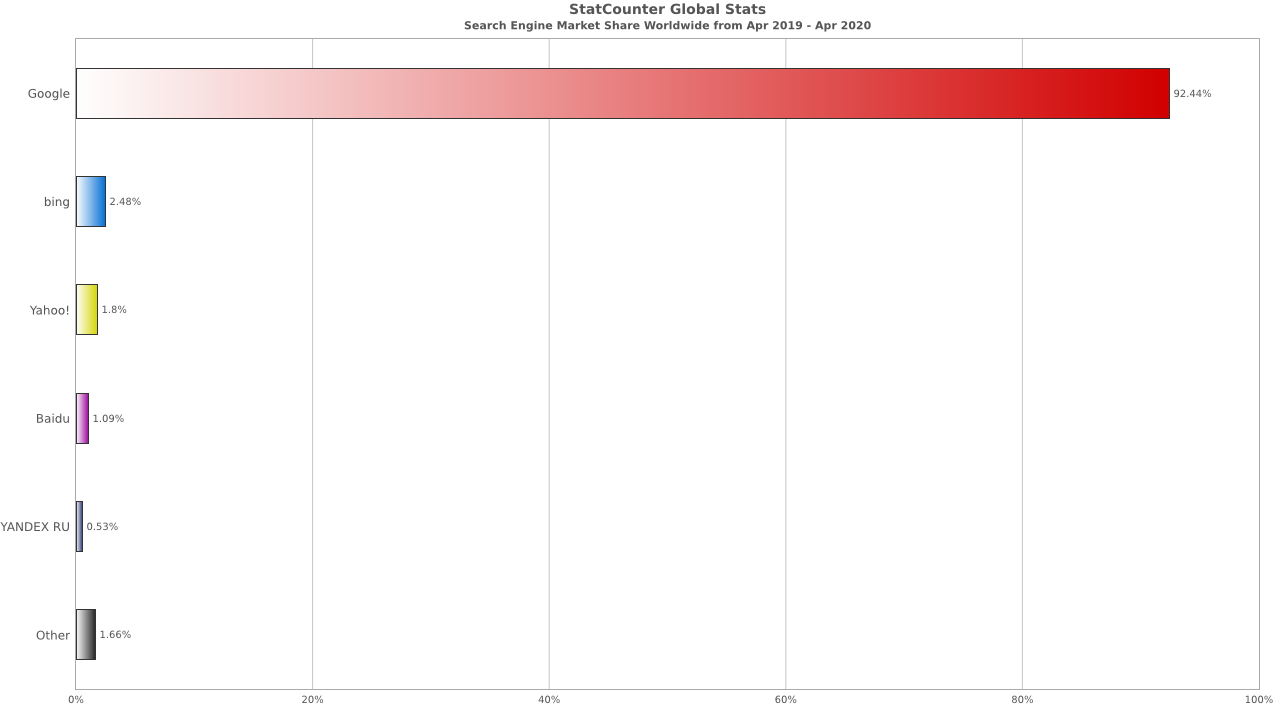
But let’s get something straight: market share isn’t the same as search volume. While Google’s dominance still translates to search volume, there’s still a lot more action on other search engines than you might think.
For instance, according to 99Firms, Google only accounts for about 75.74% of desktop searches, and 86.11% of mobile. That still leaves billions of searches through other engines, with Bing next in line.
So if you want to capture additional traffic, I recommend you utilize Bing Webmaster Tools, which is comparable to Google Search Console and also totally free.
Only in this case, you’re trying to climb Bing’s SERPs. (Search Engine Results Pages)
That said, my primary intent for recommending Bing Webmaster Tools is because they offer a second set of eyes on the way search engines understand your website. They also have a few different tools than Google Search Console and can add value in certain situations.
The setup is simple. Navigate to their homepage, and select the “Sign In” option

Once you’ve signed it (I use a Google account, it’s incredibly easy), you’ll see an option to add your website or import your Google Search Console. Either option gets you where you need to be.

You can then see a variety of stats, any XML sitemaps you’ve submitted, and a variety of menu options similar to Google Search Console.
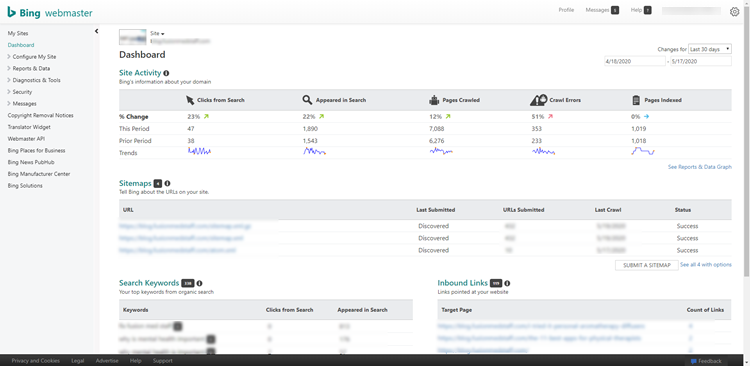
It’s that simple.
And the benefits are similar to that of Google Search Console. You can:
- Monitor and evaluate your site’s performance; see what keywords you rank for
- Disavow links
- Submit your website or the new pages to be crawled
- Check how Bing crawls and indexes your site
- Remove the content that you don’t want to be indexed
- Monitor and resolve potential malware, phishing, or spam issues.
- Use Bing’s Keyword Research tool to conduct keyword research
- Use Bing’s SEO Analyzer on any of your pages for real-time SEO suggestions.
While you may prioritize your Google SEO strategy, ignoring Bing can rob you of some valuable tools. This shouldn’t be a skippable part of any SEO checklist, and there’s a reason it’s #2 on my list here. Two heads are better than one, after all.
3) Google Tag Manager
Google Tag Manager is a powerful tool from Google that allows you to share and keep track of “Tags” — which are bits of code on your website used for a variety of purposes. Think everything from Facebook Pixels to Google Analytics, and so much more.
Google Tag Manager allows you to strategically deploy tags on your website for anything you need, including what triggers a tag (useful for analytics), where tags are placed (without deep digging in your code) and debugging tags on your site that aren’t working.
In short, this tool consolidates important scripts on your website, simplifies the process of keeping it updated, and declutters all the tags you have on your website. You can:
- Organize and Manage Tags
- Potentially speed-up load times on tag-heavy websites
- Integrate with third-party advertising solutions
- Test and Debug the tags on your website
- Simplify, annotate, and organize tag deployment
- Track basic events like PDF downloads, outbound links or button clicks
- Track complex enhanced e-commerce product and shopping behavior
It’s worth taking the time to set up your Google Tag Manager, and you can find a simple tutorial here.
4) Google Analytics
Unlike Google Search Console that is search-engine-oriented, Google Analytics centers its focus on the user and their interactions on your website for both desktop and mobile.
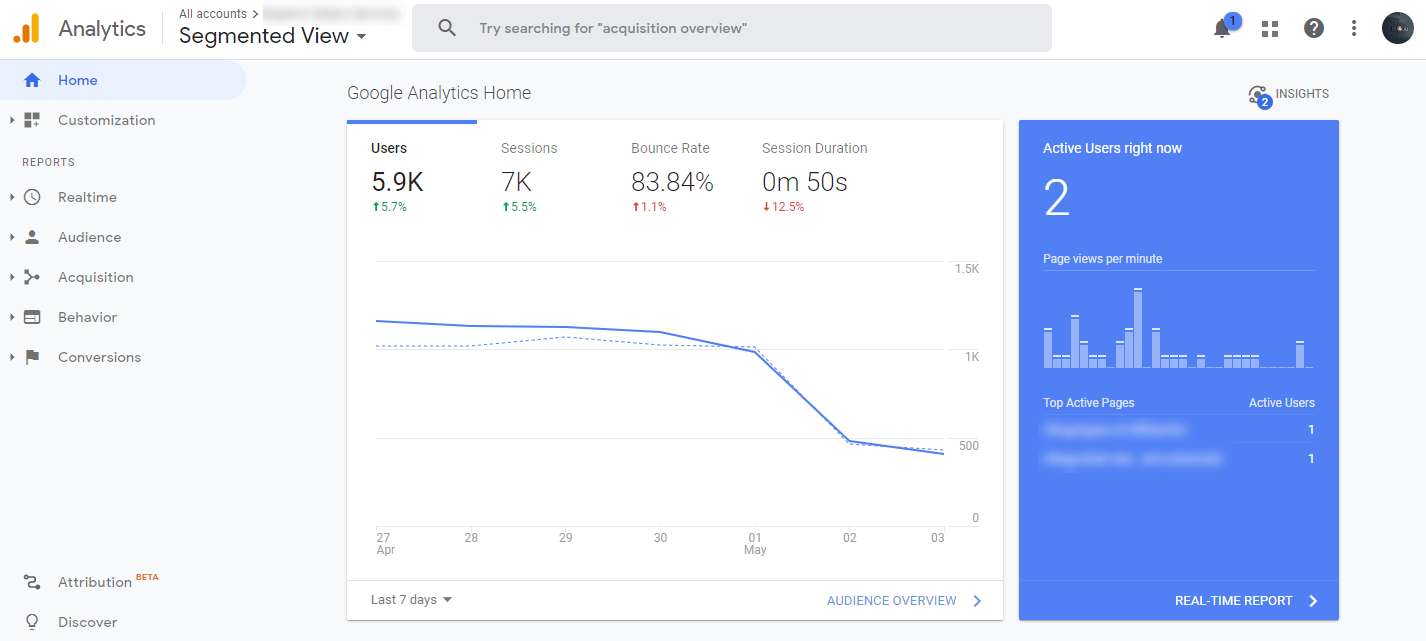
Think of Google Analytics as a data center that helps you understand your website traffic at no cost to you. It’s an essential step in learning where your users/customers are coming from by showing you data ranging from overall traffic numbers to specific information like device type, geographic information, and so much more.
This additional information helps you make better decisions in your marketing efforts.
Here are a few of the features that make this step in my SEO checklist worth your while:
- Sync your Google Analytics and Google Search Console accounts to gain additional information; there’s a section in Google Analytics called Search Console that shows landing pages, countries, devices, etc.
- Make your data a more collaborative space with an easy-to-use interface and shareable reports. You can have multiple users viewing a Google Analytics account, so data is shared with the entire team.
- Analytics intelligence features that can alert you of key changes and shifts in trends, so you don’t miss a single opportunity.
- Quick access to audience reports for a better understanding of how your customers interact with your site and other sites that use Google Analytics.
- Customizable data management that allows you to import data from external sources, in addition to existing Analytics data, so you always have the Big-Picture.
- Create filters to show clearer data filter out traffic from your own IP address and other traffic sources that you aren’t interested in including in your reporting.
- Set up goals and events so you can better track SEO ROI on your marketing campaigns and track site engagement.
- Annotations allow you to add notes; if major changes were made on a site (like a new website launch), you could add an annotation to provide more information that can be used in the future by you or other members of your team.
Interested in these features, but intimidated by the first steps? Here’s a great resource for step-by-step instructions to ease the process.
5) Yoast SEO For WordPress
If you haven’t already completed this item on the SEO basics checklist, Yoast SEO might just be your greatest untapped resource. It’s an SEO goldmine right at your fingertips. (If you use WordPress)
Yoast SEO is a WordPress plugin that provides simple optimization tools that can help you optimize your webpages.
It’s also updated frequently to align with SEO trends, allowing site owners more time working in their business rather than researching SEO trends and algorithm updates. Here are some of the key features:
- Metadata optimization (meta titles & descriptions)
- Open Graph Meta tag optimization
- Dynamic XML sitemaps
- Robots.txt control
- Readability checks
- In-line Keyword optimization checks
- Warns you of duplicated content
- Equipped with a redirect manager
- Set your targeted keywords and track how often you’re using them
- And a lot more…
And perhaps most impressively, it does all of this with zero pressure to be an SEO expert. Anyone can use it.
Installation and setup are a breeze, check out this tutorial for a more in-depth view of this essential tool.
6) XML Sitemap
An XML sitemap is exactly what it sounds like: it’s a map of your site that Google can read. When done correctly, it can help Google find and crawl all of the important pages on your site and understand how it’s structured. It’s one part of SEO best practice and helps nudge Google (and other search engines) in the right direction.
It can also include extra information on each URL, containing details of when they were last updated, their importance, and if there are other versions of the URL created in other languages.
If you’re using the Yoast SEO Plugin (which I recommend above), it’s incredibly easy to generate an XML sitemap. Check out the links above to learn how to create and submit yours to Google and Bing webmaster tools.
Note: XML sitemaps are limited to 50,000 URLs. If you have more pages on your site than that, you’ll need two (or more) separate XML sitemaps. This is called XML sitemap segmentation and it helps Googlebot with crawl efficiency.
7) Create a Robots.txt File
The robots.txt file is mainly used to specify which parts of your website should be crawled by web crawlers (user agents)— and Google provides very detailed instructions on how you can create, implement, and test this file for your website.
The file itself can specify different rules for different search engine crawlers, sort of like an instruction manual that you make for Google. Understandably, this has some pretty significant benefits:
- Block Non-Public Pages: Sometimes, there are pages on your site that you don’t want to be indexed. For example, you may have a staging version of your site or internal process documentation. While these pages do need to exist, you wouldn’t want random people to land on them, and this is where you’d use robots.txt to block these pages or directories from search engine crawlers/bots. Pro Tip: You’ll probably want to add a noindex tag on each page you don’t want Search Engines to index because sometimes web crawlers don’t listen.
- Maximize Crawl Budget: If you’re having a tough time getting all of your pages indexed, you might have a crawl budget problem. By blocking unimportant pages with robots.txt, Googlebot can spend more of your crawl budget on the pages that actually matter.
- Prevent Indexing of Resources: Using meta robots directives can work just as well (or even better) as Robots.txt for preventing pages from getting indexed. However, meta robots directives don’t work well for multimedia resources, like PDFs and images. That’s where robots.txt comes into play.
Using a robots.txt file with your website is also a web standard. Crawlers look for the robots.txt file in the host/root directory (or main folder) of your website. This text file is always named “robots.txt”.
Warning: the robot.txt file is a very impactful file, one misstep could lead to accidental de-indexation. Don’t worry, Google’s Robots Testing tool will help prevent that from happening.
Chapter 2: Keyword Research Checklist
In the holy trinity of SEO (keyword optimization, link acquisition, and content marketing), keyword research is a “you get what you give” system. As a foundational element of SEO, time invested in keyword research will help you strategically optimize your pages based on hard data.
Use this checklist as a guide the next time you’re about to dive into your keyword research. The more you do keyword research, the better and faster you’ll get at it. It’s also important to note that typically, one round of keyword research is not going to be enough because you should be creating on-going content marketing efforts based on your keyword research.
1) Understanding Search Intent
How do you decipher search intent? After all, website owners aren’t masters of mind-reading (at least not full-time)—but there’s still hope.
Let’s use the Google Search “Facebook,” as an example. When someone Googles “Facebook,” it is the website optimizer’s responsibility to understand that the search intent isn’t to jump headfirst into pages and pages of Facebook’s history. People just want to get from Point A (Google) to Point B (Facebook).
But sometimes, there isn’t an “ah-hah” moment when search intent isn’t broadcasted with big flashing arrows.
That’s where you have to dig a little deeper, which starts by understanding the four primary search intents:
- Informational — Finding info on a topic of choice (example: how to light a fire without matches)
- Navigational — Want to be directed to a particular site or page on a site (example: Facebook login or Gmail)
- Commercial — Research conducted pre-purchase that compares products of-interest (example: iPhone X reviews or iPhone X vs. iPhone XS)
- Transactional — Searching with a purpose of buying (for example front porch furniture prices or front porch furniture deals)
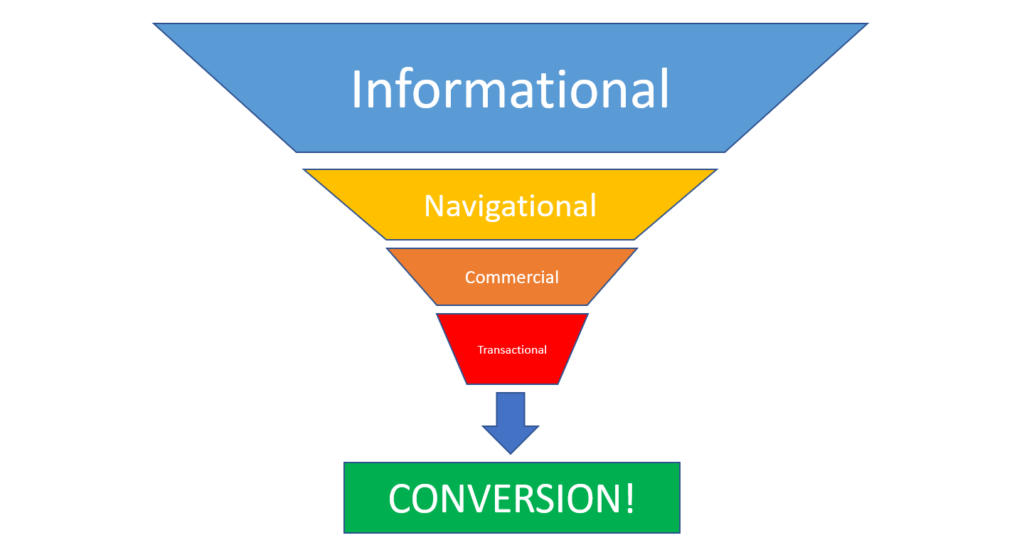
A page should be optimized based on the implied understanding of a searcher’s needs. A great way to uncover search intent is a simple Google search. Try it yourself.
When you Google “Facebook,” the first-page results aren’t surprising.
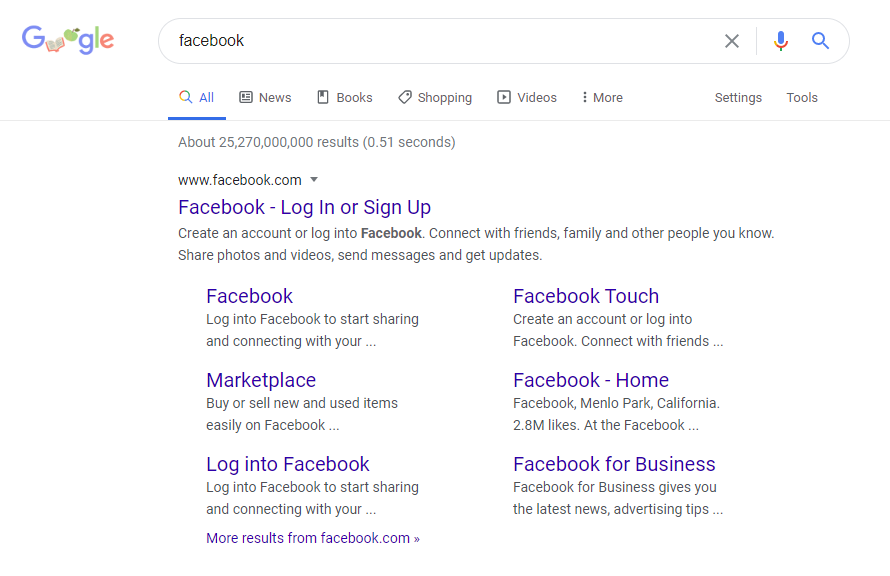
The number-one result is a link to Facebook’s homepage, where you can log in or sign up, while informational results (like Facebook’s Wikipedia page) are confined to the bottom of first-page results.
So if your business sells Facebook social media management, then aiming for this keyword just doesn’t make sense, right? It’s too broad, and you’ll probably never rank.
Your job is to make sure the intent of your pages align with the search intent of the keyword (query) you’re optimizing for.
For instance, keywords with transactional intent will often contain words like:
- buy
- deal
- discount
- product names
- subscribe
- for sale
Whereas informational searches are generally question-based and can contain words like:
- information
- where
- how to
- best way to
- why
It’s worth breaking down your content strategy and site structure to incorporate users at every stage of intent and aim to rank well for each.
2) Keyword Research
Much like how you can’t build a house without a sturdy foundation, you can’t execute a successful SEO campaign without focused keyword research. Comprehensive keyword research is the foundation of every successful SEO campaign.
But how do you find the right keyword?
Use Google Keyword Planner and Ahrefs’ Keywords Explorer
As Google’s designated research tool (that’s also totally free with a Google Ads account), Google Keyword Planner has the basic data you need to perform entry-level keyword research:
- Find new keywords using words, phrases, websites, and categories.
- Discover search volume trends and historical data for different keywords.
That said, free doesn’t always give you the most informative and accurate information. It’s a good idea to complement free tools like this with more advanced paid options like Ahrefs’ Keywords Explorer. You get a lot more data, different metrics, and can even track your site’s keyword ranking performance over time.
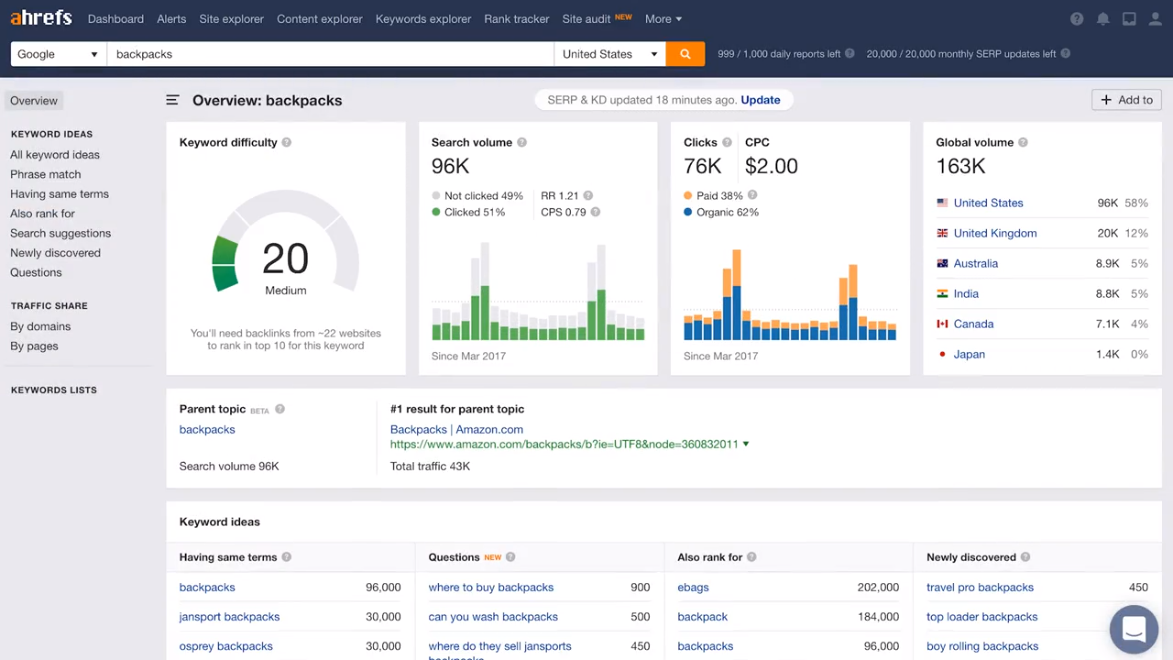
But don’t stop there. Remember, checking-off the “Keyword Research” portion of this SEO checklist should be an on-going effort.
Bonus: Ahrefs has a plethora of additional features you can use to further your SEO research and level up your SEO skillset. I also highly recommend taking a look at their blog for more in-depth training from their team of experts.
- Discover every keyword a domain ranks for (competitive keyword research)
- Discover referring domains and individual backlinks
- Discover which text is being used to link to your website (anchor text)
- Discover your top pages by estimated traffic and value, with top keywords and estimated volume
- Discover competing domains, with actionable insights like keywords unique to your domain, common keywords, keywords unique to competitors, etc.
- And so much more. Ahrefs is my absolute favorite SEO tool for research-related tasks.
Use Google Suggest to Find Long-Tail Keywords
Using Google Suggest is as easy as typing a keyword into the Google Search bar and letting Google Autocomplete do the rest.
Say you’re writing an article about backlinks, and you want to generate a list of long-tail keywords for the keyword “backlinks.”
Pull-up Google, type in a keyword generated by the Google Keyword Planner or Ahrefs’ Keywords Explorer but don’t hit enter. Instead, examine the drop-down box below your input:

These “Google Suggest” keywords are suggestions directly from the search engine you’re trying to rank in. They can be incredibly valuable, as these are queries that other Google users search for.
Similarly, when you search for your term, you’ll notice a section in the SERPs called “People Also Ask” that gives you even more potential keywords to target:
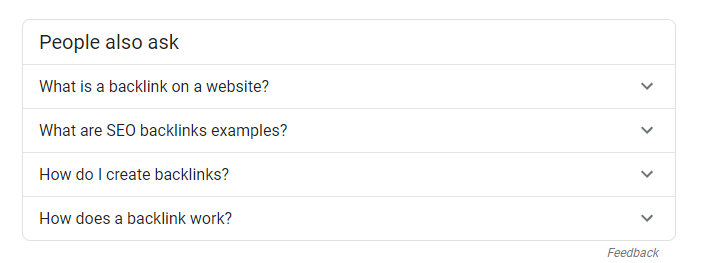
Take these ‘Google suggestions’ and ‘people also ask’ with a grain of salt, but don’t outright ignore them. They’re pointing you in the direction of your reader’s intent.
Give the People What They Want (and Search for): Utilize the Power of Online Forums
You want to use the language your audience uses, and optimize your pages for keywords your target audience is actually searching for.
That means finding places online where they’ve put the question out in the open — such as an online forum like Reddit or Quora.
Answering questions on these platforms may not necessarily directly help you rank your website, but remember: this is about keyword research. Use a simple answer on a forum as the prototype for a blog post, video, or ebook on your site that you aim to rank.
And if you don’t want to spend your time answering the questions first, that’s fine. You can still scope out Q&A threads in your topic’s niche and investigate which products, features, etc. are mentioned over and over again to establish a strong list of topics and keywords that match your visitors’ needs and interests.
Target Low-Competition Keywords for Quick Wins
Identifying popular keywords using Google Keyword Planner, paid keyword research tools, Google Autocomplete aka Google Suggest, and online forums isn’t a three-step recipe for success. You still need to take all of this info and measure it against hard data.
A great sounding keyword with no search volume may not be a great keyword after all. In the same vein, a very broad keyword can be either extremely difficult to rank for based on competition levels, irrelevant to search intent, or both.
So as the keyword strategist, you need to evaluate these keywords using some of the following metrics:
- Search volume
- Keyword difficulty
- Trends (I like using Google Trends)
This is where you’ll need to dive back into your keyword search tool —
Another great resource is KWFinder. Not only is it one of the least expensive premium keyword research tools on the market, but it also offers a smorgasbord of keyword-strategy-based benefits so you can optimize your site and climb to the first page.
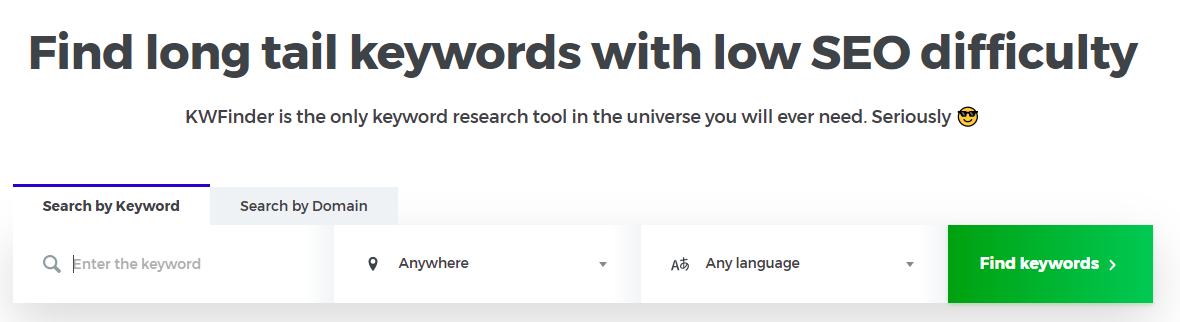
Similar to Ahrefs and Google Keyword Planner, this tool will give you the search volume of your keywords — but it also allows you to see the volume for the Autocomplete and People Also Ask sections of the SERPs as well.

So as a keyword strategist, you can have two primary goals when using KWFinder:
- Verify your compiled list of keywords (specifically question keywords) that your content is designed to answer.
- Optimize for low-competition and low hanging fruit keywords that help you climb in rankings and gain some momentum.
Note: Optimizing for high-competition keywords is not impossible, but you’ll have to shift your SEO strategy into full-gear. This is why I recommend starting with keywords with lower competition scores so you can gain some momentum and perfect your craft.
Once you know your keywords, you can then work on creating content that will top your competitor’s content and prove to Google your page is worthy of a first-page prize.
This pulls into further strategy, too, as you’ll need to a) earn backlinks from trusted sites b) resolve any technical issues (broken links, slow loading times, mobile responsiveness), and c) complete as many of the items on this SEO basics checklist as you can.
Head Terms vs. Long-Tail Keywords: What’s the Difference?
Keywords are not only classified as competitive or non-competitive, but can also be categorized by head terms, short-tail keywords, and long-tail keywords.
So, what’s the difference between the three?
Head terms stand at the head of the pack, as they accumulate high search volumes. They are extremely competitive and, therefore, difficult to rank for.

Long-tail keywords are further down the list when it comes to search volume, but also when it comes to competition. So they’re generally easier to rank for and much more specific.
Imagine you’re a shoe company in its start-up phase trying to rank for the keyword “shoes” (a great example of a head term).
Using your keyword research, you’ll quickly realize that search volume and keyword difficulty for “shoes” would present a nearly impossible task for the average website owner — and even the everyday marketing team.

A downfall of optimizing for a head term is that those terms are all-encompassing, as it umbrellas a variety of search intents: informational, transactional, and commercial. Not to mention, a broad head term like “shoes” could include every shoe retailer known to man.
Imagine interviewing for a company where you have to outshine millions of applicants. That’s what going for a head term is like.
Now imagine you could narrow down the interview pool to 20-50 applicants. That’s where long-tail keywords come in.
Instead of going for a high-volume and hard to rank for search term, you can drill down and target search queries that are easier to win. For instance, “shoes for pregnant women” is much more manageable.
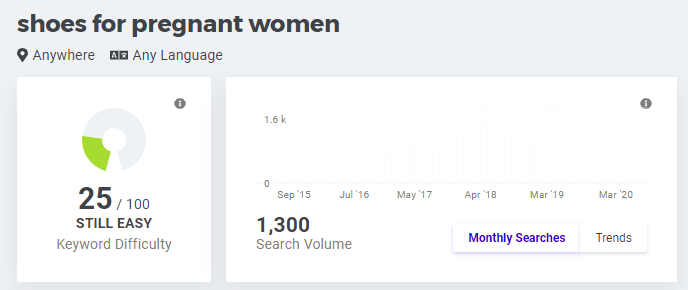
Think of long-tail keywords as a head term’s exact opposite: niched, very specific, lower search volumes, and much less competitive.
You’ll want to make sure that you optimize your SEO efforts for both long-tail keywords and head terms. This blend of long-term planning and short-term planning can lead to impressive results over time.
Chapter 3: On-Page SEO Checklist
Now that you’ve checked keyword research off your SEO basics checklist, the next step is on-page SEO. But what exactly is on-page SEO?
The answer is any on-site energy that concentrates on the optimization of your webpage, whether it be keyword incorporation, meta title and description optimization, or URL structure adjustments.
Reap the benefits of focused on-page tactics with this simple checklist:
1) Follow A Logical URL Structure
Even the smallest of details—like your URL can positively or negatively affect your rankings for many reasons, but in an effort to simplify, your URL is the first thing Google sees and you’ll want to make a great first impression.
You know those pesky URLs that take up your entire browser URL? They’re not only unsightly but fail in their purpose of introducing your webpage’s objectives, which should be giving search engines and your audience clear expectations.
2) Think about your site’s structure:
For your URLs to have a logical structure, your website has to have a flow that makes sense. That may sound like a truism, but it can actually be a lot more complicated than one would hope.
You’ve likely seen this illustration before, depicting how a website should be organized from the homepage down, with topic (or category) pages, then sub-pages below:
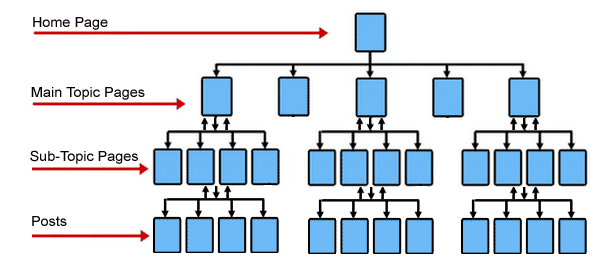
This is called a siloed URL structure because you end up with different verticals or silos on your site that — when visualized — resemble grain silos.
But how do you ensure that your silos are actually siloed? Some content management systems don’t have a visualization tool that lets you build pages under a topic or subtopics. For those content management systems, you’ll have to do it manually.
What is a URL structure then?
It’s actually incredibly simple in theory but can be more complex based on the size of your site.
Every URL has distinct parts, as you see below:

When you create a page on your site, you should have the option to change the end section of the URL (or slug), designated by the 3 and 4 in the simplistic image above. Using an outline (like the one above), you can strategically create pages that contain similar content types, topics, catalogs, etc. It’s also best practice to incorporate your target keywords within your URLs, so it will take some planning.
This helps Google understand when one page lives below another. So a URL that looks like this:
www.example.com/category/subcategory/product
Simple in theory, but easy to mess up and hard to detect on websites with thousands or even millions of URLs. I could go into much more detail on URL structure and information architecture, but this simple SEO checklist is intended to be for beginners.
3) Optimizing Your Title Tags
So, what is a title tag?
It’s the clickable headline that allows users to quickly identify a page’s topic and relevancy with minimal effort. You can find a title tag in the SERPs:

Web browsers:

Want high payoff with little investment? Expand your on-page SEO strategy into your title tags. Just follow this advice:
Keep title tags short. Google will automatically cut off title tags that exceed 60 characters or around 520 pixels in width. But not all characters have equal weight. Capital letters can monopolize more space, so be strategic when writing title tags.
Think outside the box. Don’t settle for default titles. You won’t stand out from your competitors by resorting to the overused and unoriginal titles.
Blend creativity and keyword optimization. Google does determine relevance from title tag on your page, so balance these as well as you can.
Keyword order matters. Front-load keywords when you can, as some visitors, won’t even make it past the first 2-3 words of your title.
Everyone judges a book by its cover. Think about the last time you clicked on an article with an underwhelming title (Can’t think of one? I’m not surprised).
My recommendation is to do everything in your power to write a relevant, eye-catching, attention-grabbing title tag. That includes using trigger words, timestamped content, target keyword(s), brackets, parentheses, and much, much more.
4) Optimizing Your Meta Descriptions
If you’re hoping to launch your site to first-page rankings with optimized meta descriptions, prepare to be disappointed.
Google has discontinued the use of meta descriptions as a ranking signal—but don’t be discouraged. Writing compelling meta descriptions is not a fruitless strategy.
In fact, a well-developed meta description, complete with suitable word counts, keywords, and, most importantly, value creation, can increase searchers click-through rates (CTR) and, therefore, increase your site traffic.
And one thing Google does pay attention to is the click-through rate to your webpages, as well as what happens after users land on your site. If a user is clicking through to your site more than other sites and stays there for a good amount of time, it’s a signal to Google that the user has found valuable information and will play a positive role when it comes to rankings.
But what is a meta description and how do you add one?
Think of a meta description as the exterior of a restaurant. Before visitors slurp up and devour your content, they’ll judge you from a distance, scan your posted menu, and assess whether your page can satisfy their craving.
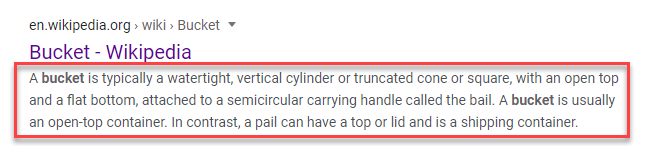
Can you recall a time you had a “quick question” that a search engine was able to answer with nothing but a few informative meta descriptions?
Sure, this may not increase your traffic—but if you want to be incorporate SEO best practices and provide value to the user, the needs of the user should be an utmost priority.
5) Optimize Heading Tags
The same optimization principle applies when writing headings — you need to make sure there’s a good balance between keyword usage, skimmability, flow, and uniqueness.
Why optimize headers though?
Well for one, it’s because a lot of readers skim — as much as 43% according to Optinmonster.
So nearly half of your audience is only looking at your headings at best. Write for them just as much as you write for the attentive reader, which translates to solid heading tags.
But what about SEO? Heading tags can help Google get a better idea of what’s happening on your page. Google’s John Mueller is on the record saying:
“We do use headings when it comes to search. But we use them to better understand the content on the pages.”
So think of headings as Google’s guide to your content. Use H1’s, H2’s, and H3’s to logically block out your content into digestible bits for both the reader and search engine crawlers.
6) Optimizing Your Body Content
You may be a prolific writer, but that doesn’t mean your content naturally comes out optimized on the first draft. Not by a longshot.
The best way to optimize your body content is to include SEO elements from the very beginning. My team uses a solid process for content creation:
- Keyword research
- Create a wireframe that includes SEO elements
- Write from that wireframe
- Edit for basic errors
- Edit for SEO best practice
- Have someone run quality assurance
Only then does a piece of content even get close to going live. It has a whole journey that helps ensure optimization from day one, which should be the foundation of every webpage: Keyword Research.
Oh, and make sure you keep these elements in mind as you further your optimization:
- Include keywords
- Don’t go “thin” — provide as much value as you can with very little fluff
- Write to engage, inform, and entertain
- Write so that it’s easy to share
- Long-form content is generally easier to rank
7) Using Synonyms & LSI
Another area of optimization for your content is known as LSI or Latent Semantic Indexing. This is a technique used by search engines to try to understand how words interact with each other — sort of like an AI trying to understand and then write poetry.
It may not be 100% perfect, but you can bet it’ll know the words and phrases used by great poets.
But how does this help you?
Well, by understanding the use of LSI, you can look for pieces of information that are related to your content’s topic. If you’re writing a blog post on “The 10 best pillowcases for 2026”, LSI encourages you to branch out and talk about other related areas — like sheets, mattresses, or features — that provide greater depth to your content.
A great tool for this is SEMRush’s SEO Content Template. When you input your keyword(s) into their tool, they provide a ton of information that helps guide your content creation — including “recommended keywords” that help you enrich your piece. You’ll notice that many of these don’t really have to do with the primary keyword (which in this example is pillowcases):
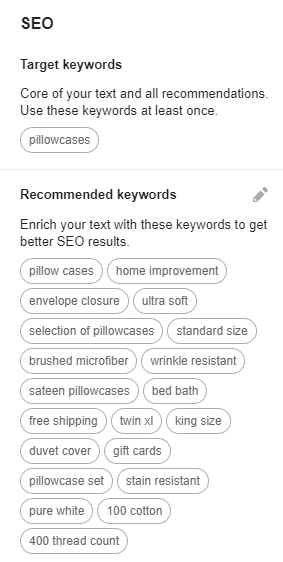
Including LSI in the picture helps you ensure that your content is robust, valuable, and easy for Google to understand and rank. It’s well worth the extra effort to optimize for LSI keywords. If you don’t have SEMRush, you can also try this free tool lsigraph.com.
8) Optimizing Your Content for Readability
Getting a visitor to click on a title is one thing. Getting them to read to the bottom of the page is a whole other ballgame, and Google watches for that. If users have a high ‘dwell time,’ then the search engines see this as a ranking signal because your webpage is providing value for that query or cluster of queries. Conversely, high bounce rates and low readability are bad for your SEO.
I can’t tell you how many pages I’ve started reading, only to leave after two or three paragraphs — and it wasn’t because I have a short attention span. It’s because the writer failed to grasp my interest and keep it.
And this encompasses a whole world of information, so I’ll try to sum up readability as best I can.
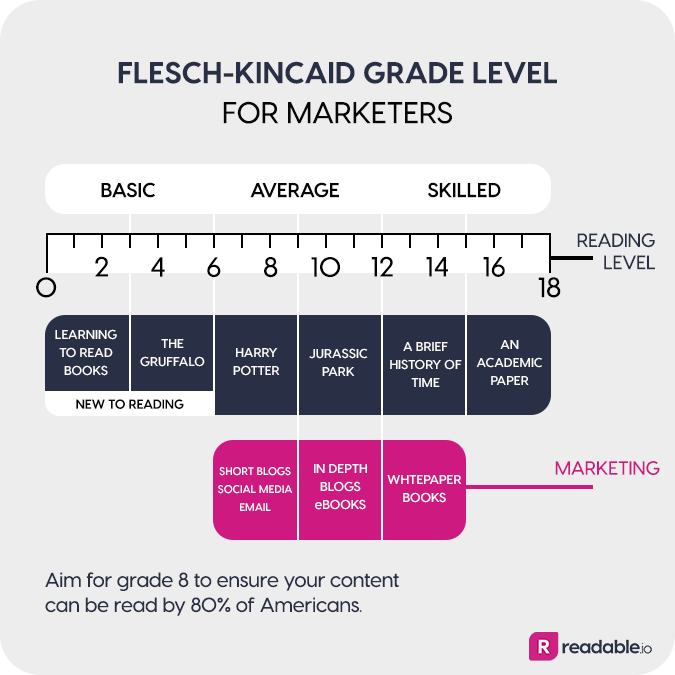
The easiest way to consider your own content’s readability is to put it on a scale. Most online readers are going to fall between a 6th grade to college freshman reading level at the highest end.
The sweet spot? Around 10th grade:
Optimizing Your Content for Readability
This isn’t because everyone failed 11th grade English — it’s because it’s more interesting and engaging to read at a comfortable, conversational level.
And then you go deeper. Readable content implements a whole host of other factors, including:
- Transitions
- Bucket Brigades
- Length
- Heading engagement
- Tone
- Descriptive headers
- Engaging imagery
- Bulleted lists
- Recent information
- And more
Here’s the kicker:
Readability can also evolve. Just because something is live on your site doesn’t mean it has to stay there for eternity. Revisit old posts and keep them fresh, and you’ll see better results.
9) Optimizing Your Images
While it’s tempting to think that the effort you put into creating an image will instantly be rewarded, that’s simply not the case.
In fact, without proper optimization, Google can’t even read your image. It knows it’s there, but it doesn’t know what it’s about — unless you tell it what the image is about.
The easiest way to optimize an image is to include an alt-tag description that describes the image to Google’s crawlers. Despite popular belief, this isn’t entirely for SEO though. In addition to helping crawlers understand what an image is, the alt tag and image title were also designed to help improve the user experience for visually-impaired users on your website.
So while Google can look at image attributes and make a ranking decision from there, the better idea is to focus on optimizing for your user. Don’t just stuff a bunch of keywords in your image alt or title tags because it 1) doesn’t help your on-page SEO and 2) makes a horrible user experience for the visually-impaired. Best practice would include describing the image to the best of your ability and sprinkling in target keywords or LSI keywords where it makes sense to do so.
Oh, and make sure your images aren’t too big. Large images invariably slow sites down, which affects page load times and user experience. I recommend using this free image compression tool, which also has a plugin for WordPress.
10) Internal Link Optimization
Internal links are precisely what they sound like: hyperlinks that go from one of your pages to another one of your pages.
A common example is your site’s navigation — an essential function that allows users to understand and move through your website. If pages are bricks, then internal links are the mortar that holds them together.
But they do more than aid navigation. They also help you establish the informational hierarchy of your site — which should match the URL structure I mentioned earlier. If you create internal links that start mismatching silos, Google could have a harder time understanding the flow of information and how users can potentially understand it:

Internal links also help you distribute link equity throughout the pages on your site. (We’ll go over link equity in further detail in Chapter 5.) Again, if Google has a hard time understanding the flow of information, it won’t have a clear idea of how to distribute your link equity.
So what can you do about this? Well, if you’re uncertain of your internal link structure (or know that you’ve messed it up), you’ll need to do an internal link audit. This guide can walk you through that process.
11) Strategic Outbound Links
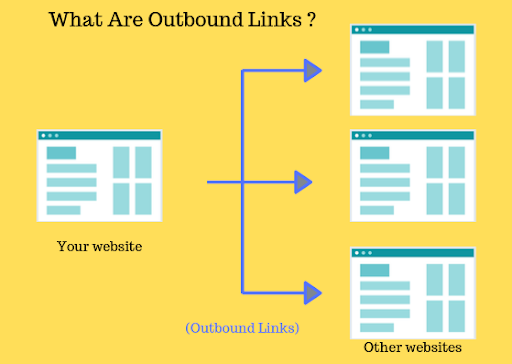
The other type of link to be aware of for on-page SEO is the outbound link. These are hyperlinks that start from your webpage but link to a different website.
For instance, this link is an outbound link, because it directs you to a different domain.
You use these all the time, and they do have quite a few purposes.
For instance, the fair use of images usually requires citations. You’ll notice that the images from other sites that I’ve shared in this post all have a linked source — that’s best practice, and will keep your content’s legitimacy on the up-and-up.
But it’s also an SEO factor from Google’s point of view. Outbound links to highly relevant and authoritative pages help Google understand your topic and can affect how you rank. While it’s not the end-all of ranking factors, it can certainly help you point Google in the right direction.
Chapter 4: Technical SEO Checklist
If you read “technical SEO” and thought: “I thought all this was technical already…”
You’re not alone!
There’s a common saying these days that “SEO is dead… to everyone but industry professionals” — and I disagree. I think that SEO is approachable by anyone, even the technical elements.
It may take some on-going education on your part, but if you’ve already set up a website and published it, you can learn the in’s and out’s of how to optimize for technical SEO. This checklist can help point you in the right direction, but it is not a comprehensive post on technical SEO.
1) Fix Your Crawl Errors
We’ve talked about crawling throughout this checklist, which is simply industry jargon for how Google finds and evaluates each page on your website.
Typically, this process goes smoothly. Google’s spent a few decades perfecting their algorithms, and they certainly know what they’re doing.
But sometimes, something catches when Google is looking at your site and they can’t reach a page. In these instances, you’ll want to find and fix the problem quickly.
Thankfully, if you’ve set up your Google Search Console, you already have everything you need to find the issue:
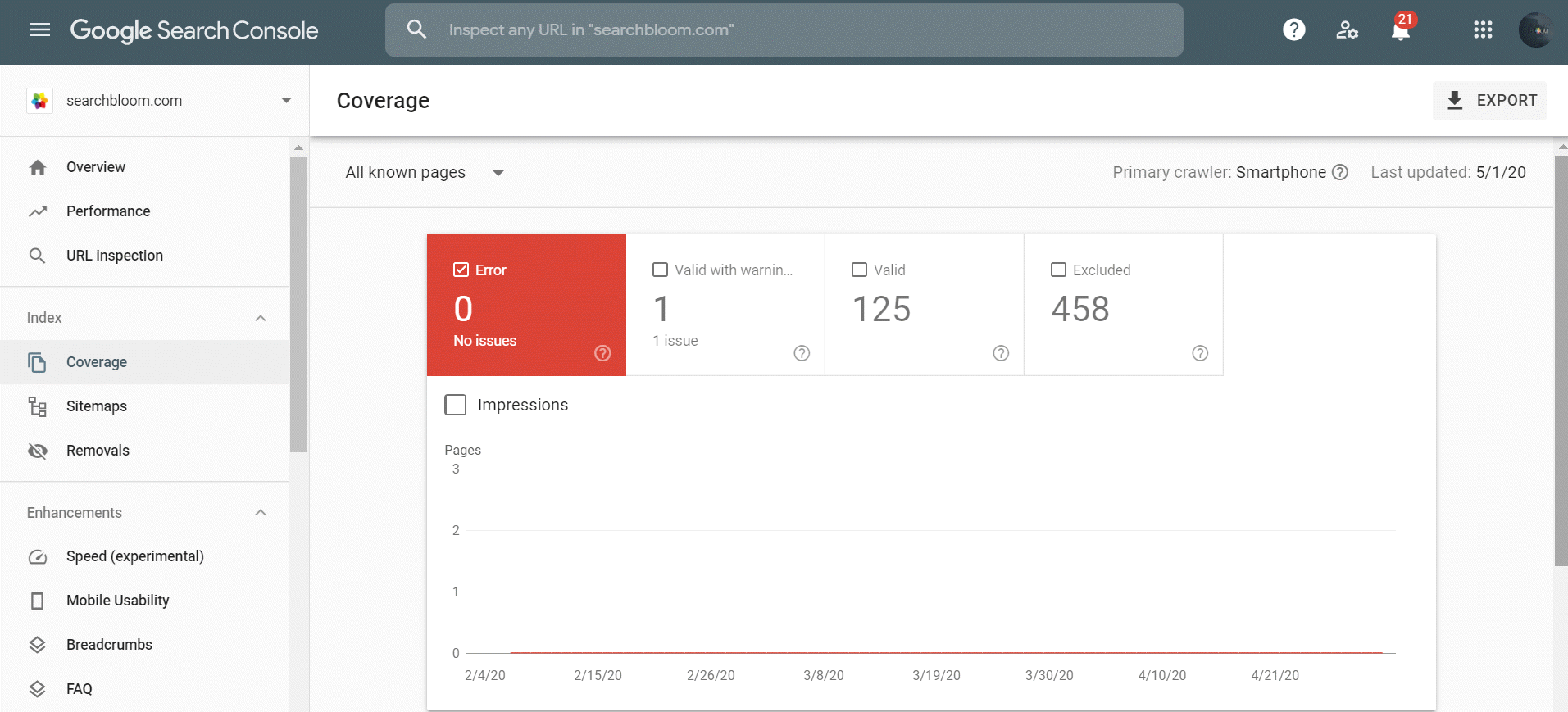
Here are just a few of the errors reported to you in Google Search Console.
Site errors
- DNS Errors
- Server Errors
- Robots Failure
URL errors
- 404 Not Found errors
- Soft 404 errors
- Mobile-specific errors
- Malware errors
Markup errors
- Structured Data errors
- Mobile Usability errors
- Breadcrumbs errors
2) Fix Broken Links
Broken links are simply links that don’t work anymore, for a variety of reasons:
- The website you linked to is no longer live
- The webpage you linked to has been moved, but not redirected
- The URL structure was changed, and your URL is wrong.
And this creates an issue for a variety of reasons. Statistically, the older a page is on your site, the more broken links you’ll have. This is known as Link Rot:
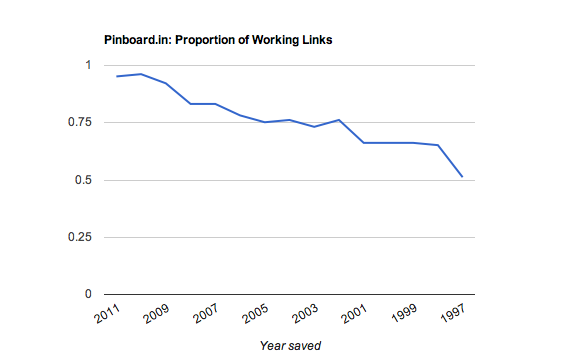
No matter how you look at it, a broken link isn’t good. It’s not a good look when someone clicks on a broken link from your site, it will also have negatively affects your SEO.
Remember that Google looks for high-quality, relevant, and strategically placed outbound and internal links to assess your web pages. A broken link obviously mars that process.
So how do you fix broken links? You find them and replace them.
How do you find them? Use a dead link checker. My favorite tool to use for this is Screaming Frog, but it does have a little bit of a learning curve.
3) Install SSL
It may seem a bit over-complicated, but Google has viewed the security of your site as a ranking factor since 2014. That’s not about to change, either.
And for now, SSL protocol is the gold standard for a browser to server security. In short, an SSL certificate encrypts the link between a user’s browser and the server where your website is hosted.
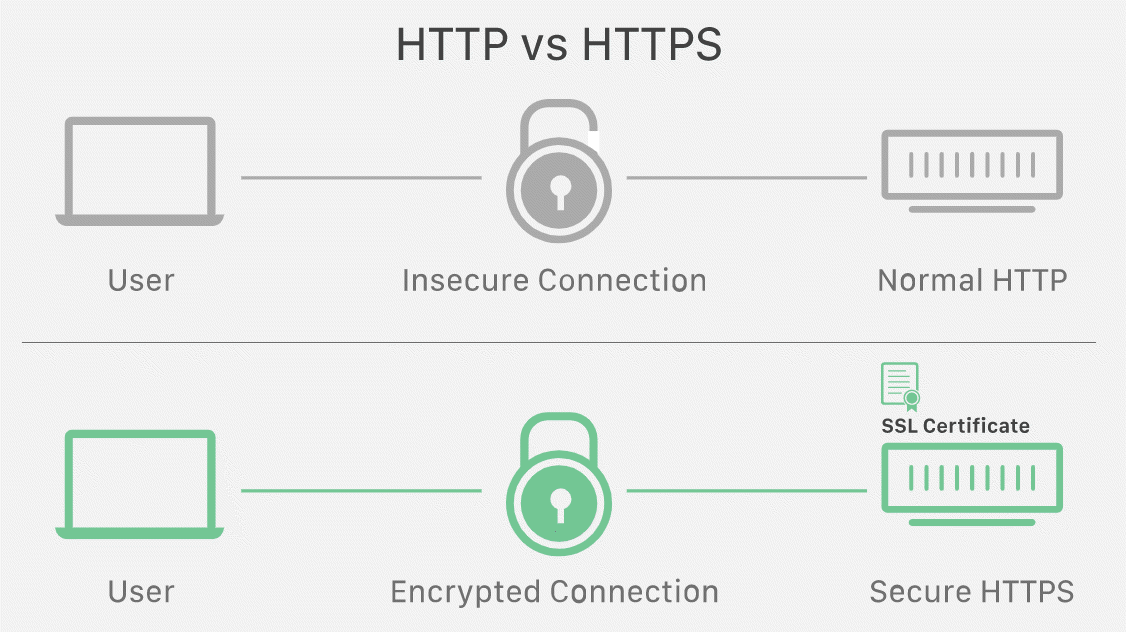
So anyone who tries to steal your users’ data is just going to get an unintelligible garble of characters. Without SSL, they get the raw data, and you could be held responsible.
These days, there’s no excuse to not have an SSL. Most web hosting companies offer them for free at signup, and even if you have to pay, it’s worth it.
That said, most sites shouldn’t need a paid SSL solution. Follow this guide to receive a free SSL for your site.
4) Ensure Your Site Doesn’t Have Duplicate Content
Duplicate content is another easily understood SEO concept. It’s any instance of a page that contains the same content, excluding your navigational elements. Duplicate content can also be found in your meta tags. i.e., meta title tags, descriptions, etc.
The issue with this is simple: when Google crawls your site and finds duplicate content, it can be difficult for the crawler to know which piece of content is the original.
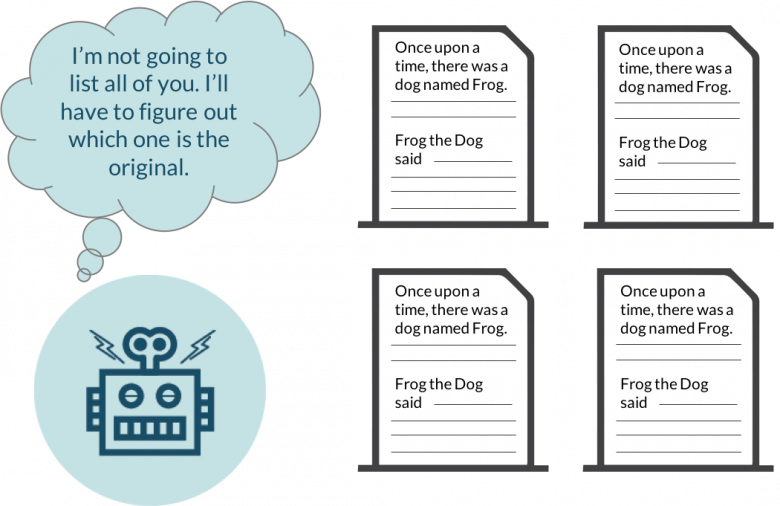
Common culprits for this are product pages, category pages, location-based pages, or incorrectly set up blogs.
The simplest solution may seem to be to find your duplicate content and rework it, but that’s not always scalable. I highly recommend this guide from Yoast if you want to consider an in-depth strategy to fix duplicate content.
Canonical Tags
If you find yourself in a situation where duplicate content is unavoidable, there is a fix for it that I want to mention: the rel=”canonical” tag.
Canonical tags allow you to tell Google which is the “original” or leading piece of content, meaning the crawler doesn’t have to guess which page it should prioritize. It essentially helps Google consolidate the information about the individual URLs with duplicate content and avoid spending your crawl budget on pointless pages.
5) 301 Redirects
As you update your website and develop new strategies for traffic, you’ll sometimes find that an old page needs to be done away with.
While it’s tempting to just hit the delete button in your CMS, that can be a bad idea if that page is in Google’s index. You may have some traffic or inbound links already flowing to that old page, and you want to try to preserve your previous gains. That’s where the 301 redirect comes in.
301 redirects (permanent redirects) allow you to send visitors (and search engine crawlers) to an updated page, essentially shifting the authority and traffic to the new page. It’s also a key part of updating your URL structure.

It’s certainly possible to mess this up though.
For one thing, it’s possible that over time, you’ll start creating “redirect chains” — essentially meaning you have a redirect going to a redirect, and then eventually a live page (200 status code). This sends Google on a wild goose chase through your site, which is never good.
You can also end up with 301 redirects for canonical tags, convoluted internal linking due to redirects, or completely unnecessary redirects. You’ll need to conduct an audit and make sure that you’re redirecting properly, which you can do with a tool like Screaming Frog.
6) Make Your Site Mobile Friendly
The digital world is mobile these days, and like many other trends in this checklist, it’s unlikely to change. More than ever, the world is browsing, reading, communicating, and buying from mobile devices.
So much so that Google now indexes your mobile site first (also called mobile-first indexing). It’s a move they’ve been rolling out since 2018.
What does this mean for your SEO?
Simply put, it means to be mobile-friendly or watch your traffic die a long, slow death. If your website looks like the image of the left below, you’re behind the curve:
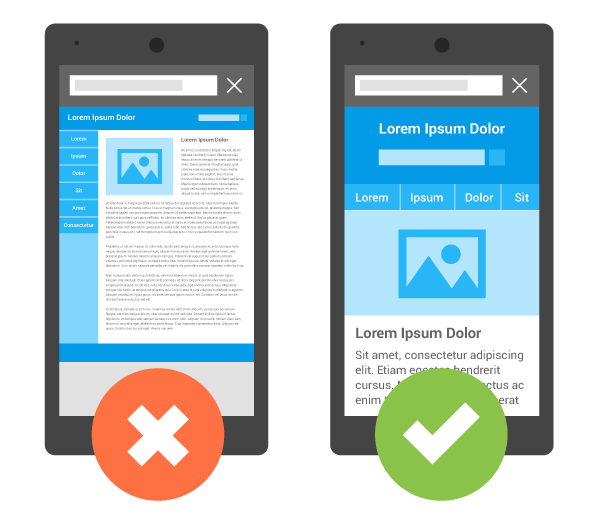
The basic test for mobile-friendliness is fairly simple: go to your website on the phone, and if you have to zoom in (or otherwise manipulate your phone) to see text, images, or navigation elements, you need to make some changes.
But that’s the bare minimum, and good SEO will take you well past that and into more technical optimization efforts.
To get a better idea, I recommend plugging your URL into Google’s own mobile-friendly test tool.
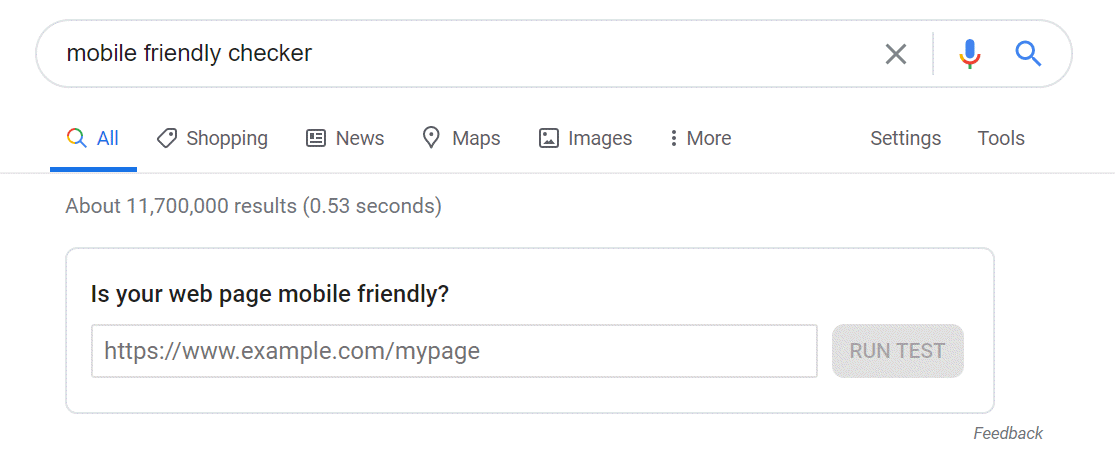
You’ll receive direct feedback about your website and a list of any improvements you can make to be more mobile-friendly.

From here, you can start to make adjustments and optimize your site.
The good news is that most WordPress website themes, e-commerce platforms, and popular CMSs are already going to produce a mobile version of your website or make it responsive to all device types. It may not be perfect, but it’s certainly a good place to start.
That said, you should also look into how you can further optimize for mobile if you want to ensure SEO best practices on your site. Because this will involve coding experience, I recommend working directly with a professional and reading up on current best practices.
7) Optimizing Your Site Speed
If you’ve been around an SEO expert for long, they probably mentioned site speed — and there’s a good reason for that.
Studies have shown that your site’s speed directly impacts a user’s patience with it, and this, in turn, can impact your site’s rankings:

If tons of people are leaving (without ever seeing what you have to offer), Google won’t view your site very favorably.
But thankfully, there are plenty of ways to check your speed and improve it. PageSpeed Insights is an easy, free tool from Google that tells you page speed information, what’s slowing your pages down, and what you can do to fix it.

That said, your site’s speed has a lot of factors that slow it down or speed it up, so I recommend going through a guide that can help you parse through all of the information that’s out there. It never hurts to be prepared and can be rather complex. Because this will involve coding experience, I recommend working directly with a professional and reading up on current best practices.
Chapter 5: Link Building Checklist
Google puts quite a bit of stock in how other high-authority websites interact with your own — and that interaction comes in the form of backlinks. As a general rule, having more high-quality links to your website will lead to better SEO results.
But developing those links is a process, and it won’t happen overnight. Pro Tip: Don’t try and take a short cut and buy low-quality links. It doesn’t work longterm anymore and will cause damage to your domain and rankings. If you put in the work, you’ll have a better chance at achieving desired results, take a short cut and you will absolutely fail.
To make the most of this part of your SEO strategy, you’ll need to get creative, create some solid (shareworthy) content, and develop a strategy that helps you acquire backlinks over time.
1) Understanding Authority Metrics
It’s easy to focus on your rank and traffic as primary metrics for SEO efforts, but there are plenty of other indicators that can help point you in the right direction.
In particular, authority metrics can help you see the big-picture and point you toward how your website can be improved incrementally — in other ways than by watching traffic or conversions. In particular, you need to pay attention to a few metrics: Domain authority or domain rating.
Domain Authority (DA) — This metric was developed by Moz and is used to help predict your website’s ability to rank. It ranges from zero to 100, with higher scores meaning more authority. It should be noted that this is not an official metric from Google, and is only predictive in nature.

Domain Rating (DR) — This metric comes from Ahrefs, and is a helpful signal for the strength of your backlink profile. Like DA, it’s measured from 0-100, with larger numbers indicating more authoritative backlinks and a stronger link profile.
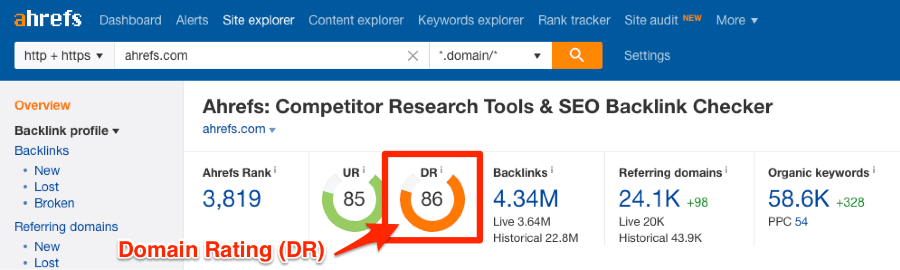
When used in tandem, DA and DR help paint a more accurate picture of your optimization efforts.
Let’s explore an analogy to make it clear why you need these.
Think of your basic understanding of how you rank on Google. It’s based on best practices, a bit of research and execution. Understanding why things happen is like trying to read a sign that’s far away, only your eyesight is a bit blurry and it’s nighttime.
You can think of these metrics like putting prescription glasses on. You can see the sign a bit clearer through both lenses, but it’s still dark and you can’t be 100% sure the prescription is right.
All that said, something is better than nothing, and these metrics are designed by people who devote their lives to understanding Google (and search engines in general). Increasing the authority of your website and leveraging these metrics should be a key part of every SEO strategy. Additional metrics like Page Authority (PA) from Moz and URL Authority (UR) from Ahrefs are also frequently used when determining the authority of a particular URL on your website.
2) Creating Business Listings (Citations)
Business listings, also known as citations, are an important element in both local SEO and link building efforts.
These listings help you provide Google’s crawlers with consistent NAP information — an acronym for Name, Address, and Phone Number. When you add this information to directories, it helps Google pinpoint your location and provide accurate results for users in your area.
More importantly, it also provides some low-hanging backlinks from sites that typically have high domain authority. Missing out on a link from these sites just isn’t worth it, especially because your competitors are likely to be on them too.
Here are a few common business listings that you can sign up for:
- Apple Maps
- Google My Business (Most important for Local SEO)
- LinkedIn Company Directory
- Bing
- Yelp
- MapQuest
- HubSpot
- Super Pages
- Yellow Book
- Thumbtack
But there are plenty more! Many businesses can take advantage of industry-specific listings as well (For instance, Searchbloom uses Clutch).
Including your business in these listings (and more) can help you when done properly, so look into your options and make sure your information stays up to date. Here is a comprehensive list of websites provided by BrightLocal to list your business on.
3) Outreach to Friends & Colleagues
When it comes to link building, it’s always a good idea to start with quick wins. That includes friends, colleagues, former colleagues, or really anyone you have a relationship with.
Plenty of guides have covered how you can do this ethically (and without sounding spammy), so I’ll leave one of them here for you.
4) Outreach to Unlinked Mentions
With over a billion websites live on the web, there’s a good chance that your business has been mentioned somewhere. It could be a local newspaper’s website, a podcast you were a guest on, or a whole host of other options.
But if these mentions don’t have a link to your website, then you aren’t getting as much of an SEO benefit from them.
It’s cool to get a shout out and feel like your business is going places, but unlinked shoutouts just don’t provide as much of an SEO benefit as linked mentions. That’s why you should try to turn these unlinked mentions into links.
It’s another area of low hanging fruit for your SEO, with potentially hundreds (for large companies) of brand mentions that should and could translate into authority for your website.
Be warned though: you’ll need a strategy to make this scalable, and even then, you may not hear back. That’s okay. Keep trying, as even a few links from this method can still be big wins.
5) Outreach to Broken Inbound Links
This tactic is similar to unlinked mentions. Like I mentioned in chapter 4, sometimes links break for a variety of reasons.
For instance, you may have changed your URL structure to better align with your website’s hierarchy — but that means any inbound links to that page may need to be updated. Those links could be dead at that point, and no one wants a dead link on their site.
You’ll need to develop a strategy — similar to unlinked mentions — that helps you pinpoint these links and provide a remedy.
And keep in mind that you can do the same thing, but with your competitors’ links. You have to create the content for replacement (if you don’t have something suitable), but you should be one-upping your competitors’ content anyways.
Speaking of which, let’s talk about how to do that.
6) Competitive Research
Competitive research is somewhat self-defining. It’s looking into what your top competitors are doing to rank and win traffic, and then turning that traffic into leads and customers.
While you’ll never want to fully knock them off, a competitive strategy can allow you to earn traffic (and potentially some business) away from your biggest threat. You can do this with both Keyword Magic Tool and Keyword Gap Tool in SEMRush.
Let’s talk about keywords though, because this will be your initial focus. A great tool that can give you a bird’s eye view of competitive keywords and where you stand is SEMrush’s Keyword Gap tool.
This pits your domain against your competitors based on the keywords each of you are ranking for and helps you see where you can improve.

The tool includes a bird’s eye view that shows how many keywords you and your competitors rank for:

As well as a more in-depth view of shared, unique, missing, strong, and weak keywords:

Use these tools to supplement your keyword strategy with competitive research.
But what about link building?
Well, when you go to create a piece of content for a link building strategy, you can use SEMRush’s SEO Content Template. You insert your keywords, and it spits out a list of elements that you can include to help increase your chances of ranking on the first page.

Among the recommendations is a list of sites you should try to earn backlinks from:
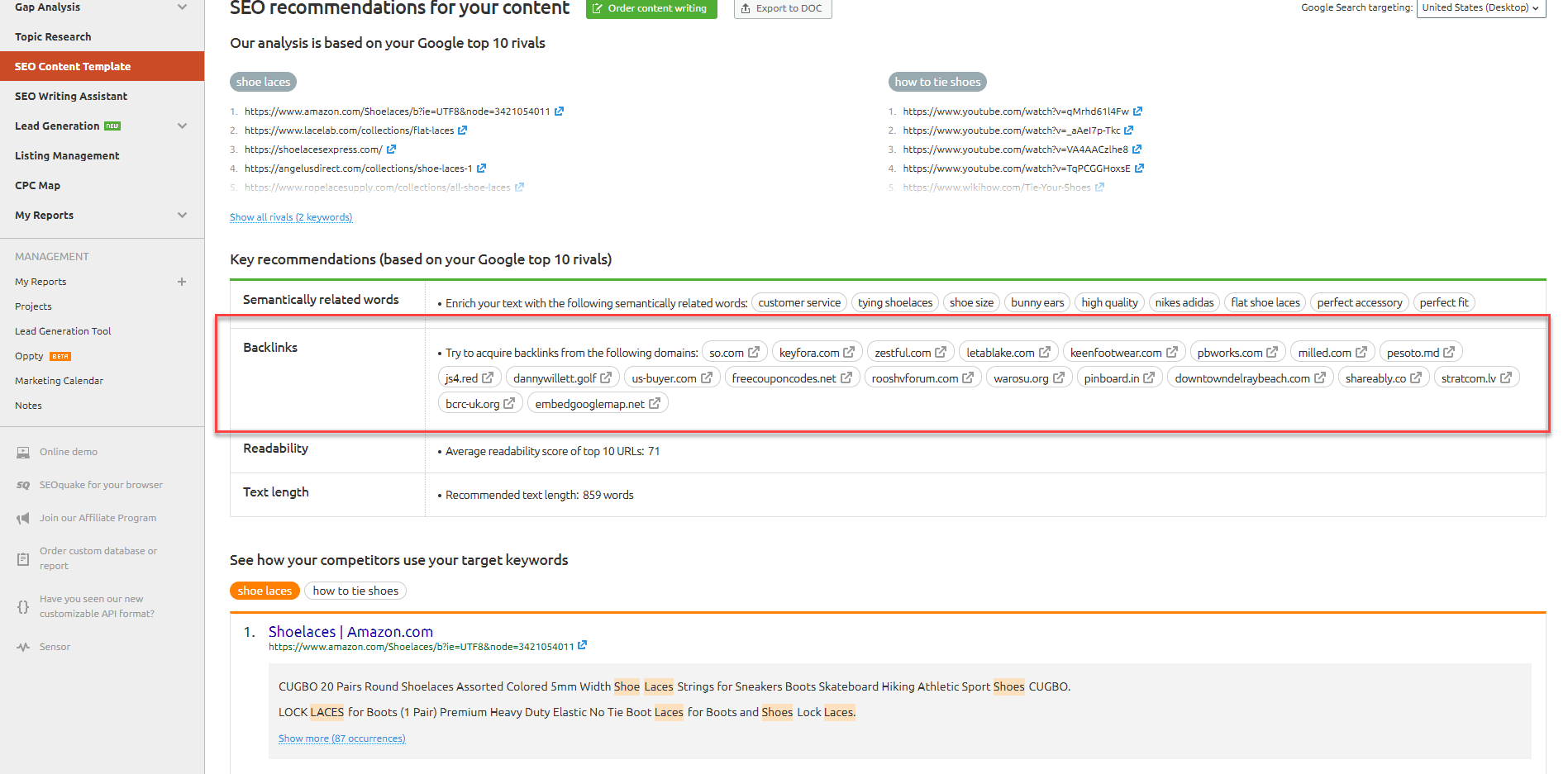
And that’s the beginning steps to your strategy.
7) Guest Posts
This very blog post is a guest post. It’s simply a blog post on a site that someone else owns and operates (preferably those with high domain authority, lots of traffic, and an active webmaster.)
And the reason to do it is simple: it’s a great way to growth hack your SEO. You can hand-select backlinks, build your brand recognition, and develop a relationship that benefits everyone in the long term.
If you want to guest post, my advice is to meet people in the industry and build relationships with them. And if you’re struggling, you can try to cold-pitch outreach that will actually speak to the blog’s audience. You may not get many replies your first few tries but keep at it because the more you do it, the better you become. Practice, practice, practice.
8) Resource Page Link Building
A resource page is a thorough go-to piece of content that covers a topic in a way that conveys clear value to the reader.
Brian Dean’s Skyscraper Technique is an awesome example of this in action. He builds a proven linkable asset, creates his own version that is better than the competition, and then builds links to his version through strategic outreach.
This blog post itself is another great example. I want to provide a resource that helps site owners like you boost their SEO capabilities, so I created this comprehensive checklist. Whenever you have a question about SEO, you can likely find the answer — or a link to it — in this post.
This practice, in turn, helps you win backlinks over time. If your post ranks well and is helpful, other content creators are going to use it as a resource for their own efforts, and will often link to it themselves to cite their source.
Let’s look at an example of this in action.
A commonly cited statistic in the marketing world revolves around the average length of blog posts. When you start researching on Google, you’ll note that one of the top-ranked pieces is old — dating back to 2014.
That’s a significant amount of staying power for such an old post — and there’s a reason why. It’s chock full of helpful content and easily shareable imagery, like this one:

A quick reverse image search shows that this image brings up more than 5 million distinct results, and the top sharers are all marketing blogs. Some of which have very high domain ratings:
The secret is to create content that truly adds value and is easily shareable. There’s never any guarantee that your content will take off, but top-notch content and visuals stand a better chance (especially when you’re using data-backed strategies to find opportunities!).
9) Leverage HARO (Help A Reporter Out)
HARO is a tactic designed to catch the attention of editorial writers in need of a quote or background for a piece. This makes it a good tactic to
attract links to your site, as you’re providing original, authoritative quotes from industry experts.
Here’s a good example of a blog post speaking to content challenges in the hospitality industry. As you can see, it provides the quote, topical information, an image, and a link to learn more:

If you want to do this for yourself, do some keyword research to find opportunities, find experts to contact, and use the results to create a high-value piece of content. You can attract links from both the experts you quote, and the people who want to quote them.
Conclusion
No matter where you are in your SEO journey, this list can be a helpful tool to guide your strategy and improve your website’s rankings.
But now I want to turn the mic to you. What have I missed? What have you found helpful, and has anything on my list yielded positive results for your website? Let me hear about it in the comments!

Ananyaa
AuthorAnanyaa Venkat is a seasoned content specialist with over nine years of experience creating industry-focused content for diverse brands. At Stan Ventures, she blends SEO insight with strategic storytelling to shape a compelling brand voice. She has contributed to several leading SEO publications and stays attuned to evolving trends to ensure her content remains authoritative, relevant, and high-quality.